
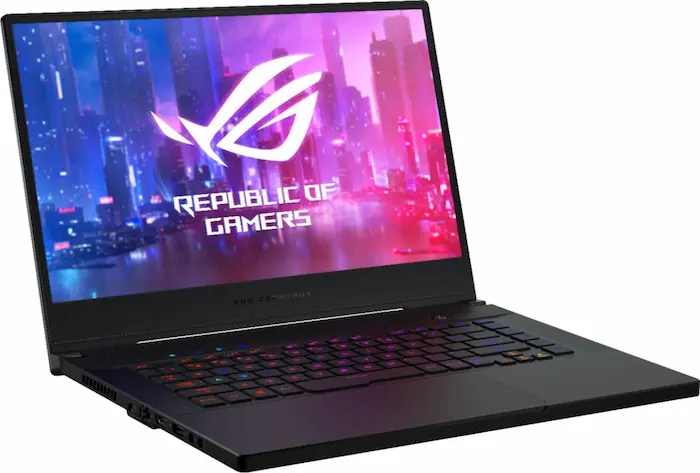

ASUS ROG, short for Republic of Gamers, has become one of the most recognisable names in PC gaming. From powerful gaming laptops to high-end desktops, monitors and accessories, ROG is designed for people who want serious performance without necessarily moving to a desktop PC.
In 2026, the ROG lineup ranges from relatively portable machines such as the ROG Zephyrus G14 to massive performance-focused systems such as the ROG Strix SCAR 18. ASUS’s current lineup includes RTX 50-series graphics, Intel Core Ultra processors, OLED displays and increasingly sophisticated cooling systems.
But is an ASUS ROG laptop actually worth buying?
Let’s take a closer look.
ASUS ROG: What Is It?
ROG is ASUS’s premium gaming brand. The product family covers gaming laptops, desktops, graphics cards, motherboards, monitors, keyboards, mice, headsets and other gaming hardware.
The philosophy behind ROG is straightforward: maximum performance, gaming-focused hardware and premium features.
The laptops are generally more powerful than conventional business or productivity machines because they combine high-performance CPUs with dedicated NVIDIA graphics.
That makes them suitable not only for gaming but also for video editing, graphic design, 3D rendering, programming and other demanding workloads.
Design and Build Quality
One of the biggest changes in modern ROG laptops is their design.
Older gaming laptops were often bulky machines covered in aggressive RGB lighting. Modern ROG models can be considerably more refined.
The Zephyrus range, in particular, focuses on portability and a more understated appearance.
The G14 is a good example. Reviews of recent generations have praised its compact design, display quality and ability to combine gaming performance with productivity. PCWorld described the 2025 G14 as a particularly well-rounded 3.3-pound gaming laptop.
The Strix family takes a different approach. These machines prioritise performance and cooling over portability.
For someone who wants a laptop that looks professional enough for university, work or a technology business, I’d generally favour the Zephyrus line.
Display: One of ROG’s Biggest Strengths
Display quality is one of the strongest reasons to consider an ROG laptop.
Many recent models offer high-resolution OLED panels with fast refresh rates.
For example, the 2026 ROG Zephyrus G14 is available with a 14-inch 3K OLED display running at 120Hz, while the ROG Strix SCAR 18 can offer an 18-inch 4K 240Hz ROG Nebula HDR display.
That combination is excellent for gaming.
But it is also useful for creators.
Photo editing, video editing and general media consumption benefit from a high-quality display with strong contrast and vibrant colours.
Gaming Performance
This is where ROG really shines.
Unlike ordinary laptops that rely primarily on integrated graphics, many ROG machines come with dedicated NVIDIA GeForce RTX GPUs.
Current models can go as high as the RTX 5090 Laptop GPU.
The 2026 ROG Strix SCAR 18, for example, can be configured with an RTX 5090 Laptop GPU and Intel Core Ultra 9 290HX Plus.
The result is a machine capable of handling demanding modern games at high settings.
The smaller Zephyrus models are obviously not going to match the largest Strix machines in sustained performance, but they offer a much better balance between portability and gaming capability.
Reviews of the G14 have demonstrated that even the compact machine can deliver strong performance in demanding games.
Performance Beyond Gaming
This is where an ROG laptop becomes particularly interesting for technology professionals.
You don’t have to be a gamer to benefit from one.
A powerful ROG laptop can handle:
- Video editing
- Photoshop and graphic design
- 3D modelling
- Programming
- AI development
- Data analysis
- Content creation
- Streaming
- Heavy multitasking
- Virtual machines
For someone running a technology publication, for example, the additional GPU power can be useful for video production, image processing and AI-related workloads.
However, buying a gaming laptop solely for basic blogging, WordPress management and web browsing would be overkill.
Cooling and Fan Noise
Power comes with a price.
Gaming laptops generate significant heat when the CPU and GPU are under heavy load, so cooling is extremely important.
ROG machines use sophisticated cooling systems designed to move heat away from high-performance components.
But don’t expect silence.
When you’re playing demanding games or rendering video, the fans can become loud.
This is particularly noticeable on smaller machines because manufacturers are trying to fit powerful hardware into a compact chassis.
Reviews of the 2025 G14, for example, highlighted both heat and fan noise as weaknesses.
For normal browsing and office work, however, the experience can be much quieter.
Battery Life
Battery life depends heavily on the model and how you’re using it.
Gaming on battery power can drain a laptop quickly because the CPU and dedicated GPU consume considerably more energy.
The Zephyrus models generally make more sense if you want to combine gaming with mobile productivity.
The larger Strix machines are designed more around performance than portability.
This is an important distinction:
ROG laptop ≠ MacBook-style all-day battery experience.
If battery life is your number-one priority, a gaming laptop probably isn’t the best category to begin with.
Keyboard and Trackpad
ROG keyboards are generally designed around gaming but remain perfectly usable for productivity.
The larger models provide plenty of space, while compact Zephyrus models manage to provide a surprisingly good typing experience despite their smaller footprint.
The trackpads on recent Zephyrus machines are also large and comfortable.
That makes the G14/G16 particularly interesting because they don’t feel like gaming machines exclusively.
They can function as legitimate work laptops.
Port Selection
Another advantage of gaming laptops is connectivity.
ROG machines typically offer a much broader selection of ports than ultra-thin productivity laptops.
Depending on the model, you can find USB-A, USB-C, HDMI, headphone connections and high-speed connectivity options.
The 2024 Zephyrus G16, for example, included two USB-A ports, two USB-C ports, Thunderbolt 4, HDMI 2.1, an SD card reader and a 3.5mm headphone jack.
That’s particularly useful for creators who regularly connect cameras, external drives, monitors and other accessories.
ROG Zephyrus vs ROG Strix
This is probably the most important decision within the ROG family.
ROG Zephyrus
Best for: gaming + work + portability
The Zephyrus range is thinner, lighter and more understated.
It’s the ROG family I’d recommend to someone who wants one laptop for both professional work and gaming.
ROG Strix
Best for: maximum gaming performance
Strix laptops are generally larger and more performance-focused.
They’re better suited to someone who prioritises gaming performance and doesn’t mind carrying a heavier machine.
ROG Strix SCAR
Best for: serious/high-end gamers
The SCAR represents the premium end of the Strix family.
The 2026 SCAR 18 can reach flagship specifications including an RTX 5090 Laptop GPU and a 4K 240Hz display.
The problem?
Price.
High-end ROG machines can become extremely expensive. ASUS currently lists the 2026 ROG Strix SCAR 18 starting at around $4,299.99 in the US for the listed configuration.
The Biggest Advantages
1. Excellent performance
ROG machines can deliver desktop-class levels of performance in a laptop form factor.
2. Excellent displays
OLED and high-refresh-rate panels are among the biggest selling points.
3. Dedicated NVIDIA GPUs
Excellent for gaming, creative work and GPU-accelerated applications.
4. Strong build quality
The premium models feel considerably more refined than many conventional gaming laptops.
5. Versatility
A good ROG laptop can serve as a gaming machine, work computer and creative workstation.
The Biggest Disadvantages
1. Price
High-end ROG laptops can be extremely expensive.
2. Fan noise
Performance requires cooling, and cooling often means noise.
3. Heat
The chassis can become hot during intensive workloads.
4. Battery life
Gaming on battery isn’t ROG’s strongest use case.
5. Overkill for basic users
If you’re primarily browsing, using Microsoft Office, managing WordPress and watching YouTube, you don’t need an RTX 5070/5080/5090 gaming laptop.
Is ASUS ROG Good for Work?
Absolutely—but choose the right model.
If your work involves blogging, WordPress, social media, research and normal productivity, a Zephyrus model makes more sense than a giant Strix SCAR.
The combination of a powerful processor, dedicated GPU, excellent screen and portable design can make the Zephyrus a very capable all-purpose computer.
The G14 is particularly impressive because reviewers have found it capable of combining gaming performance with productivity and portability.
Is ASUS ROG Worth Buying in 2026?
Yes, but don’t buy the brand—buy the configuration.
An inexpensive ROG laptop with an older processor and weak GPU isn’t automatically better than a newer Lenovo Legion, HP Omen or ASUS TUF Gaming machine.
Look closely at:
- CPU generation
- GPU
- GPU power limit
- RAM
- SSD capacity
- Display resolution
- Refresh rate
- Battery capacity
- Cooling
- Upgradeability
- Price
For gaming, the GPU is especially important.
For professional workloads, I’d generally target at least 16GB RAM, while 32GB is preferable for heavier editing, development and multitasking.
Final Verdict
ASUS ROG remains one of the strongest gaming-laptop families in 2026.
Its biggest strength is that the better models aren’t simply gaming machines. They can be powerful professional computers capable of handling demanding creative and technical workloads.
The ROG Zephyrus is the sweet spot for people who want performance without carrying a huge gaming laptop.
The ROG Strix is better for people who prioritise raw gaming performance.
And the ROG Strix SCAR is for buyers who want flagship performance and are willing to pay for it.
Overall rating: 9/10
Best for: Gamers, developers, creators, video editors, AI enthusiasts and power users.
Not ideal for: Basic office users, people prioritising maximum battery life, or anyone working with a tight budget.
The key takeaway is simple: if you want one Windows laptop that can handle gaming today and serious workloads tomorrow, ASUS ROG is one of the brands worth considering.
