
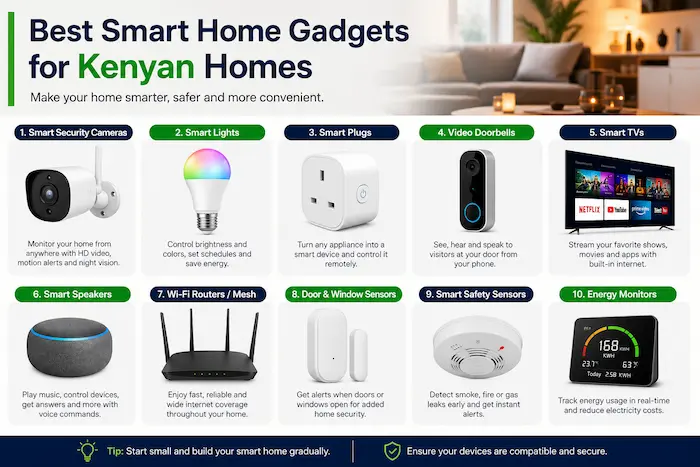

Building a smart home in Kenya no longer requires a huge budget or a house full of expensive automation systems.
A smart plug can cost a few thousand shillings, while smart bulbs, security cameras, motion sensors and energy-monitoring devices provide practical ways to automate everyday tasks, monitor your home and manage connected appliances.
But buying smart-home devices in Kenya requires more thought than simply choosing the gadgets with the highest ratings online.
You need to consider local prices, electricity consumption, Wi-Fi coverage, power interruptions, device compatibility, privacy, warranty support and whether replacement accessories are readily available.
This guide looks at the best smart home gadgets in Kenya in 2026, what they cost, what they are useful for, and which devices are worth buying first.
Best Smart Home Gadgets in Kenya at a Glance
| Smart home gadget | Typical Kenya price | Best use |
|---|---|---|
| Smart bulb | KSh 1,000–2,500 | Lighting automation |
| Smart plug | KSh 2,500–6,000 | Appliance control |
| Smart energy monitor | KSh 5,000–9,000 | Monitoring electricity use |
| Indoor security camera | KSh 4,000–6,000 | Indoor monitoring |
| Outdoor security camera | KSh 10,000+ | Gate and compound security |
| Door/window sensor | KSh 1,100–2,500 | Security alerts |
| Smart alarm system | KSh 9,500+ | Home security |
| Smart door lock | KSh 40,000+ | Keyless access |
| Smart air purifier | KSh 24,500+ | Indoor air quality |
| Smart speaker | Varies | Voice control |
Prices vary between retailers, brands, storage configurations and promotions. For example, Kenyan listings have placed Xiaomi smart bulbs around KSh 2,299, Xiaomi C200 cameras around KSh 4,499 and smart door locks around KSh 39,999.
Always confirm the current price, warranty and included accessories before purchasing.
1. Smart Plugs: The Best First Smart-Home Gadget
For someone building a smart home for the first time, a smart plug is one of the most useful places to start.
A smart plug connects to a normal electrical socket and allows you to control a compatible appliance using a smartphone app. Depending on the model, you can also create schedules, timers and automation routines.
You can use a smart plug with devices such as:
- Lamps
- Fans
- TVs
- Routers
- Chargers
- Selected small appliances
A TP-Link Tapo P100, for example, has appeared in Kenyan retail listings at around KSh 2,800–KSh 2,900.
What can a smart plug do?
Instead of manually switching a lamp on every evening, you can schedule it to turn on at a particular time.
You can also remotely switch off a connected appliance if you forgot to turn it off before leaving home.
Some more advanced models include energy monitoring, allowing you to see how much electricity a connected appliance is consuming.
Important safety warning
Do not assume every smart plug is suitable for high-power appliances.
Water heaters, cookers, irons and other high-load equipment can require significantly more power than a cheap consumer smart plug is designed to handle.
Check the manufacturer’s electrical ratings before connecting an appliance. For permanently installed high-power equipment, a qualified electrician can recommend a suitable smart switch or energy-management solution.
TechDrivers verdict: Excellent first purchase.
2. Smart Energy Monitors: Useful for Managing Electricity
Smart-home technology isn’t only about convenience.
For Kenyan households dealing with electricity costs, energy monitoring can provide useful information about where power is being consumed.
Depending on the product, an energy monitor or smart plug can measure:
- Voltage
- Current
- Instantaneous power
- Energy consumption
- Historical usage
- Estimated electricity costs
Some Kenyan listings show smart plugs with energy monitoring selling for approximately KSh 5,000–KSh 6,000, while dedicated energy meters can cost around KSh 5,000 or more.
This can help you identify appliances that consume significant amounts of electricity.
For example, you may discover that your biggest loads come from:
- Water heaters
- Refrigerators
- Freezers
- Electric cookers
- Irons
- Water pumps
- Entertainment equipment
Does a smart device automatically reduce your electricity bill?
No.
A connected device still consumes electricity, however small its own consumption may be.
The real benefit comes from measurement and control.
If monitoring shows that an appliance is being left on unnecessarily, automation can help you change that behaviour.
Think of smart-home technology as a way to gain better visibility and control, rather than an automatic electricity-saving solution.
3. Smart Bulbs: Affordable Home Automation
Smart bulbs are among the easiest smart-home products to install.
Instead of replacing your entire lighting system, you can replace a compatible conventional bulb with a smart bulb and control it through an app.
Depending on the model, features may include:
- Remote on/off control
- Scheduling
- Dimming
- Colour adjustment
- Lighting scenes
- Voice control
Kenyan listings have shown products such as Tuya-compatible smart bulbs around KSh 1,600, while Xiaomi smart bulbs have been listed around KSh 2,299.
Where can smart bulbs be useful?
You could schedule outdoor or entrance lighting to switch on in the evening and turn off later at night.
You can also use them in bedrooms, living rooms, home offices and children’s rooms.
For a first-time smart-home buyer, bulbs offer a relatively inexpensive introduction to automation.
TechDrivers verdict: One of the easiest smart-home upgrades.
4. Smart Security Cameras
For many Kenyan households, security cameras offer more practical value than decorative smart-home gadgets.
A connected camera can send notifications to your phone when movement is detected and allow you to check a monitored area remotely.
Depending on the model, you may also get:
- Two-way audio
- Night vision
- Motion detection
- Human detection
- Local microSD recording
- Cloud recording
- Remote viewing
Xiaomi’s authorised Kenyan store has listed models including the C200 at approximately KSh 4,499, while other models can cost more depending on resolution and features.
Indoor vs Outdoor Security Cameras
The right camera depends on where you want to monitor.
Indoor cameras
Suitable for:
- Living rooms
- Hallways
- Home offices
- Baby monitoring
- Indoor entrances
Outdoor cameras
Better suited to:
- Gates
- Parking areas
- Compounds
- Garages
- Perimeter areas
Outdoor models should be designed for outdoor conditions and may require more careful mounting and installation.
For larger properties, PoE cameras can also be worth considering because power and network connectivity can be delivered through Ethernet.
5. Smart Door and Window Sensors
You don’t need a camera covering every entrance.
A smart door or window sensor can provide a relatively inexpensive way to know when an entry point has been opened.
These sensors are useful for:
- Main doors
- Back doors
- Windows
- Garages
- Stores
Some models can send an alert to your phone when the sensor changes state.
Kenyan listings show basic smart sensors and motion detectors available from around KSh 1,000–KSh 2,500, depending on the technology and brand.
For a security-focused smart home, these devices can complement cameras rather than replace them.
6. Smart Alarm Systems
A smart alarm system brings several security devices together.
Depending on the product, a system may include:
- Door sensors
- Motion sensors
- Siren
- Remote control
- Smartphone notifications
- Central hub
Some Kenyan retailers list basic Wi-Fi smart alarm systems from around KSh 9,500.
However, you don’t necessarily need a complete alarm system for a small apartment.
A combination of a security camera, door sensor and alarm may be sufficient for basic monitoring.
Larger homes may benefit from a more comprehensive professionally installed security system.
7. Smart Door Locks
Smart locks are one of the most advanced consumer smart-home upgrades, but they are also among the most expensive.
Some models provide:
- Fingerprint unlocking
- PIN codes
- Smartphone access
- Temporary access codes
- Activity logs
- Automatic locking
Kenyan listings have placed some Xiaomi smart door locks around KSh 40,000.
That makes them considerably more expensive than smart bulbs, plugs and cameras.
Who should consider a smart lock?
They can make particular sense for:
- Airbnb properties
- Rental apartments
- Offices
- Modern homes
- Properties with frequent visitors
The most important consideration is door compatibility.
Before purchasing, check the lock dimensions, door thickness, locking mechanism and installation requirements.
8. Smart Speakers
A smart speaker can act as a voice-control interface for compatible devices.
For example, instead of opening an app, you may be able to use a voice command to control a compatible light or plug.
However, the speaker itself isn’t what makes a home smart.
Its usefulness depends on the devices it can communicate with.
This is why it is better to choose your smart-home ecosystem first, then purchase compatible products.
9. Choose Your Smart-Home Ecosystem Carefully
One of the easiest ways to make a smart home unnecessarily complicated is to buy products from several incompatible ecosystems.
You could end up with:
- One app for your bulbs
- Another for your cameras
- Another for your plugs
- Another for your alarm
- Another for your door lock
Before buying multiple devices, decide which ecosystem best fits your needs.
Common options include:
- Google Home
- Amazon Alexa
- Apple Home
- Tuya/Smart Life
- Xiaomi Home
Compatibility should be checked at the individual device level. A product being advertised as “smart” does not mean it will automatically work with every platform.
10. Check Your Wi-Fi Before Buying Smart Devices
Your home network is the foundation of many affordable smart-home systems.
A large number of budget smart-home devices depend on 2.4GHz Wi-Fi, which generally provides better range than 5GHz but lower maximum throughput.
This can matter in:
- Large houses
- Maisonettes
- Multi-room apartments
- Compounds
- Homes with thick walls
If a smart camera cannot maintain a reliable connection to your router, the problem may be your Wi-Fi coverage rather than the camera itself.
Depending on the size of your home, you may need:
- A better router
- Wi-Fi extender
- Mesh Wi-Fi
- Additional access point
- Better router positioning
11. Plan for Power Interruptions
A smart home depends on both electricity and connectivity.
If the power goes out and your router shuts down, internet-connected cameras, plugs and other devices may lose remote access.
This is especially important for security equipment.
A small UPS can keep a router and networking equipment running during short power interruptions.
For longer outages, households may consider:
- UPS systems
- Portable power stations
- Solar backup
- Inverters
- Battery systems
The appropriate solution depends on how much equipment needs to remain operational and for how long.
12. Protect Smart Devices From Power Surges
Smart-home equipment contains electronic components that can be affected by electrical surges and unstable power.
Potentially affected equipment includes:
- Routers
- Security cameras
- Smart TVs
- Smart speakers
- Smart plugs
- Hubs
- Chargers
Use appropriate surge protection and voltage protection where required.
For expensive electronics, proper electrical protection is a much better investment than replacing damaged equipment.
13. Privacy Is a Major Smart-Home Consideration
Smart-home convenience comes with a privacy trade-off.
A security camera installed inside your home may capture family members, visitors, employees and other people.
Depending on the product, recordings may be stored locally or uploaded to a manufacturer’s cloud service.
Before buying a camera, ask:
Where is the footage stored?
Who can access it?
Is cloud storage mandatory?
Can I use a microSD card instead?
Does the manufacturer provide security updates?
These questions matter because a poorly secured connected device can create unnecessary privacy and cybersecurity risks.
14. Avoid Installing Cameras in Sensitive Areas
Security does not mean putting cameras everywhere.
Bedrooms, bathrooms and other highly private spaces require particular caution.
Think carefully about what a camera can see and who has legitimate access to the footage.
If you employ domestic workers or regularly have visitors, make sure your surveillance practices respect their privacy.
A camera should solve a genuine security problem rather than create unnecessary monitoring.
15. Change Default Passwords and Secure Your Accounts
After installing a smart device, don’t leave it protected by default credentials.
Use a strong, unique password for the manufacturer’s account and enable multi-factor authentication where available.
You should also:
- Update device firmware
- Install security updates
- Review account access
- Remove unused devices
- Avoid sharing account credentials
- Secure your home Wi-Fi
These simple measures can significantly reduce unnecessary security risks.
16. Consider a Separate IoT Network
If your router supports guest networks, VLANs or other network-segmentation features, you can consider placing smart-home devices on a separate network.
For example:
Primary network: Phones, laptops and work devices
IoT network: Cameras, bulbs, plugs and other connected devices
This can provide an additional layer of network isolation.
It isn’t necessary for every beginner, but it is worth considering for households with many connected devices.
17. Check Cloud Storage Costs Before Buying a Camera
The purchase price isn’t always the complete cost of owning a smart camera.
Some cameras support local microSD storage, while others promote cloud recording subscriptions.
A camera costing KSh 5,000 may therefore have additional recurring costs if cloud storage is required.
Before purchasing, check:
- Whether microSD recording is supported
- Maximum supported card capacity
- Whether cloud storage is optional
- Monthly or annual cloud fees
- How long recordings are retained
- Whether the camera remains useful without an internet connection
This is particularly important for buyers trying to keep long-term ownership costs low.
18. Buy Products With Local Support Where Possible
Buying a smart-home product from an overseas marketplace may initially appear cheaper, but the purchase price isn’t the only consideration.
A product with local availability can make it easier to find:
- Replacement accessories
- Power adapters
- Memory cards
- Mounting equipment
- Installation services
- Warranty assistance
Brands such as Xiaomi and TP-Link have an established presence in the Kenyan consumer electronics market, while Tuya-compatible products are also widely available through local retailers.
That doesn’t mean these are automatically the best products. It means availability and support should form part of your buying decision.
How Much Does It Cost to Build a Smart Home in Kenya?
You don’t need to automate your entire home at once.
A staged approach is usually more practical.
Budget setup: KSh 5,000–KSh 8,000
A basic setup could include:
- Two smart bulbs
- One smart plug
- One basic sensor
This provides simple automation without a large initial investment.
Security-focused setup: KSh 10,000–KSh 20,000
You could add:
- Indoor security camera
- Door/window sensors
- Motion sensor
- Smart alarm
An outdoor camera would increase the total cost.
Advanced smart-home setup
Once the basics are working, you can consider:
- Smart door lock
- Energy monitoring
- Smart switches
- Smart curtains
- Smart speaker
- Mesh Wi-Fi
- Backup power
- Multiple security cameras
The advantage of building gradually is that you can determine which technologies actually improve your daily life before spending more money.
The Best Smart Home Setup for a Typical Kenyan Home
For most households, I would prioritise usefulness over novelty.
A sensible starting configuration would be:
1. Smart plug
Useful for controlling selected appliances and creating schedules.
2. Security camera
Provides remote visibility and can deliver movement alerts.
3. Smart bulbs
Provides inexpensive lighting automation.
4. Door/window sensors
Adds another layer of security without requiring cameras everywhere.
5. Router backup power
Keeps the network and connected security devices running during short outages.
6. Energy monitoring
Useful for understanding electricity consumption.
7. Smart speaker
Convenient once you already have compatible smart devices.
8. Smart lock
A premium upgrade that makes more sense for particular homes and properties.
What Should You Buy First?
If you’re starting from zero, my recommended order is:
🥇 Smart plug
Best combination of affordability and everyday usefulness.
🥈 Security camera
A practical upgrade for monitoring entrances and important areas.
🥉 Smart bulbs
Simple automation at a relatively low cost.
4. Door/window sensors
Useful for strengthening basic home security.
5. Router backup power
Important if you rely on connected cameras and remote monitoring.
6. Energy monitor
Useful for households that want better visibility into electricity consumption.
7. Smart speaker
Convenient, but not essential.
8. Smart lock
Worth considering when the convenience justifies the higher price and installation requirements.
Are Smart Home Gadgets Worth Buying in Kenya?
Yes, but the right device depends on the problem you’re trying to solve.
A KSh 2,800 smart plug can be more useful than an expensive smart appliance if you need better control over everyday equipment.
A KSh 4,500–KSh 6,000 security camera can provide more practical value than decorative lighting.
An energy-monitoring device can help you understand where your electricity is being consumed.
The goal shouldn’t be to fill your home with connected products.
The goal should be to use technology where it provides measurable benefits in convenience, security, energy awareness or accessibility.
Frequently Asked Questions
What are the best smart home gadgets in Kenya?
For most households, the best starting devices are smart plugs, smart bulbs, security cameras, door/window sensors and energy-monitoring devices. The right combination depends on your budget and requirements.
How much does a smart home cost in Kenya?
A basic smart-home setup can start at roughly KSh 5,000–KSh 8,000, while a more advanced system involving cameras, smart locks, sensors, networking equipment and backup power can cost considerably more.
Do smart home gadgets use a lot of electricity?
Most small smart devices consume relatively little electricity individually, but connected devices remain powered when in standby. Their main benefit is providing greater control and visibility over connected appliances.
Do smart plugs work with Kenyan electricity?
Compatible smart plugs can be used with Kenya’s electrical system, but buyers should verify the product’s voltage, frequency, plug type and current rating before purchase.
Do smart cameras work without Wi-Fi?
Some cameras can continue recording to local storage without an internet connection, depending on the model. However, remote viewing and cloud features generally require an internet connection.
Do smart home devices need Wi-Fi?
Many affordable smart-home products use Wi-Fi, but some devices use Bluetooth, Zigbee, Thread or other technologies. Check the connectivity requirements before buying.
Are smart home gadgets safe?
They can be, but security depends on the device, manufacturer, software updates, account protection and network configuration. Use strong passwords, enable multi-factor authentication where available and keep firmware updated.
What is the cheapest smart home gadget in Kenya?
Smart bulbs and basic sensors are among the least expensive ways to begin building a smart home, with some products available for around KSh 1,000–KSh 2,500, depending on the brand and retailer.
Final Verdict
The best smart home gadgets in Kenya in 2026 are not necessarily the most expensive ones.
For most households, smart plugs, bulbs, security cameras, door sensors and energy monitors provide the strongest combination of affordability and practical value.
Current Kenyan retail prices show that you can begin with a relatively small investment, while advanced products such as smart locks, comprehensive security systems and whole-home automation can be added later.
Before buying any smart-home device, look beyond the advertised features.
Check power requirements, Wi-Fi compatibility, privacy controls, security updates, local warranty support, replacement accessories and recurring subscription costs.
Most importantly, build your smart home around genuine needs.
If the technology helps you control appliances, monitor your property, understand electricity consumption or make everyday tasks easier, it is solving a problem.
That is what makes a smart home genuinely useful—not simply having more gadgets connected to your Wi-Fi.
