
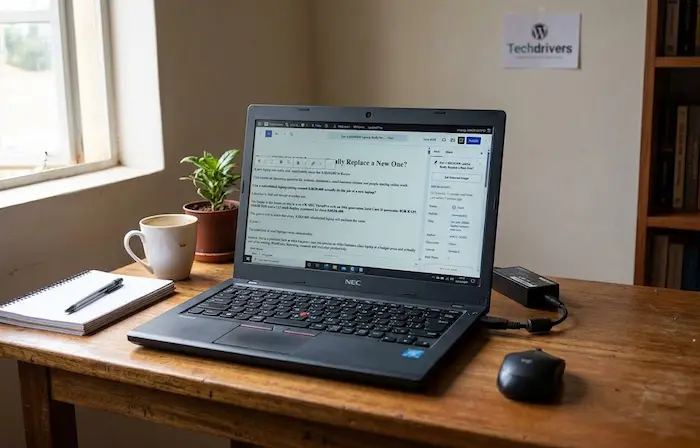

A new laptop can easily cost significantly more than KSh20,000 in Kenya.
That creates an interesting question for students, freelancers, small-business owners and people starting online work:
Can a refurbished laptop costing around KSh20,000 actually do the job of a new laptop?
I decided to find out through everyday use.
The laptop in this hands-on test is an ex-UK NEC VersaPro with an 11th-generation Intel Core i5 processor, 8GB RAM, 256GB SSD and a 12.5-inch display, purchased for about KSh20,400.
The goal is not to claim that every KSh20,000 refurbished laptop will perform the same.
It won’t.
The condition of used laptops varies considerably.
Instead, this is a practical look at what happens when you choose an older business-class laptop at a budget price and actually use it for writing, WordPress, browsing, research and everyday productivity.
The KSh20,000 Laptop: What Are You Actually Getting?
Here are the basic specifications of the machine tested:
| Specification | Hands-on laptop |
|---|---|
| Model | NEC VersaPro |
| Processor | Intel Core i5, 11th generation |
| RAM | 8GB |
| Storage | 256GB SSD |
| Display | 12.5-inch |
| Condition | Refurbished / ex-UK |
| Purchase price | About KSh20,400 |
On paper, those specifications may not look particularly exciting in 2026.
There is no flashy gaming GPU.
The screen is relatively small.
The storage capacity is modest compared with many modern laptops.
But specifications are only part of the story.
The more important question is:
Can it actually handle the work I need it to do?
What I Use the Laptop For
A laptop does not need to perform every possible task.
My everyday workload includes things such as:
- Writing technology articles
- Managing WordPress
- Researching stories
- Browsing with multiple tabs
- Uploading images
- Editing documents
- Managing social-media content
- Using web-based tools
- Watching videos
- Communicating online
That makes the machine’s real-world performance more important than benchmark numbers alone.
Someone editing 4K video or playing demanding PC games has completely different requirements.
For a writer, blogger, student or office worker, the priorities can be very different.
First Test: Everyday Performance
The first thing you notice with an SSD-equipped laptop is responsiveness.
Windows starts reasonably quickly, applications open without the long delays associated with older mechanical hard drives, and switching between ordinary productivity applications is generally comfortable.
The 11th-generation Core i5 is also considerably more relevant than simply seeing the words “Core i5” on a seller’s advertisement.
This is important when shopping for refurbished laptops in Kenya.
A seller saying:
Core i5, 8GB RAM, 256GB
has not given you enough information.
The exact processor generation matters.
Microsoft’s current Windows 11 supported-processor documentation includes 11th-generation Intel Core i5 processors among supported Intel processor generations.
That doesn’t mean every laptop with an 11th-generation processor is identical, but it demonstrates why the exact processor model matters when evaluating an older machine.
How Does 8GB RAM Hold Up?
The laptop has 8GB of RAM.
For my normal workload, that is usable.
I can browse, write, research and work with WordPress without constantly feeling that the computer has run out of memory.
However, 8GB is not unlimited.
If you open a large number of browser tabs, run several heavy applications simultaneously or work with demanding creative software, you can eventually feel the limitation.
This is one area where a newer laptop with 16GB RAM can have a practical advantage.
For everyday productivity, however, 8GB is still capable of doing a lot.
The important thing is to match the laptop to your workload.
The SSD Makes a Big Difference
The laptop has a 256GB SSD.
That capacity is not enormous.
Windows, applications, documents, images and downloaded files can gradually consume it.
But an SSD is much more important for everyday responsiveness than simply looking at the number of gigabytes.
The difference becomes noticeable when:
- Windows starts
- Applications open
- Files are accessed
- Browser sessions are restored
- Documents are loaded
- The system wakes from sleep
If you’re shopping for a refurbished laptop in Kenya, don’t accept a listing that simply says “256GB storage.”
Ask whether it is an SSD or HDD.
Then verify it yourself.
256GB: Enough or Too Little?
For my workload, 256GB is workable.
But I would not call it generous.
If you’re storing large video files, photographs, games or extensive offline media, you can fill 256GB surprisingly quickly.
For a student writing assignments, an office worker handling documents or a blogger managing web content, it can be sufficient.
For heavier users, 512GB provides much more breathing room.
This is one of the compromises that comes with keeping the purchase price around KSh20,000.
Display Test: Small but Usable
The NEC VersaPro in this test has a 12.5-inch display.
That makes the laptop compact and relatively easy to carry.
For writing and general productivity, the screen is usable.
But the smaller display becomes more noticeable when working with several windows simultaneously.
A 14-inch or 15.6-inch laptop gives you more physical workspace.
This is where personal preference becomes important.
If portability is your priority, a 12.5-inch business laptop can make sense.
If you spend most of your day working with spreadsheets, multiple documents or image-editing software, a larger display may be more comfortable.
Keyboard and Touchpad
For someone who writes for a living, the keyboard is not a minor detail.
You can have a powerful processor and a large SSD, but if the keyboard is uncomfortable, you will notice it every day.
A refurbished laptop should therefore be tested physically before purchase.
Press every key.
Check the spacebar.
Test the arrow keys.
Try the trackpad.
Look for keys that fail to register or feel significantly different from the rest.
A used laptop can have cosmetic wear that does not affect functionality.
The opposite is also possible: a machine can look clean while having a keyboard or trackpad problem.
Battery Test: The Biggest Question With Refurbished Laptops
This is where refurbished laptops require more caution.
A laptop may have a perfectly capable processor and SSD while carrying an ageing battery.
Battery health depends on the individual machine’s previous usage, charging history, age and battery condition.
Microsoft provides a built-in Windows battery-report tool that can show information such as the battery’s design capacity and current full-charge capacity.
You can generate the report by opening Command Prompt and running:
powercfg /batteryreport
Windows creates an HTML report that you can open in a browser.
What Should You Look For?
Compare:
Design capacity: the battery’s original intended capacity.
Full charge capacity: the capacity the battery can currently hold.
The larger the difference, the more the battery has degraded.
There is no universal battery-life number that applies to every refurbished laptop.
Brightness, workload, processor usage, Wi-Fi activity and battery condition all affect actual runtime.
That’s why testing the actual laptop is more useful than believing a seller’s generic battery-life claim.
Thermal Test: What Happens When the Laptop Works Hard?
A laptop can feel perfectly fine when you’re only writing a document.
The real test begins when you push it.
With the machine in regular use, temperatures and fan behaviour are generally manageable.
However, one thing became particularly noticeable during heavier browsing: fan noise.
For example, opening a graphics-heavy website such as Gadget360 caused the fan to become noticeably louder.
After closing the demanding tab, the laptop became quieter again.
That is useful information because it demonstrates something specifications cannot tell you:
A laptop’s thermal behaviour depends heavily on what you actually do with it.
A thin refurbished laptop may be perfectly comfortable for writing and browsing but become much louder during heavier workloads.
Does Fan Noise Mean the Laptop Is Bad?
Not necessarily.
Fans exist to move heat away from the processor and other components.
Hearing the fan under load is not automatically a sign of failure.
What matters is the overall behaviour.
Watch for:
- Excessive heat
- Sudden shutdowns
- Major performance drops
- Persistent fan activity during very light workloads
- Unusual noises
- Burning smells
- Battery swelling
Microsoft warns that a severely deteriorated battery can become a safety concern, particularly if it begins to swell.
If a laptop battery is visibly swollen, stop using the device and have it handled appropriately.
What About Performance Under Real Workloads?
This is where the KSh20,000 laptop becomes interesting.
For everyday technology publishing, the machine is capable of handling the basic workload.
Writing articles is not particularly demanding.
WordPress administration is manageable.
Web research is manageable.
Documents and spreadsheets are manageable.
Video playback is manageable.
Social-media management is manageable.
The limitations become more obvious when workloads become heavier.
For example:
- Advanced video editing
- 3D rendering
- Modern gaming
- Heavy virtual machines
- Large-scale data processing
- Professional creative workloads
are not the workloads I would use this machine to judge.
A laptop should be evaluated according to the job it is expected to perform.
Can It Run WordPress?
For a technology writer or website owner, this is one of the most important tests.
WordPress itself is web-based, so the laptop does not need extraordinary hardware to manage a normal WordPress dashboard.
The more demanding part can be everything around it:
- Multiple browser tabs
- Image editing
- Online research
- File uploads
- Canva or similar tools
- Video calls
- AI tools
- Cloud applications
With 8GB RAM and an SSD, the machine is capable of handling this type of workflow.
The limitation is not whether WordPress can open.
The question is how many other demanding tasks you want to perform at the same time.
What About AI Tools?
This is an increasingly important consideration in 2026.
Many AI tools run primarily in the cloud through a web browser.
That means you don’t necessarily need a powerful dedicated GPU to use services such as AI writing assistants, research tools or chatbot platforms.
The laptop still needs enough processing power, RAM and browser performance to handle the workload comfortably.
This is one reason an older business laptop can remain useful even as AI becomes more common.
However, running large AI models locally is a completely different requirement.
If your plan is to run demanding AI models directly on the laptop, a KSh20,000 refurbished machine may not be the right class of hardware.
What About Gaming?
This is where expectations need to be realistic.
The laptop is not a gaming machine.
Integrated graphics can handle basic graphical workloads, but modern demanding games require significantly more graphics performance.
If gaming is your primary reason for buying a laptop, your budget should be planned around a machine with substantially stronger graphics capabilities.
For writing, office work, browsing and web publishing, that requirement is very different.
New vs Refurbished: What Are You Actually Comparing?
The comparison shouldn’t simply be:
KSh20,000 refurbished vs KSh20,000 new.
You need to compare what each machine gives you.
A refurbished business laptop at around KSh20,000 may offer:
- A stronger processor than some new entry-level machines
- 8GB RAM
- An SSD
- A sturdier business-oriented chassis
- More useful ports
- A compact design
But the refurbished machine may also have:
- An older battery
- Cosmetic wear
- A shorter remaining support period
- No manufacturer warranty
- Unknown previous usage
- Limited storage
- Older display technology
A new budget laptop may provide:
- A fresh battery
- A warranty
- Newer components
- Longer expected product life
But depending on the model and price, it may compromise on processor performance, build quality, RAM or storage.
The Hidden Cost of Buying Cheap
The purchase price is only the beginning.
Suppose you buy a refurbished laptop for KSh20,000.
Then discover that you need:
- A replacement battery
- A new charger
- More storage
- Additional RAM
- A replacement screen
The effective cost can rise quickly.
This is why the condition of the actual machine matters more than the headline price.
Before buying, ask yourself:
How much will this laptop cost me over the next two or three years?
How Much Should You Pay for a Refurbished Laptop?
There is no single price that makes every refurbished laptop a good deal.
The value depends on:
- Processor generation
- Exact processor model
- RAM
- SSD condition
- Battery health
- Screen quality
- Build quality
- Warranty
- Physical condition
- Upgradeability
- Seller reputation
A KSh20,000 laptop with a healthy battery and SSD can make more sense than a KSh17,000 machine that immediately needs repairs.
Likewise, spending more on a newer machine can make sense if you need longer support, stronger performance or a warranty.
What to Test Before Buying a Refurbished Laptop in Kenya
If you’re standing inside a laptop shop in Nairobi or another Kenyan town, don’t simply switch on the laptop and look at the desktop.
Run through this checklist.
1. Check the processor
Find the exact model and generation.
Don’t accept simply “Core i5.”
2. Check RAM
Confirm that the advertised capacity is actually installed.
3. Check the SSD
Verify that it is an SSD and, where possible, check its health.
4. Check battery health
Generate a battery report where practical.
5. Test the display
Look for dead pixels, lines, flickering, pressure marks and cracks.
6. Test every keyboard key
A single faulty key can become extremely irritating for someone who writes every day.
7. Test the trackpad
Check clicking, scrolling and gestures.
8. Test the ports
Check the USB ports, HDMI, audio jack and charging port.
9. Test Wi-Fi and Bluetooth
Connect to a network and verify that the connection works.
10. Test the webcam and microphone
This matters if you use Zoom, Teams, Google Meet or other video-conferencing services.
11. Listen to the fan
A fan that becomes louder under heavy workloads isn’t automatically a problem, but unusual grinding or persistent extreme noise deserves investigation.
12. Check the hinges
Open and close the laptop carefully.
13. Check Windows activation
Make sure the operating system is properly activated.
14. Ask about warranty
Get the warranty terms in writing.
15. Get a receipt
Keep proof of purchase and the laptop’s serial information.
TechDrivers has already published a dedicated refurbished laptop buying checklist covering processor checks, RAM, SSD health, battery testing, display inspection, ports, warranty and other checks.
Don’t Judge a Refurbished Laptop by the “Core i7” Sticker
One of the biggest mistakes in Kenya’s second-hand laptop market is comparing machines using only Core i3, Core i5 and Core i7 labels.
Those names cover multiple generations.
An older Core i7 isn’t automatically faster or more suitable than a newer Core i5.
Always find the exact processor model.
For example:
Core i5-1135G7
tells you much more than:
Core i5
This is especially important when shopping around the KSh20,000–KSh30,000 range.
What About “Ex-UK” Laptops?
“Ex-UK” is a common description in Kenya’s refurbished electronics market.
But the label does not tell you everything about the machine.
Two laptops described as ex-UK can have completely different:
- Battery health
- SSD health
- Screen condition
- Keyboard condition
- Previous usage
- Cosmetic condition
- Warranty terms
Treat the individual laptop as the product—not the label.
Could a KSh20,000 Laptop Be Better Than a New Budget Laptop?
It depends on what you mean by “better.”
A refurbished business laptop can offer a combination of processor performance, build quality and usability that may be attractive to someone working with a limited budget.
A new laptop offers advantages too, particularly a fresh battery, warranty and newer hardware.
The comparison should therefore be based on your workload and priorities, not simply whether one machine is new.
Who Should Consider a KSh20,000 Refurbished Laptop?
A machine in this category can make sense for someone who mainly needs a computer for:
- Schoolwork
- Microsoft Office
- Web browsing
- WordPress
- Research
- Writing
- Video calls
- Online learning
- Basic business work
- Light photo editing
- General productivity
It may be less appropriate for someone who needs:
- High-end gaming
- Professional video production
- 3D rendering
- Heavy CAD workloads
- Advanced local AI workloads
- Other GPU-intensive applications
What I Would Check Before Buying Another One
After using a refurbished laptop in this price range, I would pay particular attention to five things before handing over money:
Battery health.
SSD health.
Thermal behaviour.
Display condition.
Exact processor model.
Those five checks can tell you much more about the real condition of the laptop than a seller’s specification sticker.
Related TechDrivers Guides
If you’re shopping for technology on a limited budget, these TechDrivers articles are useful companions:
- What to Check Before Buying a Refurbished Laptop in Kenya — a practical pre-purchase inspection checklist.
- Why Some Kenyan Apps Stop Working on Older Android Phones — explains why software support matters when buying older devices.
- Facebook Marketplace Scams in Kenya: How to Avoid Them — useful if you’re considering buying a second-hand device through an online marketplace.
- How to Choose the Best Smartphone in Kenya in 2026 — a broader guide to evaluating technology based on actual needs rather than specifications alone.
Frequently Asked Questions
Can a KSh20,000 laptop really replace a new laptop?
For some users, yes. A well-maintained refurbished business laptop can handle writing, browsing, WordPress, office work, research and other everyday tasks. It will not necessarily match a newer laptop for battery condition, warranty, efficiency or demanding workloads.
Is buying a refurbished laptop in Kenya risky?
There are risks because the condition of used machines varies. Testing the actual laptop, checking battery and SSD health, verifying the processor and getting clear warranty terms can reduce those risks.
Is 8GB RAM enough in 2026?
For many everyday workloads, 8GB remains usable. However, 16GB provides more headroom for heavy multitasking, demanding applications and larger workloads.
Is a 256GB SSD enough?
It can be enough for documents, browsing, WordPress and normal productivity. Users storing large videos, photographs or many applications may benefit from 512GB or more.
How do I check the battery on a refurbished laptop?
On Windows, open Command Prompt and run powercfg /batteryreport. Microsoft says the resulting report provides detailed battery information, including capacity and usage data.
Is a Core i7 better than a Core i5?
Not automatically. The exact generation and processor model matter. Compare the actual CPU rather than relying only on the i5 or i7 label.
Should I buy an ex-UK laptop?
You can consider one, but inspect the individual machine carefully. “Ex-UK” does not by itself tell you the battery health, SSD condition, previous usage or remaining lifespan.
What is the biggest risk with a KSh20,000 refurbished laptop?
There isn’t one universal risk. Battery degradation, storage condition, hidden physical damage, overheating and limited warranty support are among the issues buyers should investigate.
Should I buy a refurbished laptop or save for a new one?
That depends on your workload, budget and priorities. A refurbished machine can provide useful performance at a lower upfront cost, while a new machine can offer newer hardware, a fresh battery and warranty coverage.
Conclusion: The Price Tag Isn’t the Whole Story
So, can a KSh20,000 laptop really replace a new one?
For the right user and the right refurbished machine, it can handle a surprisingly large amount of everyday work.
My KSh20,400 NEC VersaPro demonstrates why specifications and age alone don’t tell the entire story.
An 11th-generation Core i5, 8GB RAM and 256GB SSD can provide a practical work machine for writing, WordPress, research, browsing and everyday productivity.
But there are compromises.
The battery is not equivalent to that of a brand-new laptop.
The 12.5-inch display is compact rather than spacious.
The 256GB SSD requires some storage discipline.
And under heavier workloads, fan noise becomes noticeable.
That is exactly why testing matters.
If you’re shopping for a refurbished laptop in Kenya, don’t ask only:
“How much does it cost?”
Ask:
“What condition is it in, what can it actually do, and how much longer can I realistically use it?”
A KSh20,000 laptop can be a useful technology investment—but only when the machine itself passes the test.
Editorial note: This is a hands-on experience with one refurbished laptop and should not be interpreted as a performance claim for every KSh20,000 laptop. Refurbished machines vary by model, previous usage, component condition and seller. Prices and availability in Kenya can also change.
