
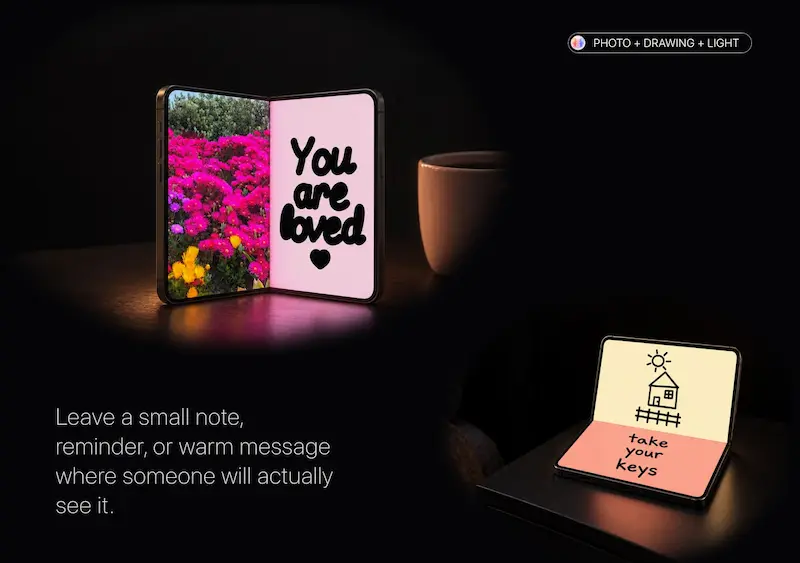

Smartphone applications are increasingly expanding what people can do with their devices beyond communication, photography and entertainment. One example is LumaFold, an iPhone application that uses screen lighting, colour effects, a live camera mirror and creative tools to turn a compatible display into a portable visual workspace.
Developed by Max Babenko under TypeSwitch, LumaFold is designed around the idea of using two screen areas for different purposes. Users can combine adjustable lighting with a live mirror, display colours and animations, or add photographs and handwritten messages to the screen.
The concept introduces another way to use smartphone displays, particularly for people interested in mobile photography, personal grooming and digital content creation.
However, there is an important consideration for potential users: the application’s main experience is built around a two-screen configuration, and prospective users should establish whether their particular iPhone supports the intended functionality before downloading it or purchasing the premium version.
What Is LumaFold?
LumaFold is a Photo & Video application available through Apple’s App Store.
Rather than functioning as a conventional photo-editing application, it focuses on using the smartphone display as a source of adjustable light and a creative surface.
The application combines several functions:
- A live front-camera mirror.
- Adjustable screen brightness and lighting warmth.
- Independent colour controls.
- Animated gradients and moving patterns.
- Photo displays and drawing tools.
- Saved lighting and creative configurations.
According to its developer, the application is designed to let users assign different functions to different screen areas.
For example, one area can display a live mirror while another provides adjustable lighting. Users can also experiment with contrasting colours or animated visual effects.
This approach makes LumaFold different from conventional applications that primarily concentrate on editing photographs after they have been captured.
1. Using an iPhone as a Makeup Mirror and Light Source
One of LumaFold’s main features combines a live camera preview with adjustable screen lighting.
The application allows users to view themselves through the front camera while using the display as a supplementary light source.
Its controls include brightness and warmth adjustments, alongside close-up and makeup-oriented modes.
This could be useful for people who want to check their appearance before taking photographs, recording videos or attending an event.
For Kenyan users, the feature could offer a convenient option when preparing for work, social events or content creation without carrying a separate mirror and small lighting accessory.
However, screen lighting has limitations. It does not necessarily provide the intensity, direction or consistency of a dedicated photography light.
Its effectiveness will depend on the phone’s display brightness, surrounding light and distance from the subject.
2. Dual-Colour Lighting for Mobile Photography
Another interesting feature is the ability to control colours and brightness independently across the two screen areas.
Users can select matching colours, combine contrasting tones or experiment with different lighting intensities.
This could be useful when creating photographs or short videos with a smartphone.
For example, a Kenyan content creator recording a product demonstration for TikTok or Instagram could experiment with coloured screen lighting to create a different visual atmosphere.
A small business selling fashion accessories, beauty products or handmade items could also explore creative lighting effects when producing social media content.
However, LumaFold should not be considered a replacement for professional photography equipment.
The application itself explains that it is not a calibrated studio light or professional colour reference tool.
Its purpose is to provide additional creative lighting options using the device’s display.
3. Animated Colours and Moving Patterns
LumaFold also includes animated gradients, waves and geometric visual effects.
These patterns can transform a static display into a moving visual surface.
Users can experiment with motion, scale and colour combinations to create different effects.
Potential applications include:
- Creating colourful backgrounds for photographs.
- Adding visual atmosphere to a workspace.
- Experimenting with lighting during video production.
- Creating different visual effects for personal projects.
For creators who regularly produce short-form videos, these effects could provide another way to experiment with backgrounds and lighting.
The actual result will depend on the device’s display characteristics and the environment in which the application is used.
4. Displaying Photos, Drawings and Personal Messages
LumaFold also combines photography and drawing features.
Users can display their own photographs, add handwritten messages and draw over images or coloured backgrounds.
The developer says the application supports adjustments such as photo positioning, size, blur and saturation.
This makes the application more than a basic screen-lighting utility.
For example, someone could display a favourite photograph while adding a handwritten reminder or personal message on another screen area.
Small businesses and independent creators could also experiment with displaying product images or visual messages.
However, these features should be viewed as creative display tools rather than a replacement for dedicated graphic-design applications.
5. Saving Favourite Lighting Configurations
Another feature worth considering is the ability to save preferred lighting and creative configurations.
Instead of rebuilding a colour combination or visual setup every time, users can save their favourite arrangements and return to them later.
This could be convenient for people who regularly create similar photographs or videos.
For example, a content creator who prefers a particular lighting combination for product photographs could save that setup for future use.
The availability of saved configurations and the wider creative library depends on the version of LumaFold being used.
LumaFold Free vs LumaFold Pro: What Is the Difference?
LumaFold follows a free-to-download model with optional paid features.
According to its App Store description, the free version includes the makeup mirror, basic lighting controls, preset colours and an included animation.
LumaFold Pro unlocks additional creative options.
| Feature | Free version | Pro version |
|---|---|---|
| Live makeup mirror | Yes | Yes |
| Basic lighting | Yes | Yes |
| Preset colours | Yes | Yes |
| Included animation | Yes | Yes |
| Custom colours and warmth | Limited | Yes |
| Advanced lighting controls | Limited | Yes |
| Full animation collection | No | Yes |
| Photo and drawing tools | Limited | Yes |
| Saved configurations | No | Yes |
How much does LumaFold Pro cost?
The US App Store listing provides the following subscription and purchase options:
| Plan | US App Store price |
|---|---|
| Monthly | $2.99 |
| Yearly | $14.99 |
| Lifetime | $29.99 |
These are US storefront prices, not confirmed Kenyan prices. The amount displayed to a Kenyan user may differ depending on Apple’s local pricing and storefront arrangements.
The monthly and yearly options renew automatically unless cancelled according to Apple’s subscription terms.
Users should check the actual price displayed in their App Store before purchasing.
For someone who only needs basic mirror and lighting functions, the free version may be sufficient. Those interested in additional colour effects, animations and saved configurations may find the Pro features more relevant.
The best option depends on how frequently the application will be used.
Privacy: What Happens to Your Photos and Camera Data?
Privacy is an important consideration for applications that use smartphone cameras and personal photographs.
According to Apple’s App Store privacy information, the developer indicates that LumaFold does not collect data from the application.
The developer also states that photos are processed on the device and saved configurations are stored locally. An account is not required to use the application.
These are useful privacy disclosures, particularly for people who prefer applications that do not require registration.
However, Apple’s privacy information is based on disclosures provided by the developer and is not an independent security audit.
Users should still review the application’s permissions and privacy policy before granting camera or photo-library access.
This is especially important when using applications that handle personal photographs.
Is LumaFold Available in Kenya?
The developer has confirmed that LumaFold is available through both the Kenyan and US App Store storefronts.
This means Kenyan iPhone users can check the local App Store listing rather than relying on an international download link.
The application is listed in English and requires iOS 18.0 or later.
However, there is an important compatibility question.
The developer’s website describes LumaFold as being designed around two screen areas, while the App Store identifies it as an iPhone application.
Potential users should not assume that every iPhone running iOS 18 supports the full two-screen experience.
Before purchasing LumaFold Pro, users should confirm the exact compatible device models and which features work on their particular device.
Download: LumaFold on the Apple App Store
Developer information: Official LumaFold product page
What LumaFold Means for Kenya’s Growing Creator Economy
Kenya has a growing community of people using smartphones to produce digital content, promote businesses and communicate with customers.
Platforms such as TikTok, Instagram, YouTube and Facebook have made mobile content creation an important part of online business and personal branding.
For independent creators, the ability to produce presentable photographs and videos without investing in extensive equipment can be valuable.
LumaFold introduces another creative option by using the smartphone display as a supplementary lighting and visual surface.
Consider three potential applications.
Small businesses: An online clothing or accessories seller could experiment with screen lighting when photographing products for social media.
Content creators: People recording short videos could explore different colour combinations and lighting effects.
Personal use: Individuals could use the mirror and lighting features when preparing for photographs or checking their appearance.
These are potential applications rather than independently tested results. The actual usefulness will depend on device compatibility, display brightness and individual requirements.
For Kenyan users, the decision to purchase the Pro version should also take into account the availability of cheaper alternatives, including ordinary LED lights and dedicated mobile photography accessories.
Limitations: What Users Should Know Before Downloading
Despite its interesting concept, LumaFold has limitations worth considering.
Device compatibility: Its dual-screen concept makes exact device compatibility particularly important. The developer should provide a clear list of supported models.
Screen brightness: A smartphone display cannot necessarily match the lighting output of a dedicated photography light.
Not a professional studio light: The developer explicitly states that LumaFold is not a calibrated studio-lighting system or professional colour reference tool.
Paid features: Some creative functions require a Pro subscription or lifetime purchase.
Limited public feedback: The App Store listing currently indicates that there are insufficient ratings and reviews to display an overall review summary.
Independent testing: Its performance, battery consumption and practical lighting effectiveness should be assessed on a compatible device before making a definitive recommendation.
These limitations do not necessarily make the application unsuitable. They help establish what users should realistically expect.
Frequently Asked Questions About LumaFold
1. What is LumaFold used for?
LumaFold is an iPhone application that combines screen lighting, a live camera mirror, colour effects, animations, photographs and drawing tools.
2. Is LumaFold free?
Yes. The application is free to download and includes basic mirror and lighting functions. Additional features are available through LumaFold Pro.
3. Does LumaFold work on all iPhones?
The App Store lists iOS 18.0 or later as a requirement. However, the full experience is designed around two screen areas. Users should confirm their device’s compatibility with the developer before purchasing premium features.
4. Can LumaFold replace a professional photography light?
No. It uses the smartphone display as a supplementary light source. It is not designed to replace calibrated studio lighting equipment.
5. Does LumaFold collect personal photographs?
The developer states that photographs are processed on the device and that no data is collected. Apple’s privacy disclosure also identifies no data collection, although these statements have not been independently audited.
6. Is LumaFold available in Kenya?
Yes. The developer has confirmed availability on both the Kenyan and US App Store storefronts. Kenyan users should check their local listing for current pricing.
7. Is LumaFold Pro worth paying for?
It depends on how frequently you use the additional features. People interested in advanced lighting controls, colour combinations, animations and saved setups may find Pro useful. Users who only need basic lighting and mirror functions can start with the free version.
Final Verdict: Is LumaFold Worth Exploring?
LumaFold presents an interesting approach to smartphone utility by combining lighting, photography, mirror functionality and creative display tools within one application.
Its strongest idea is the ability to use different screen areas for separate purposes, creating opportunities for experimentation with lighting and visual content.
For Kenyan content creators, small businesses and smartphone enthusiasts, the application is worth exploring if they own a compatible device and want additional creative options.
However, it is important to understand its limitations. Screen lighting is not equivalent to professional photography equipment, and device compatibility should be confirmed before purchasing the premium version.
The free version provides an opportunity to understand the application’s basic concept before committing to a paid plan.
Ultimately, LumaFold is an example of how software developers are finding new ways to extend the usefulness of smartphone hardware. Whether it becomes a practical everyday tool will depend on device compatibility, performance and how much value individual users find in its creative features.
Editorial disclosure: TechDrivers received a complimentary promotional access code from LumaFold’s developer, Max Babenko, for independent evaluation. The developer did not purchase a positive review or guarantee publication. This article is a product first look based on the developer’s product information and publicly available App Store details. It is not a claim of hands-on testing or an independently verified performance assessment.
Sources and further information:
