
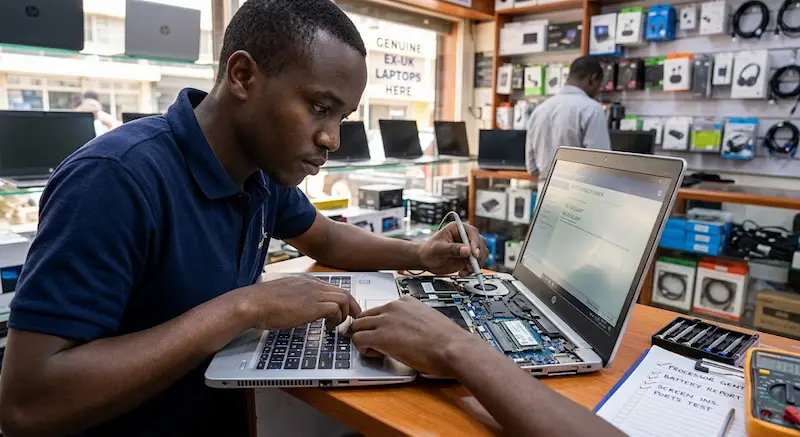

Buying a refurbished laptop in Kenya can be a practical way to get a more capable computer without paying the price of a brand-new machine.
You can find older business laptops from brands such as Dell, HP and Lenovo with Core i5 or Core i7 processors, 8GB or more of RAM and SSD storage at prices that may fit a tighter budget.
But there is an important catch.
A refurbished laptop should not be judged by its specifications alone.
Two laptops with the same Core i5 processor can have very different battery health, SSD condition, screen quality, keyboard wear and overall reliability.
That is why the most important thing you can do before buying a refurbished laptop in Kenya is test the actual machine you are being offered.
Whether you are shopping in Nairobi’s CBD, buying from a local computer dealer or ordering online, this hands-on checklist can help you identify problems before you pay.
1. Check the Exact Processor Model
Do not stop at the words Core i5, Core i7 or Ryzen 5.
Ask for the exact processor model and generation.
For example, “Core i5” covers many generations of Intel processors with significantly different capabilities.
A seller advertising a laptop simply as:
Core i5, 8GB RAM, 256GB
has not given you enough information.
You want to know something closer to:
- Intel Core i5-1135G7
- Intel Core i5-10210U
- Intel Core i7-8650U
- AMD Ryzen 5 5500U
You can check the processor from Settings > System > About or through Task Manager.
Why this matters in Kenya
If you have a budget of around KSh20,000–KSh30,000, you may encounter many older business laptops.
The cheaper model is not automatically the better deal.
A laptop with a newer processor, SSD and reasonable battery condition can make more sense than buying an older machine simply because its sticker says “Core i7.”
Generation and exact processor model matter more than the i5/i7 label alone.
2. Confirm the RAM
Check that the laptop actually has the amount of RAM advertised.
If the seller says it has 8GB, verify it in Windows.
Open:
Settings → System → About
or:
Task Manager → Performance → Memory
For many everyday users, 8GB can provide a reasonable starting point for browsing, Microsoft Office, WordPress, video calls and general productivity.
If you regularly use many browser tabs, image-editing software, development tools or other demanding applications, 16GB can provide more breathing room.
Also ask whether the RAM can be upgraded.
Some laptops have upgradeable RAM while others have memory soldered directly to the motherboard.
That difference matters if you intend to keep the laptop for several years.
3. Make Sure the Storage Is Actually an SSD
Never assume that “256GB storage” means a 256GB SSD.
Ask:
Is it SSD or HDD?
Then verify it yourself.
Open Task Manager → Performance → Disk and check the drive information.
An SSD generally provides a much more responsive experience than an old mechanical hard drive.
You will notice the difference when:
- Windows starts
- Applications open
- Files are transferred
- Browser tabs load
- Programs are installed
- The laptop wakes from sleep
For a refurbished laptop intended for everyday work, an SSD should generally be one of the first things you check.
4. Check the SSD’s Condition
Capacity is only part of the story.
A laptop may have a 256GB or 512GB SSD but still contain a drive that has seen significant previous use.
If possible, ask the seller to show you the drive’s health information using a reputable disk-health utility.
Look for information such as:
- Drive health
- Total host writes
- Power-on hours
- Drive model
- Temperature
- Warning indicators
You do not necessarily need a brand-new SSD.
The important thing is understanding what you are buying.
If a seller refuses to allow basic hardware checks on a refurbished machine, that should make you more cautious.
5. Test the Battery — Don’t Just Ask “How Long Does It Last?”
Battery condition is one of the most important checks when buying a refurbished laptop.
A laptop can look almost new while carrying a heavily worn battery.
Ask the seller whether you can test the machine without the charger connected.
Watch how quickly the battery percentage drops during normal use.
Windows also has a built-in battery reporting tool.
Open Command Prompt and run:
powercfg /batteryreport
Windows generates an HTML battery report showing information including the battery’s design capacity and estimated full-charge capacity. Microsoft documents this feature as a way to get more detailed information about battery usage and capacity.
What should you compare?
Design Capacity: What the battery was designed to hold when new.
Full Charge Capacity: What the battery can currently hold.
The larger the difference, the more the battery has degraded.
There is no single battery-health percentage that guarantees a particular number of hours because actual battery life depends on the processor, screen brightness, workload, Windows settings and other factors.
The important thing is to know the condition before buying.
6. Look Carefully at the Screen
A laptop screen can be expensive to replace, so inspect it properly.
Open a plain white screen and then a dark or black screen.
Look for:
- Dead pixels
- Bright spots
- Dark spots
- Vertical or horizontal lines
- Flickering
- Pressure marks
- Uneven brightness
- Cracks
- Discolouration
Do not inspect the display only from the Windows desktop.
A colourful wallpaper can hide problems.
Also check the hinges
Open and close the laptop carefully.
The screen should move smoothly without excessive looseness.
Do not force the hinges.
A small cosmetic scratch is very different from a cracked hinge or damaged screen frame.
7. Test Every Keyboard Key
Open Notepad or another simple text editor and test the keyboard.
Do not type only a sentence.
Press individual keys across the keyboard.
Check:
- Letters
- Numbers
- Function keys
- Arrow keys
- Enter
- Spacebar
- Backspace
- Shift
- Ctrl
- Alt
- Windows key
- Touchpad
A keyboard with one or two defective keys might still work, but you should know about the problem before negotiating the price.
8. Test the Touchpad
Use the touchpad normally.
Check:
- Cursor movement
- Left click
- Right click
- Scrolling
- Two-finger gestures
- Clicking around the edges
If the touchpad behaves erratically, ask whether it is a software issue or hardware problem.
9. Test Every Port You Need
This is one of the easiest checks to forget.
Depending on the laptop, test:
- USB-A
- USB-C
- HDMI
- Headphone jack
- SD card reader
- Ethernet
- Charging port
You do not need to test a port you will never use, but you should know whether the ports you depend on actually work.
If possible, carry a small USB flash drive or another accessory when inspecting a laptop.
For example, insert the flash drive into each USB port and confirm Windows detects it.
10. Test Wi-Fi, Bluetooth, Webcam and Speakers
Connect the laptop to Wi-Fi and browse a few websites.
If Bluetooth is important to you, pair a device.
Open the camera application and test the webcam.
Play audio through the speakers.
Also test the microphone.
This is particularly important if the laptop will be used for:
- Zoom meetings
- Google Meet
- Microsoft Teams
- Online classes
- Content creation
- Remote work
A laptop can have excellent specifications but still be frustrating if its webcam, microphone or Wi-Fi hardware has problems.
11. Listen to the Fan
Spend a few minutes using the laptop normally.
Open several browser tabs and perform a few ordinary tasks.
Listen to the fan.
Some fan noise is completely normal, especially when the processor is working hard.
But unusually loud or constant fan noise deserves investigation.
Also pay attention to:
- Excessive heat
- Sudden shutdowns
- Major performance slowdowns
- Fan constantly running at high speed
This is particularly important with older refurbished machines.
A laptop that becomes very hot during simple browsing may need cleaning, thermal maintenance or further diagnosis.
12. Inspect the Body and Hinges
Refurbished does not mean perfect.
Minor scratches and marks can be expected depending on the machine’s condition.
What matters is distinguishing cosmetic wear from damage that could affect reliability.
Check for:
- Cracked plastic
- Bent chassis
- Broken hinge covers
- Loose hinges
- Missing screws
- Damaged rubber feet
- Cracked screen bezel
- Swollen battery signs
If the bottom panel is bulging or the laptop appears to be physically pushed apart by the battery, stop and have the machine inspected rather than pressing the panel back into place. Microsoft warns that a swollen battery can become a safety issue.
13. Check the Charger
The charger is part of the laptop purchase.
Confirm that:
- It is compatible with the laptop
- It charges consistently
- The charging connector fits properly
- The cable is not badly damaged
- The laptop does not repeatedly disconnect from charging
A seller may advertise an inexpensive laptop but provide a poor-quality replacement charger.
That changes the real value of the deal.
14. Check Windows Activation
If the laptop comes with Windows, verify its activation status.
Go to:
Settings → System → Activation
Do not assume that Windows is properly activated simply because the operating system is installed.
Also check that the machine has no suspicious software, unknown administrator accounts or obvious remnants of a previous owner’s data.
A refurbished laptop should be properly prepared for its new owner.
15. Ask About the Warranty
This is one of the most important questions to ask a refurbished laptop seller in Kenya:
What happens if this laptop develops a fault after I take it home?
Ask:
- How long is the warranty?
- What exactly does it cover?
- Is the battery covered?
- Is the charger covered?
- Does it cover hardware faults?
- Where do I take the laptop if something goes wrong?
- Are physical damages excluded?
- Do I receive a receipt?
Get the terms in writing.
A warranty is much more useful when you know exactly what it covers.
16. Don’t Assume “Ex-UK” Means Excellent Condition
The phrase “Ex-UK” is common in Kenya’s refurbished laptop market.
But the label itself should not be treated as a guarantee of quality.
The important question is:
What condition is this specific laptop in?
A machine can have a clean exterior but a worn battery.
Another laptop can have scratches but excellent battery health and a healthy SSD.
Instead of buying because a seller says “Grade A Ex-UK,” inspect the actual machine.
Ask for evidence.
Test it.
Check the condition.
Understand the warranty.
The refurbishment process and the condition of the individual laptop matter more than the marketing label.
17. Calculate the Real Cost
The price on the sticker is not always the final cost.
Suppose you find a refurbished laptop for KSh22,000.
But after buying it, you discover that you need:
- A replacement battery
- More RAM
- A new charger
- An SSD upgrade
The KSh22,000 laptop may no longer be a KSh22,000 purchase.
This is why you should calculate the total cost of ownership before paying.
Example
| Item | Cost |
|---|---|
| Refurbished laptop | KSh22,000 |
| Battery replacement | Extra |
| RAM upgrade | Extra |
| Charger replacement | Extra |
| Total | Depends on condition |
The cheapest laptop is not necessarily the cheapest computer to own.
18. Test the Laptop for Your Actual Work
This is perhaps the most important practical test.
Do not buy based only on specifications.
Think about what you will actually do with the laptop.
For a student
Test:
- Browser
- Word processing
- PDFs
- Video calls
- Online learning platforms
For office work
Test:
- Microsoft Office
- Browser multitasking
- Video conferencing
- File management
For programming
Test:
- Code editor
- Browser
- Terminal
- Development tools you actually need
For content creation
Test:
- Image editing
- Video playback
- Browser multitasking
- External display support
For WordPress publishing
Test:
- Browser performance
- WordPress dashboard
- Image uploads
- Multiple tabs
- Basic image editing
- Video calls
A laptop that handles your real workload comfortably is more useful than one with impressive specifications that you never use.
Your 10-Minute Refurbished Laptop Test
If you are physically at a laptop shop, save this checklist on your phone.
Before paying:
1. Processor
- Check exact model
- Check generation
2. RAM
- Confirm advertised capacity
3. Storage
- Confirm SSD
- Check drive condition if possible
4. Battery
- Test unplugged
- Generate battery report if possible
5. Screen
- White screen
- Black screen
- Check pixels and marks
6. Keyboard
- Test every key
7. Touchpad
- Test clicking and scrolling
8. Ports
- Test the ports you need
9. Connectivity
- Wi-Fi
- Bluetooth
- Webcam
- Speakers
- Microphone
10. Physical condition
- Hinges
- Body
- Charger
- Screws
- Battery swelling
11. Windows
- Check activation
12. Warranty
- Get the terms in writing
13. Receipt
- Keep proof of purchase and, where available, the laptop’s serial number
If the seller does not allow you to perform basic checks on a refurbished machine, consider that information when deciding whether to proceed.
Refurbished Laptop Red Flags
Be more cautious when you encounter several of these at once:
- Seller cannot provide the exact processor model
- “Core i7” is used without mentioning the generation
- Seller refuses to let you test the machine
- Battery condition is unknown
- SSD/HDD type is unclear
- Screen has visible damage
- Charging port is loose
- Laptop overheats during simple tasks
- Windows activation is unclear
- No written warranty
- No receipt
- Seller avoids questions about defects
- Price seems unusually low compared with similar machines
One red flag does not automatically mean a laptop is unusable.
But several together should make you slow down and investigate further.
Refurbished Does Not Mean Bad
There is nothing inherently wrong with buying a refurbished laptop.
For a buyer working with a limited budget, a well-maintained business laptop can provide useful hardware at a lower entry price than some new machines.
The key is to separate the laptop’s label from the laptop’s actual condition.
Instead of asking:
“Is this a good refurbished laptop?”
ask:
“Is this specific laptop healthy enough for what I need it to do?”
That changes the buying process completely.
How This Connects to Kenya’s Changing Technology Market
Laptop buying is also becoming more interesting as smartphones and AI tools change the way people work.
Your phone may handle communication, mobile money, social media and many everyday tasks.
But a laptop remains useful for longer-form writing, programming, spreadsheets, website management, professional applications and multitasking.
TechDrivers recently looked at this shift in smartphones and computers, including why smartphones have not simply made computers irrelevant. From Smartphones Replacing Computers to AI Replacing Humans
AI is also changing what people expect from their computers.
Instead of simply using a laptop to run traditional applications, users increasingly want devices capable of supporting AI-powered workflows, research, coding and productivity tools.
TechDrivers explored this shift in AI and workplace management, looking at how AI could change workflows rather than simply replace people. AI Will Not Become Your Employee. It Will Change How Work Is Managed
And for readers interested in practical technology rather than specifications alone, TechDrivers also covers everyday gadgets and how they fit into real-world use. 15 Essential Gadgets That Make Everyday Life Easier
Frequently Asked Questions
Is a refurbished laptop worth buying in Kenya?
It can be, particularly for buyers who want better specifications within a limited budget. The important factors are the condition of the individual laptop, battery, SSD, display, ports, warranty and seller support.
What should I check first when buying a refurbished laptop?
Start with the exact processor model, RAM, SSD, battery condition and physical condition. Then test the screen, keyboard, ports, Wi-Fi, webcam, speakers and charger.
Is an Ex-UK laptop the same as a refurbished laptop?
Not necessarily. “Ex-UK” generally describes the machine’s origin or previous market, while “refurbished” describes work performed on a used device. A buyer should verify the condition of the actual laptop rather than relying on either label.
How do I check laptop battery health?
On Windows, you can generate a battery report using powercfg /batteryreport. The report provides information about battery capacity and usage.
Is 8GB RAM enough for a refurbished laptop?
For many everyday activities such as browsing, office applications, WordPress and video calls, 8GB can be a reasonable starting point. Users running heavier applications or many demanding programs simultaneously may benefit from 16GB or more.
Should I buy a refurbished Core i5 or Core i7?
Do not decide based on the i5 or i7 label alone. Compare the exact processor model and generation, RAM, SSD, battery condition and the work you intend to perform.
Should I test a refurbished laptop before paying?
Yes. If possible, physically test the machine before payment. Check the display, keyboard, touchpad, battery, ports, Wi-Fi, webcam, speakers, charger and overall condition.
What warranty should I look for?
There is no single warranty period that makes every refurbished laptop a good purchase. More important is knowing exactly what the seller covers, how faults are handled and whether the warranty terms are provided in writing.
Conclusion: Test the Laptop Before You Buy It
Buying a refurbished laptop in Kenya does not have to be a gamble.
The biggest mistake is paying too much attention to the sticker on the laptop and too little attention to the machine itself.
A laptop advertised as Core i7, 16GB RAM and 512GB SSD can still have a worn battery, damaged screen, faulty USB port or overheating problem.
The solution is simple:
Test before you pay.
Check the processor.
Verify the RAM.
Confirm the SSD.
Test the battery.
Inspect the screen.
Type on the keyboard.
Test the ports.
Check Wi-Fi and the webcam.
Listen to the fan.
Inspect the hinges.
Test the charger.
Confirm Windows activation.
Then ask for the warranty and receipt.
For Kenyan buyers, especially those shopping on a tight budget, these few minutes of testing can make the difference between getting a useful work machine and spending more money fixing a laptop that looked like a bargain.
The best refurbished laptop is not necessarily the cheapest one. It is the one whose condition, specifications and support match what you actually need.
TechDrivers Editorial Note
Prices and availability of refurbished laptops in Kenya can change significantly depending on processor generation, RAM, storage, battery condition, brand, physical condition, accessories and seller warranty. Buyers should inspect the specific unit they intend to purchase rather than relying solely on a product description or “Ex-UK” label.
