

Kenyan consumers are doing more online than ever. People use the internet to send and receive money, access M-PESA and banking services, shop online, apply for jobs, pay bills and access government services.
But as online activity increases, so does the risk of phishing and fake websites designed to steal passwords, payment information and personal data.
A fraudulent website can look remarkably convincing. Scammers can copy the colours, logos, fonts and layouts of banks, mobile-money providers, online shops and government platforms.
For Kenyan internet users, this creates a serious problem.
A website can look legitimate while being completely controlled by a scammer.
The good news is that you don’t need to be a cybersecurity expert to identify many suspicious websites.
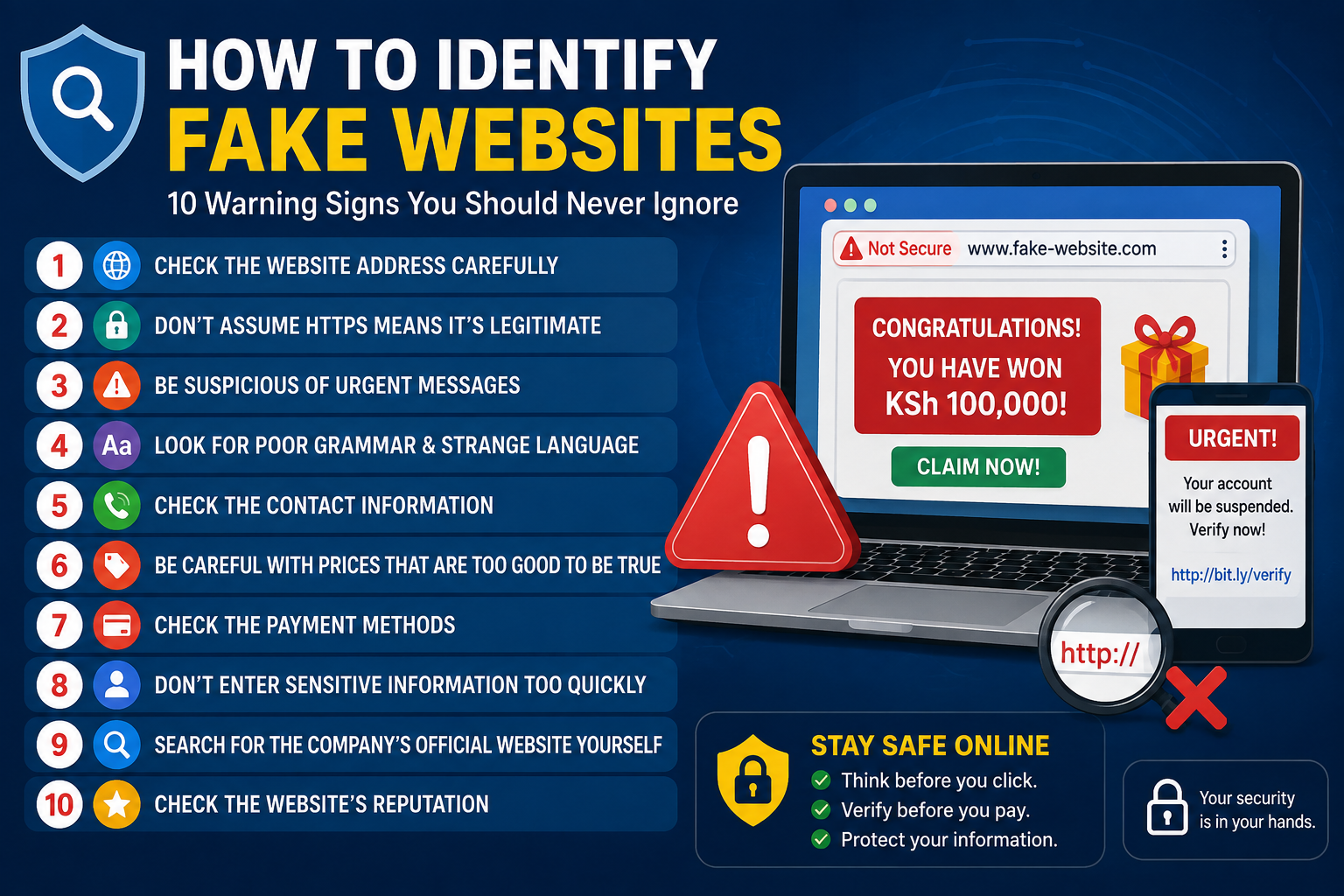
Here are 10 signs to check before trusting a website or entering your personal information.
1. Check the Website Address Before Doing Anything
The first thing to examine is the website’s URL.
Don’t rely on the logo, colours or appearance of a webpage. Look at the address displayed in your browser.
Scammers commonly create domains that resemble legitimate websites by using:
- Misspelled brand names
- Extra words
- Additional hyphens
- Unusual domain extensions
- Numbers or characters that look similar
- Fake login subdomains
- Slight variations of a legitimate domain
For example, a scammer could create a domain that looks similar to a bank or mobile-money company but isn’t the organisation’s genuine website.
The important rule
Don’t ask whether the website looks real. Ask whether the domain is correct.
If you’re unsure, close the page and find the organisation’s official website independently.
2. HTTPS Does Not Mean the Website Is Legitimate
Many people assume that the padlock symbol or https:// means a website is safe.
That’s not enough.
HTTPS encrypts information travelling between your browser and the website. It does not prove that the organisation operating the website is genuine.
A scammer can also operate a fraudulent website using HTTPS.
Therefore, check:
HTTPS + the complete domain name + how you reached the website.
Never treat the padlock as proof that a website belongs to your bank, mobile network, retailer or government agency.
3. Be Suspicious of Urgent Messages
Phishing scams often try to make you panic.
You might receive a message claiming:
“Your account will be suspended today.”
“Your M-PESA account requires verification.”
“Your payment has failed.”
“Your package cannot be delivered.”
“You have won KSh 100,000.”
“Verify your account immediately.”
The objective is to make you click before you have time to verify the message.
This technique is particularly common in SMS, WhatsApp, email and social-media scams.
What should you do?
Don’t click the link immediately.
Instead, open your browser or the relevant official app and access the service yourself.
If there really is a problem with your account, you should normally be able to see it through the organisation’s official channels.
4. Look for Spelling Errors and Unusual Language
Poor grammar can be a warning sign.
A fake website may contain:
- Spelling mistakes
- Awkward sentences
- Inconsistent company names
- Poor translations
- Strange instructions
- Missing information
- Unprofessional wording
However, don’t rely on grammar alone.
Modern phishing websites can be professionally written, and legitimate websites can occasionally contain mistakes.
Treat unusual language as one warning sign among several.
5. Check the Company’s Contact Information
Before buying something from an unfamiliar Kenyan website, look for verifiable business information.
Check whether the website provides:
- Physical address
- Telephone number
- Business email
- Customer-support information
- Company details
- Clear terms and conditions
- Return or refund information
Be particularly cautious if a supposed business provides only a WhatsApp number, personal email address or contact form with no verifiable company information.
And remember:
A phone number displayed on a website isn’t automatically genuine.
Verify important contact details through an independent source.
6. Be Careful With Deals That Are Too Good to Be True
Unrealistic discounts are a common way of attracting victims.
For example, imagine a smartphone normally selling for KSh 80,000 being advertised online for KSh 15,000.
Before paying, ask why the price is dramatically lower than the market price.
A suspicious online shop may:
- Offer huge discounts
- Create fake countdown timers
- Pressure you to pay immediately
- Offer no meaningful return policy
- Provide limited company information
- Demand payment through unusual channels
Compare the product with established Kenyan retailers before sending money.
A low price isn’t proof of a scam, but an unrealistic price should trigger additional checks.
7. Pay Attention to the Payment Method
The payment process can reveal whether a website deserves your trust.
Be extremely cautious if an unfamiliar website asks you to:
- Send money to a personal M-PESA number
- Transfer money to an unrelated bank account
- Buy gift cards
- Send cryptocurrency
- Make an irreversible payment
- Share your banking password
- Provide an M-PESA PIN
- Give someone an OTP or verification code
Never share your confidential authentication details
Your M-PESA PIN, banking password, card PIN and one-time authentication codes should not be provided to a website or person simply because they claim to represent a company.
If someone asks for this information, stop and verify the request through an official channel.
8. Don’t Enter Sensitive Information Without Checking Why It Is Needed
Before completing an online form, consider what information the website is requesting and whether it makes sense.
Sensitive information may include:
- Passwords
- Banking details
- Card information
- M-PESA credentials
- National identification information
- One-time passwords
- Security questions
- Personal contact information
A phishing website may deliberately request information that a legitimate service would never need.
For example, if you receive a random SMS asking you to “verify your M-PESA account” through a link, don’t enter your details simply because the webpage displays a familiar logo.
Verify the request first.
9. Find the Official Website Yourself
This is one of the easiest ways to avoid phishing links.
Suppose you receive an SMS claiming to be from your bank.
Instead of clicking the link:
- Open your browser.
- Search for the bank independently.
- Confirm the official domain.
- Open the organisation’s website.
- Log in through the official website or app.
- Check whether there is actually an account notification.
You can also type a known official address directly into your browser.
The important principle is:
Don’t let the message choose the website for you.
This applies to:
- Banks
- M-PESA-related services
- Mobile networks
- Government services
- Online shops
- Delivery companies
- Job websites
- Social-media platforms
10. Research an Unfamiliar Website Before Paying
If you’re about to send money to a company you’ve never used before, spend a few minutes researching it.
Search for:
Company name + reviews
Company name + complaints
Company name + scam
Look for independent information rather than relying solely on reviews published on the website itself.
You can also check whether the company has:
- An established online presence
- Consistent social-media accounts
- Verifiable business information
- Independent customer reviews
- A history of operating in Kenya
A website that appeared online recently and has little verifiable information deserves extra caution.
Fake Website vs Legitimate Website
| Check | Potential warning sign | What you want to see |
|---|---|---|
| Domain | Look-alike or misspelled address | Correct official domain |
| HTTPS | Used as the only proof of legitimacy | HTTPS plus verified domain |
| Price | Unrealistic discount | Reasonable market price |
| Contact details | Limited or unverifiable | Multiple verifiable channels |
| Payment | Personal or unusual payment account | Established payment process |
| Messages | Urgent pressure | Clear, normal communication |
| Information requests | Excessive sensitive data | Relevant information only |
| Company history | Little verifiable information | Established presence |
| Reviews | Only testimonials on the site | Independent reviews |
| Website design | Copied branding | Consistent official presence |
How to Check a Suspicious Link Before Clicking
If you receive a suspicious link through SMS, WhatsApp, email or social media, don’t click it immediately.
Use this simple process.
Step 1: Inspect the URL
Look at the complete web address.
Don’t just check the first word you recognise.
Step 2: Check the domain
Look for spelling changes, extra words, unusual characters and unfamiliar domain extensions.
Step 3: Consider the message
Ask:
Was I expecting this message?
An unexpected account warning deserves additional scrutiny.
Step 4: Visit the official website independently
Use a known website address or search for the organisation yourself.
Step 5: Check your account
If the message claims that a payment, delivery or account problem exists, verify it through the official app or website.
Step 6: Don’t enter information if you’re still unsure
You don’t lose anything by closing a suspicious webpage.
When in doubt, don’t submit the form.
How to Spot Fake M-PESA Websites in Kenya
M-PESA is one of the services scammers may try to imitate because of its importance to Kenyan consumers.
Be suspicious of websites or messages claiming that you need to:
- “Upgrade” your M-PESA account
- “Verify” your account through an unfamiliar link
- Claim a prize
- Reverse a transaction through a random webpage
- Unlock a blocked account
- Receive a refund by entering your PIN
- Confirm a transaction using an unfamiliar form
Never enter your M-PESA PIN into a webpage simply because it uses M-PESA branding.
When dealing with M-PESA-related issues, use official Safaricom channels rather than links received unexpectedly through messages.
Be Careful With Fake Job Websites
Job seekers are another major target for online scams.
A fraudulent website may advertise a job and then request:
- Registration fees
- Application fees
- “Training” payments
- Banking details
- Identification documents
- Mobile-money payments
Before applying, research the employer independently.
If a supposed employer asks you to pay money simply to obtain a job, treat the offer as highly suspicious.
Don’t assume that a professional-looking careers website is proof that the job is genuine.
Fake Online Shops Can Look Very Professional
Online shopping scams are increasingly difficult to identify based on appearance alone.
A fake store can have:
- Professional product photos
- Social-media pages
- Customer testimonials
- Discount codes
- WhatsApp support
- A polished checkout page
None of these proves that the business is legitimate.
Before paying, check:
Who owns the business?
Does it have a verifiable physical presence?
Are there independent customer reviews?
Does the business have a clear return policy?
Does the payment account belong to the business?
If the answers are unclear, reconsider the purchase.
What If You Already Entered Your Details on a Fake Website?
If you realise that you’ve entered sensitive information on a suspicious website, act quickly.
If you entered a password
Change the password immediately.
If you used the same password on other accounts, change those passwords as well.
Enable two-factor authentication where available.
If you entered banking information
Contact your bank through its official customer-service channels.
Explain what happened and monitor your account for unauthorised activity.
If you entered M-PESA-related information
Secure your account and contact the appropriate official support channel as soon as possible.
Do not provide your PIN or authentication codes to someone claiming to be helping you recover the account.
If you downloaded a suspicious application or file
Don’t open it again.
Remove suspicious software and run a security scan using reputable security tools.
If the device contains important accounts, consider changing passwords from a trusted device.
How to Protect Your Family From Fake Websites
Online safety shouldn’t only focus on technically experienced users.
Children, parents, older relatives and employees can also be targeted by phishing campaigns.
Teach your family a simple three-step rule:
STOP
Don’t click immediately.
CHECK
Verify the website address and the message independently.
PROTECT
Never share passwords, PINs or authentication codes with suspicious websites or people.
This simple habit can prevent many common phishing attacks.
7 Rules Every Kenyan Internet User Should Remember
If you remember nothing else from this guide, remember these:
1. Check the domain before entering information.
2. Don’t assume HTTPS means a website is legitimate.
3. Don’t click unexpected financial or account links.
4. Never share your M-PESA PIN, banking password or OTP.
5. Verify businesses before sending money.
6. Be suspicious of unrealistic offers and urgent requests.
7. When in doubt, leave the website and access the service independently.
Final Verdict
Fake websites are becoming more convincing, but scammers still depend heavily on the same basic tactic:
Getting you to act before you verify.
Whether you’re checking your bank account, shopping online, applying for a job or dealing with an M-PESA-related message, take a few seconds to examine the website before entering any information.
The most important lesson is that a professional design, familiar logo, padlock icon or HTTPS connection does not automatically make a website genuine.
For Kenyan internet users, the safest approach is simple:
Stop. Check the domain. Verify the source. Then decide whether to proceed.
And when a website asks for sensitive financial information unexpectedly, the safest response is often to close the page and access the service through its official website or app instead.
Fake Website Safety Checklist
Before entering personal or financial information, ask:
✅ Is the domain name correct?
✅ Did I expect this message or website?
✅ Is the offer realistic?
✅ Can I verify the organisation independently?
✅ Does the company have verifiable contact information?
✅ Is the website asking for information it shouldn’t need?
✅ Is someone pressuring me to act immediately?
If you cannot confidently answer these questions, don’t enter your information and don’t send money.
