
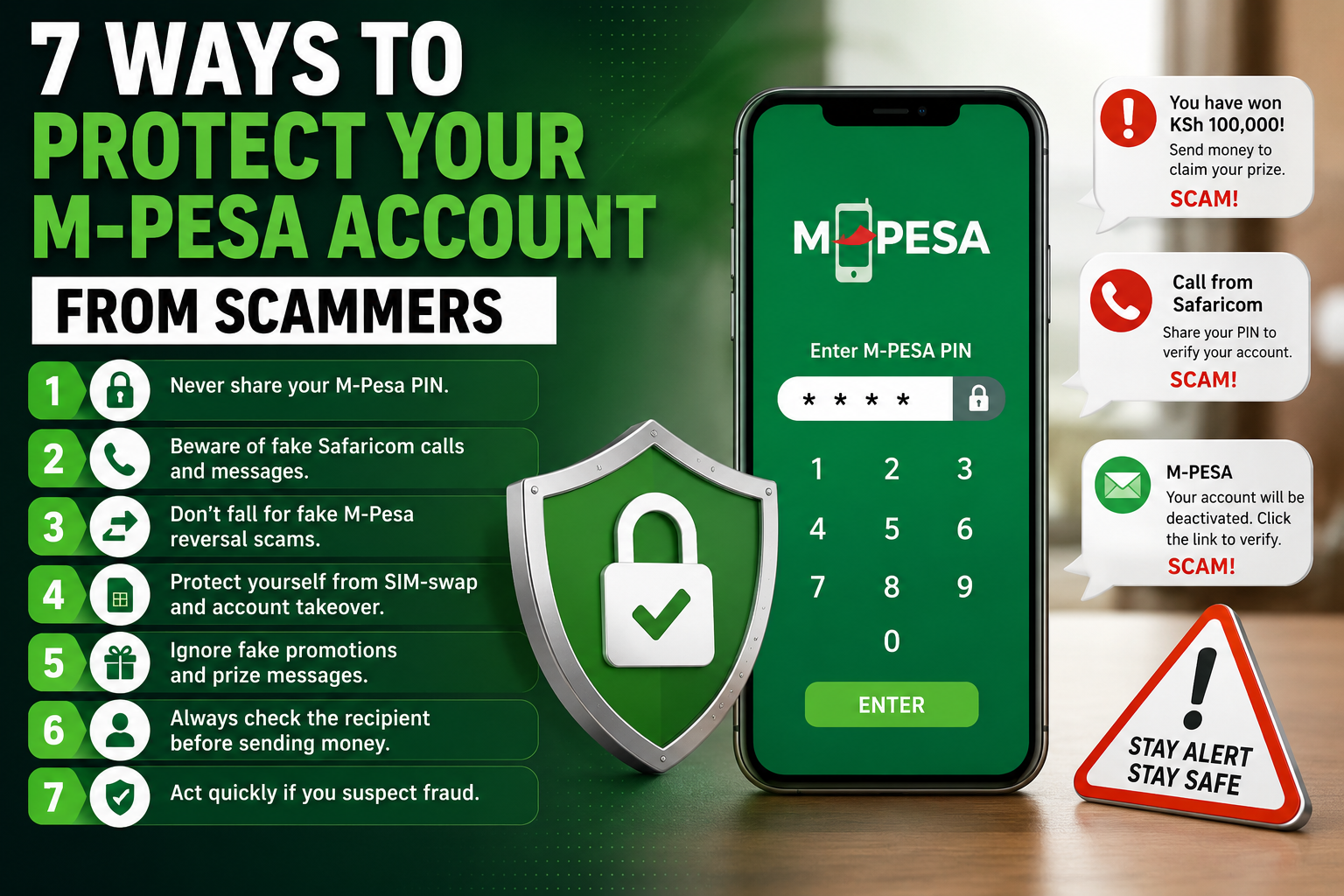

M-Pesa has become an essential part of everyday financial life in Kenya. Millions of people use it to send and receive money, pay bills, buy goods, receive salaries and run businesses.
But its popularity has also made M-Pesa a major target for fraudsters.
Scammers use a range of tactics, including fake Safaricom calls, fraudulent promotions, social engineering, M-Pesa reversal scams, phishing links and attempts to take control of mobile numbers.
The most important thing to understand is that M-Pesa security starts with protecting your PIN, phone number and personal information.
Here are seven practical ways to protect your M-Pesa account from scammers in Kenya in 2026.
1. Never Share Your M-Pesa PIN
Your M-Pesa PIN is a confidential security credential. Never disclose it to another person, regardless of who they claim to represent.
A scammer may pretend to be a Safaricom employee, bank representative, government official, shop attendant or customer-service agent and claim they need your PIN to solve a problem.
Common excuses include:
- Reversing a transaction
- Upgrading your account
- Fixing an M-Pesa problem
- Confirming your identity
- Activating a promotion
- Unlocking your account
Do not provide your PIN.
If you believe someone has discovered your PIN, change it immediately and use official Safaricom support channels for assistance.
Your M-Pesa PIN should remain known only to you.
2. Be Careful With Fake Safaricom Calls and Messages
Fraudsters frequently impersonate well-known companies because familiarity makes people more likely to trust a message or phone call.
A scammer may tell you that:
- Your M-Pesa account has a problem.
- You have won a promotion.
- A transaction needs to be reversed.
- Your SIM needs to be upgraded.
- Your account will be blocked.
- You need to verify your identity.
Don’t assume a caller is legitimate simply because they know your name, phone number or other basic information.
If you receive an unexpected request:
- End the call if it appears suspicious.
- Don’t provide your M-Pesa PIN.
- Don’t disclose OTPs or authentication codes.
- Don’t click suspicious links.
- Verify the claim independently using Safaricom’s official customer-service channels.
- Check your own M-Pesa transaction history instead of relying on information provided by the caller.
A genuine-looking phone call is not proof that the person contacting you is genuine.
3. Verify M-Pesa Reversal Requests Yourself
M-Pesa reversal scams rely heavily on urgency.
Someone may contact you claiming they accidentally sent money to your number and ask you to return it immediately.
For example, a caller might claim:
“I accidentally sent KSh 5,000 to you. Please send it back.”
Don’t send money simply because someone makes this claim.
First, check your own M-Pesa transaction history and confirm that the money was actually received.
Don’t rely on:
- Screenshots
- Messages shown on another person’s phone
- Claims made during a phone call
- Pressure from the sender
If you receive a suspicious reversal request, use official Safaricom support channels rather than allowing the caller to dictate what you should do.
Why M-Pesa reversal scams work
The scammer wants you to react before you verify the transaction.
That is why the safest rule is simple:
Verify first. Act second.
4. Protect Your Mobile Number From SIM-Swap Fraud
Your phone number can be an important gateway to financial accounts, authentication services and communication platforms.
SIM-swap fraud occurs when criminals attempt to take control of a victim’s mobile number by impersonating them and obtaining a replacement SIM.
Warning signs can include:
- Your phone suddenly loses network connectivity without an obvious explanation.
- You receive unexpected account or SIM-related notifications.
- You receive authentication codes you did not request.
- You notice unusual activity involving your mobile number.
- Your financial accounts show activity you don’t recognise.
If your mobile service suddenly stops working and you suspect unauthorised activity, don’t ignore it.
Contact your mobile provider through an official channel as soon as possible and secure any financial accounts linked to the number.
You should also avoid publicly sharing unnecessary personal information. Fraudsters can use publicly available details to make impersonation attempts more convincing.
5. Don’t Trust Fake M-Pesa Promotions and Prize Messages
Fake promotions are another common way criminals try to obtain money or personal information.
You might receive a message saying:
“Congratulations! You have won KSh 100,000.”
The message may use the name, logo or branding of a well-known company.
The scammer may then ask you to pay a “processing fee”, provide personal information or click a link.
Be suspicious if a supposed promotion asks you to:
- Send money before receiving a prize.
- Provide your M-Pesa PIN.
- Provide an OTP.
- Click an unfamiliar link.
- Share identification information unnecessarily.
- Call an unknown number.
- Pay a fee to unlock winnings.
If you don’t remember entering a competition, don’t assume that the prize is genuine.
Verify promotions through the organisation’s official website, app or verified communication channels.
A familiar logo or company name does not prove that a promotion is legitimate.
6. Check the Recipient Before Sending Money
M-Pesa fraud doesn’t always involve someone gaining unauthorised access to an account.
Sometimes the scammer simply convinces the victim to send money voluntarily.
Before confirming a transaction, carefully check:
- Recipient name
- Phone number
- Amount
- Reason for payment
Be particularly cautious when someone creates unnecessary urgency.
For example:
“Send the money immediately.”
“Don’t hang up.”
“The offer expires now.”
“Your account will be blocked if you don’t pay.”
These tactics are designed to prevent you from thinking clearly.
Take a few seconds to verify the request before pressing the confirmation button.
If you’re unsure who you’re paying, don’t send the money until you’ve verified the recipient.
7. Act Immediately If You Suspect M-Pesa Fraud
If you believe your M-Pesa PIN has been exposed, your mobile number has been compromised or an unauthorised transaction has occurred, act quickly.
Depending on the situation:
- Change your M-Pesa PIN if you believe it has been exposed.
- Review your recent transactions.
- Contact Safaricom through an official customer-service channel.
- Report suspicious transactions or attempted fraud.
- Secure other accounts linked to your mobile number.
- Keep relevant evidence such as transaction messages, phone numbers and screenshots.
- Consider reporting significant suspected fraud to the appropriate authorities.
Don’t continue following instructions from the person who contacted you.
If someone has already gained access to your information, additional conversations with the scammer could expose you to further attempts.
How to Recognise an M-Pesa Scam
A phone call, SMS, WhatsApp message or online request deserves extra caution when several of these warning signs appear:
| Warning sign | Why you should be cautious |
|---|---|
| Someone asks for your M-Pesa PIN | Your PIN is confidential |
| Someone requests an OTP | It may allow authentication of an action |
| You are pressured to act immediately | Urgency can prevent verification |
| You are promised unexpected money | Fake rewards are commonly used in scams |
| Someone asks for a reversal | Verify the transaction independently |
| You receive a suspicious link | It may lead to phishing |
| Someone requests unnecessary personal information | Such information can support impersonation |
| You are asked to send money to claim a prize | Legitimate offers should be independently verified |
One warning sign doesn’t necessarily prove that something is fraudulent, but multiple warning signs should make you stop and verify the situation.
What to Do If You Have Already Been Scammed
If you have already sent money to a suspected scammer or disclosed confidential information, don’t panic—but act quickly.
If you shared your M-Pesa PIN
Change your PIN immediately if you believe it has been exposed.
If you sent money to a scammer
Keep the transaction information and contact Safaricom through an official customer-service channel as soon as possible.
If you suspect SIM-swap fraud
Contact your mobile provider through an official channel and explain that you suspect unauthorised control of your number.
If you shared a password
Change the password immediately, particularly if you have reused it on other services.
Keep evidence
Don’t delete potentially useful evidence.
Save:
- SMS messages
- Transaction confirmations
- Phone numbers
- Screenshots
- Dates and times
- Suspicious links
- Relevant account notifications
This information may be useful when reporting the incident.
How to Protect Your M-Pesa Account Long Term
Good M-Pesa security is about habits rather than complicated technology.
Make these practices routine:
Keep your PIN private.
Verify unexpected requests.
Check transactions yourself.
Don’t click suspicious links.
Don’t send money under pressure.
Protect your SIM and mobile number.
Keep your phone and apps updated.
Use official customer-service channels when something goes wrong.
Also be careful about the personal information you publish online. Details shared publicly can sometimes make social-engineering attacks more convincing.
M-Pesa Scam Safety Checklist
Before responding to an unexpected M-Pesa-related request, ask yourself:
☑ Did I initiate this request?
☑ Do I know the person contacting me?
☑ Have I independently verified their claim?
☑ Is anyone asking for my PIN or OTP?
☑ Am I being pressured to act immediately?
☑ Have I checked my actual M-Pesa transaction history?
☑ Is the link or website genuinely associated with the organisation?
If you cannot verify the request, stop before sending money or providing information.
Frequently Asked Questions
Can Safaricom employees ask for my M-Pesa PIN?
You should never disclose your M-Pesa PIN to someone who contacts you claiming to provide customer support. Treat any request for your PIN as a serious warning sign.
Can someone reverse an M-Pesa transaction without my permission?
Do not assume that a person claiming to have sent money can simply instruct you to send funds back. Verify the transaction and use official support channels when you need assistance with a reversal.
What should I do if someone calls claiming to be from Safaricom?
Don’t provide confidential information. End the call if you are suspicious and independently contact Safaricom through an official customer-service channel.
Is it safe to give someone my M-Pesa OTP?
No. Authentication codes are confidential. Don’t share OTPs or other security codes with people who contact you unexpectedly.
How can I tell whether an M-Pesa promotion is genuine?
Verify it through the organisation’s official website, application or verified communication channels. Don’t pay fees or disclose confidential information simply because a message claims that you have won a prize.
Final Verdict
M-Pesa scams in Kenya often rely less on sophisticated hacking and more on social engineering, urgency and deception.
A scammer may pretend to be a Safaricom representative, claim that money was sent to your number, offer a fake prize or create fear that your account will be blocked.
The safest response is to slow down and verify.
Never share your M-Pesa PIN. Don’t disclose OTPs. Verify reversal requests. Protect your SIM. Check recipients before sending money and use official support channels when something looks suspicious.
Your M-Pesa account is connected to your money. Treat your PIN, phone number and financial information as sensitive credentials.
Stop. Verify. Then act.
