

Losing an Android phone can be more than an inconvenience. Your smartphone may contain M-PESA and banking apps, WhatsApp conversations, photos, email accounts, contacts, work documents and saved passwords.
If your phone goes missing, the most important thing is to act quickly.
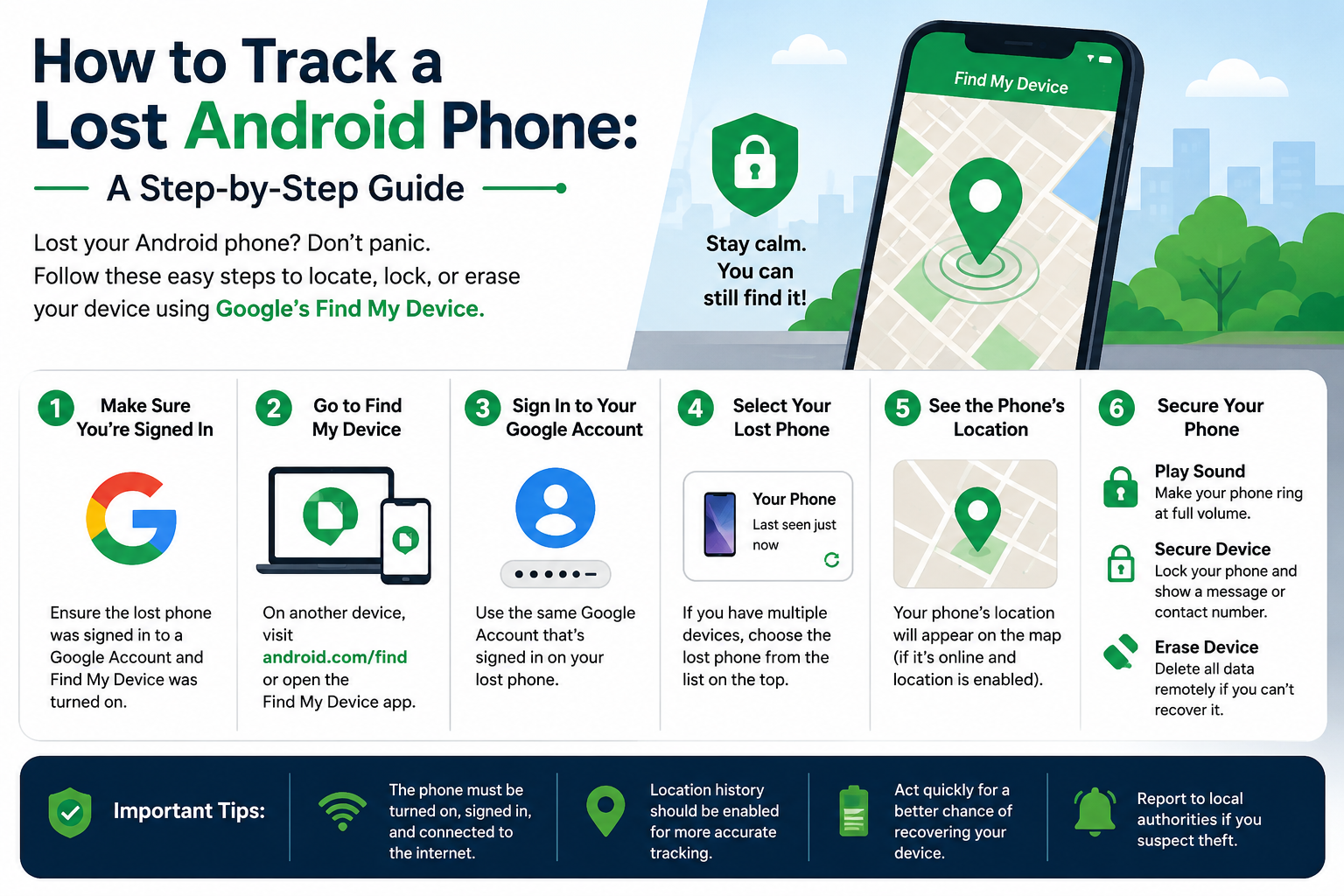
Android provides built-in tools that can help you locate a lost phone, make it ring, lock it remotely or erase its data. Kenyan users should also take additional steps to protect their SIM card, mobile-money accounts and other services linked to the device.
This guide explains how to track a lost Android phone in Kenya, what to do if it has been stolen, and how to protect your personal and financial information.
How to Track a Lost Android Phone Using Google
The first tool you should try is Google’s device-finding service.
If your Android phone is connected to your Google account and the relevant tracking features are available, you may be able to see its location from another device.
Step-by-step
- Open a browser on another phone or computer.
- Sign in to the Google account associated with the missing Android phone.
- Open Google’s device-finding service.
- Select the missing phone from your list of devices.
- Check the location displayed on the map.
- If the phone is nearby, use the option to make it ring.
- If you cannot recover it immediately, lock the device remotely.
The location shown may be the phone’s current location or its most recent available location. Accuracy depends on factors such as internet connectivity, location settings and the device’s ability to communicate with Google’s services.
Can You Track an Android Phone If It Is Offline?
Sometimes.
Modern Android devices can have additional finding capabilities that may help locate a device even when it is not currently connected to the internet, depending on the phone model, settings and Google’s available network-finding features.
However, you should not assume that every lost Android phone can be tracked while offline.
If the phone is switched off, has a depleted battery, has lost connectivity or cannot communicate its location, the location information available to you may be limited.
This is why enabling device-finding and security features before the phone is lost is so important.
Make Your Lost Phone Ring
If you think the phone is somewhere nearby, try the Play Sound option.
The device can play a loud sound, making it easier to locate if it is:
- Under furniture
- Inside a vehicle
- In another room
- At your workplace
- In a bag
- Nearby but on silent mode
This is one of the simplest recovery options and should be tried before assuming that the phone has been stolen.
Lock Your Android Phone Remotely
If you cannot immediately recover the device, secure it.
Google’s device-finding tools can allow you to remotely lock the phone and display a message or contact number on the screen.
For example, you could display:
Lost phone. Please call this number.
This gives an honest finder an opportunity to contact you without giving them access to your personal information.
More importantly, remotely locking the phone helps prevent someone from casually accessing your apps, messages, photos and other information.
Should You Erase a Stolen Android Phone?
If you believe the phone has been stolen and recovery is unlikely, remote data deletion may be appropriate.
Remote erasure can remove personal information stored on the device, potentially including:
- Photos and videos
- Files
- Contacts
- App data
- Locally stored account information
However, do not erase the phone too quickly if you are still actively trying to locate it.
Depending on the service and device, erasing the phone can prevent you from continuing to use the device-finding service to locate it.
A sensible approach is:
Locate → Lock → Recover if possible → Erase if recovery is unlikely.
Use Another Android Phone to Find Your Device
You don’t need a computer to search for a missing Android phone.
If you have access to another compatible Android smartphone, you can use Google’s device-finding functionality to sign in and select the missing device.
This can be particularly useful if you are away from home and don’t have access to a laptop.
Check Google Maps for Recent Locations
Google Maps location history or Timeline may provide useful information if it was previously enabled on your account.
It may help you identify places where the phone was recently used.
For example, you might discover that the phone was last active:
- At your workplace
- At a shopping centre
- In a taxi or matatu
- At a restaurant
- At home
- Along your regular commute
Location history should be treated as a clue rather than guaranteed evidence of the phone’s current location.
What Kenyan Users Should Do About M-PESA
A lost smartphone can create additional risks in Kenya because many people use their phones to access M-PESA and other financial services.
If your phone is missing, don’t focus only on recovering the hardware.
Think about the accounts connected to the device.
If you believe someone may be able to access your mobile number, SIM card or financial accounts, contact your mobile network provider through an official channel and take appropriate steps to secure your account.
Do not give your M-PESA PIN, banking password or one-time authentication code to anyone claiming they have found your phone.
Important
A person who finds your phone may contact you and ask for a PIN or verification code.
Do not provide it.
A genuine recovery process should not require you to reveal confidential security credentials.
Contact Your Mobile Network Provider
If your phone has been stolen, contact your mobile network provider as soon as possible.
Your provider may be able to assist with:
- Blocking the SIM
- Replacing the SIM while retaining your number
- Protecting your mobile account
- Addressing suspicious activity involving your number
For Kenyan users, this step is particularly important because the same mobile number may be connected to mobile money, banking, email accounts, social media and authentication services.
What About WhatsApp?
If your missing phone contains WhatsApp, consider protecting your account as well.
Your WhatsApp account is linked to your phone number, so securing your SIM and mobile account is important.
If you regain control of your number on another phone, you can take steps to sign into WhatsApp again and protect the account.
Also review WhatsApp’s available security settings, including two-step verification.
Change Important Passwords
If you believe someone may have accessed your phone, don’t wait for the device to be recovered before securing important accounts.
Prioritise accounts containing sensitive information, such as:
- Banking
- Mobile-money services
- Social media
- Online shopping
- Work accounts
If you reused the same password across multiple services, change it on every affected account.
Use unique passwords wherever possible.
How to Find Your Phone’s IMEI Number
The IMEI (International Mobile Equipment Identity) is a unique identifier associated with a mobile device.
You may need it when reporting a stolen phone or dealing with your mobile provider.
You can usually find the IMEI number from:
- The original phone box
- Your purchase documents
- The device’s original settings or account information
- Documentation supplied when you purchased the phone
Keep your IMEI somewhere secure before your phone goes missing.
Do not publish your IMEI publicly.
Report a Stolen Phone in Kenya
If you believe your phone was stolen, consider reporting the incident to the relevant authorities.
Provide useful information such as:
- Phone make and model
- IMEI number
- Phone number
- Approximate time and location of the incident
- Purchase information, if available
- Screenshots or location information from Google’s device-finding service
If your phone’s location appears to show a specific person or property, do not confront the suspected thief yourself.
Share relevant information with the appropriate authorities instead.
Can You Track a Phone Using Its IMEI Number?
An IMEI number is useful for identifying a device, but ordinary users should not expect to enter an IMEI number into a website and receive a live GPS location.
Be particularly cautious about websites or individuals claiming they can instantly track any phone using only its IMEI number.
Some services advertised online may be scams designed to obtain money or personal information.
Use legitimate device-finding tools and official service-provider or law-enforcement channels instead.
What If the Phone Has No Internet?
If the device cannot connect to the internet, live location updates may not be available.
Depending on the phone and its configuration, Google’s finding network may still provide some location information.
Otherwise, you may only see the last available location.
This is another reason why a lost phone should be reported and secured quickly rather than waiting several days.
What If the Phone’s Battery Is Dead?
If the battery has completely run out, the phone cannot normally provide a new live location.
You may still see previously available location information, and some newer devices support limited finding capabilities after power-off depending on their hardware and settings.
But don’t rely on this.
The safest strategy is to enable all appropriate security and device-finding features while the phone is still in your possession.
How to Prepare Your Android Phone Before It Gets Lost
The easiest lost-phone recovery process is one you prepare in advance.
1. Enable Google’s Device-Finding Features
Check your Android settings and make sure Google’s device-finding functionality is enabled.
Do this before your phone disappears.
2. Use a Strong Screen Lock
Use a strong PIN or password.
Biometric security such as fingerprint or face unlock can provide additional convenience where supported.
Avoid simple PINs that someone could easily guess.
3. Keep Your Phone Updated
Install Android and security updates when they become available.
Updates can address security vulnerabilities and improve device protection.
4. Enable Two-Step Verification
Protect your Google account and other important accounts with two-factor or two-step authentication where available.
This adds another layer of protection if someone obtains your password.
5. Back Up Important Data
A lost phone is replaceable.
Important photos, documents and contacts may not be.
Use a reputable cloud backup service or another secure backup method for important information.
6. Save Your IMEI Number
Record your phone’s IMEI number and keep it somewhere you can access if the device disappears.
The original packaging is one useful place to find it.
7. Avoid Saving Sensitive Information in Unsafe Places
Don’t store your M-PESA PIN, banking PINs or passwords in plain text in your phone’s notes or messages.
Use a reputable password manager where appropriate.
Lost vs Stolen Phone: What Should You Do?
The response should depend on the circumstances.
If you simply misplaced the phone
1. Call the number.
2. Use Google’s device-finding service.
3. Make the phone ring.
4. Check its last known location.
5. Lock it if you cannot find it.
If you believe the phone was stolen
1. Try to locate it remotely.
2. Lock the device.
3. Contact your mobile network provider.
4. Secure M-PESA and other financial accounts if necessary.
5. Change important passwords.
6. Record the IMEI number.
7. Report the theft to the relevant authorities.
8. Do not confront anyone based solely on a location shown on a map.
How to Protect Your M-PESA and Banking Apps After Losing Your Phone
For Kenyan smartphone users, this deserves special attention.
A lost phone may contain access to several financial services.
After losing your device:
- Secure your mobile number.
- Contact your mobile network provider if necessary.
- Review recent financial transactions.
- Change passwords for important financial accounts.
- Never disclose your M-PESA PIN.
- Never share OTPs or authentication codes.
- Report suspicious transactions immediately.
- Monitor your accounts for unusual activity.
The goal is not simply to recover your phone.
The goal is to prevent the loss of the phone from becoming a loss of money or personal information.
Common Mistakes to Avoid
Don’t keep calling a suspected thief
If someone has stolen your phone, repeatedly calling them may not help.
Use official recovery and reporting channels.
Don’t publish your location publicly
If you locate the phone, avoid posting detailed information about its location on social media.
Don’t pay strangers who promise to “track” your phone
Be cautious about anyone demanding money in exchange for recovering or tracking a device.
Don’t share your passwords or PINs
Someone claiming to be helping you recover the phone should not need your confidential financial credentials.
Don’t erase the device immediately
If recovery is still realistic, consider locking it first. Erasing may limit your ability to continue locating it.
Frequently Asked Questions
Can I track my Android phone without an internet connection?
Possibly, depending on the device model, settings and Google’s available finding features. If the phone cannot communicate its location, you may only see its last known location.
Can I track my stolen phone using the IMEI number?
The IMEI identifies the device but does not provide ordinary users with a live GPS tracking service. Be cautious of websites claiming otherwise.
Can I track a lost phone using its phone number?
A normal user cannot simply enter a phone number into a legitimate website and obtain a phone’s live GPS location. Use Google’s official device-finding tools for Android instead.
What should I do if my stolen phone contains M-PESA?
Secure your mobile account immediately and contact your mobile network provider through official channels if you believe your SIM or mobile-money access is at risk. Never disclose your M-PESA PIN or OTP.
Can I erase my Android phone remotely?
Yes, remote data erasure may be available through Google’s device-finding service, depending on the device and its connection. Remember that erasing the phone can affect your ability to locate it afterward.
How can I prevent my Android phone from being stolen?
Use a strong screen lock, keep device-finding features enabled, avoid leaving your phone unattended in public places and maintain backups of important data.
Final Verdict
If you’ve lost an Android phone in Kenya, act quickly rather than assuming it is gone forever.
Start with Google’s device-finding tools to determine whether the phone can be located. If it is nearby, make it ring. If you cannot recover it immediately, lock it and display a contact message.
If you believe the phone has been stolen, move beyond device recovery and protect the information connected to it. Contact your mobile network provider when necessary, secure M-PESA and banking access, change important passwords and report the theft through appropriate channels.
For Kenyan smartphone users, the biggest risk isn’t always the value of the handset.
It’s what the handset gives someone access to.
Locate it. Lock it. Protect your accounts. And erase the device if recovery is no longer realistic.
Lost Android Phone Checklist
Before you finish, make sure you have:
☑ Tried Google’s device-finding service
☑ Checked the phone’s location
☑ Made it ring if it may be nearby
☑ Locked the device remotely
☑ Secured your SIM and mobile account if necessary
☑ Protected M-PESA and banking access
☑ Changed important passwords
☑ Recorded the IMEI number
☑ Reported the theft if appropriate
☑ Erased the phone if recovery is unlikely
The best time to prepare your Android phone for loss is before it goes missing.
