
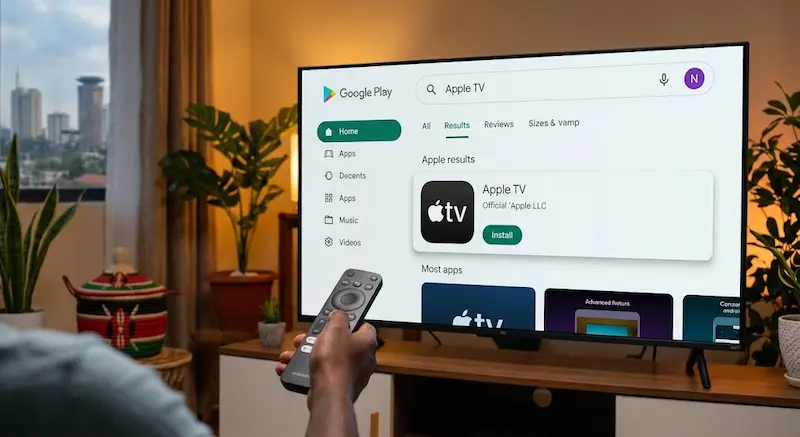

If you own an Android TV or Google TV in Kenya and want to watch Apple Originals, you no longer need an Apple TV streaming box to get started.
The Apple TV app is available on compatible Android TV and Google TV devices, allowing users to access Apple Originals directly from their television. Apple also expanded Apple TV availability in Kenya in September 2026, giving Kenyan users another way to access the service.
This guide explains how to install Apple TV on Android TV in Kenya, how to sign in, what to do if the app does not appear, and what Kenyan users should know before subscribing.
What Is Apple TV?
Apple TV is Apple’s streaming service and home for Apple Originals, including television series, movies and other programming.
The service has changed its branding from Apple TV+ to simply Apple TV. Apple says subscribers can access hundreds of exclusive shows and movies, with new releases added regularly.
Popular Apple Originals include titles such as Ted Lasso, Silo, Severance, Slow Horses and The Morning Show.
Importantly, Apple TV is different from the Apple TV 4K device.
The Apple TV 4K is Apple’s physical streaming box, while the Apple TV app is software that can run on compatible televisions, streaming devices, smartphones, computers and other platforms.
That means a Kenyan household with a compatible Android TV may not need to purchase an Apple TV 4K simply to watch Apple Originals.
Is Apple TV Available on Android TV in Kenya?
Yes, Apple supports the Apple TV app on compatible Android devices and streaming platforms.
Apple’s support documentation says users can subscribe through the Apple TV app on compatible smart TVs, Android devices, PCs and streaming devices. Availability of the app and subscription can vary by country or region.
Apple’s Kenyan website also now provides an Apple TV service page, confirming that the service is available for users in Kenya.
In September 2026, Apple announced that Apple TV and Apple Arcade would also be included with iCloud+ for subscribers in Kenya at no additional cost.
This makes the service particularly relevant for Kenyan Apple users who already pay for iCloud+.
What You Need Before Installing Apple TV
Before attempting the installation, check the following:
1. A compatible Android TV or Google TV
Your television needs to support the Apple TV app.
This includes compatible televisions and streaming devices running supported versions of Android TV or Google TV.
2. Internet connection
You need an active internet connection to download the app and stream video.
For Kenyan users, this could be home fibre, a fixed wireless connection or a mobile hotspot.
3. Google account
Your Android TV will normally require a Google account to access the Play Store.
4. Apple Account
You will need an Apple Account to sign in and access Apple TV.
If you do not already have one, Apple allows users to create an account during the setup process.
5. Payment method if required
Depending on your subscription arrangement, Apple may ask you to confirm billing information and provide an accepted payment method.
How to Install Apple TV on Android TV in Kenya
The easiest method is to install the official app through your television’s app store.
Step 1: Turn on your Android TV
Switch on your television and make sure it is connected to the internet.
If you are using Google TV, go to the home screen.
Step 2: Open Search
Select the search option on your Android TV or Google TV.
Depending on your television manufacturer, the exact location of the search button may be different.
Step 3: Search for Apple TV
Type:
Apple TV
Look for the official Apple TV application.
Avoid downloading unofficial applications with similar names.
Step 4: Select Install
Open the official Apple TV listing and select Install.
The television will download and install the application.
Step 5: Open Apple TV
Once installation is complete, select Open.
You can also find Apple TV later from your television’s list of installed applications.
Step 6: Sign in
Select Sign In and follow the instructions displayed on your television.
Apple may provide different sign-in options depending on the device.
Once your Apple Account is connected, you can access the content available under your subscription.
What If Apple TV Does Not Appear on Your Android TV?
This is one of the most common problems users may encounter.
If searching for Apple TV produces no official app, try the following.
Check your TV’s operating system
Not every Android-powered television necessarily supports every Android TV application.
Check the TV’s model number and software version.
Update your television
Go to your TV’s settings and check for available system updates.
An outdated operating system may prevent certain applications from appearing or functioning correctly.
Check the Google Play Store
Open the Play Store directly rather than relying only on the television’s home-screen recommendations.
Search for Apple TV again.
Check your region
Apple states that Apple TV app and subscription availability can vary by country and region.
If the app is still unavailable, check the country or region associated with your Google Play account and device.
Restart the television
A simple restart can also refresh the Play Store and application listings.
Should You Sideload the Apple TV APK?
You may find websites offering an Apple TV APK for manual installation.
However, sideloading should not be the first option.
Installing applications from unknown APK websites can create security and compatibility risks. It is safer to use the official Play Store whenever the application is available for your television.
If Apple TV does not appear in your Play Store, first determine whether your television model and region are supported before attempting alternative installation methods.
For most Kenyan users, the official application should be the preferred route.
How to Sign Up for Apple TV in Kenya
After installing the application, open Apple TV and select the option to sign in or subscribe.
Apple’s current support instructions say users can select Sign In or Sign Up, enter their Apple Account details and, where required, confirm billing information and a valid payment method.
There is another important option for Kenyan users.
Apple announced in September 2026 that iCloud+ subscribers in Kenya can receive Apple TV and Apple Arcade as part of their iCloud+ subscription at no additional cost.
Therefore, before paying for a separate Apple TV subscription, check whether your existing iCloud+ plan already gives you access.
This could make a significant difference for Kenyan users who already pay for additional iCloud storage.
How Much Internet Data Does Apple TV Use in Kenya?
Streaming video can consume a significant amount of mobile data.
For that reason, users relying on Safaricom, Airtel, Telkom or another mobile network should consider using a home fibre connection or another suitable fixed connection for regular high-quality streaming.
Actual data consumption depends on factors such as:
- Video quality
- Streaming device
- Network conditions
- Content being watched
- Apple’s adaptive streaming behaviour
If you are using a mobile hotspot, check your remaining data before starting a long streaming session.
For heavy streaming households, the cost of the internet connection can ultimately matter more than the streaming subscription itself.
Internal-link opportunity: Link this section to your TechDrivers article on Safaricom data bundle prices.
Can You Watch Apple TV Without an Apple TV 4K?
Yes.
The Apple TV 4K hardware is not required if your television or streaming device supports the Apple TV app.
Apple lists smart TVs, streaming devices, Android devices and other platforms among the ways users can watch Apple TV.
For someone in Kenya who already owns a compatible Android TV, installing the app can therefore be a simpler option than buying additional streaming hardware.
Apple TV on Android TV vs Apple TV 4K
The two options serve different purposes.
Apple TV app on Android TV
- Uses your existing television
- No additional streaming box required
- Works through a compatible Android TV or Google TV
- Requires an internet connection
Apple TV 4K
- Dedicated Apple streaming hardware
- Designed for users who want Apple’s own streaming platform and ecosystem
- Connects to a television through HDMI
- Can be useful when a television does not support the applications you want
If your existing Android TV already supports the Apple TV app, there may be little reason to purchase additional hardware purely to access Apple TV content.
Apple TV on Android TV: Common Problems and Fixes
Apple TV is missing from the Play Store
Check whether your TV model and region are supported. Apple says availability varies by country and region.
The app installs but will not open
Restart the TV, check for system updates and make sure your internet connection is working.
The video keeps buffering
Test your internet connection and reduce network congestion by disconnecting devices that are not being used.
You cannot sign in
Check your Apple Account credentials and follow Apple’s account-recovery process if you have forgotten your password.
You cannot subscribe
Check your Apple Account billing information and available payment method. Apple notes that an account may need to be prepared for purchases before a subscription can be completed.
You already pay for iCloud+
If you are an iCloud+ subscriber in Kenya, check your Apple TV access before purchasing another subscription because Apple announced that Apple TV is included with iCloud+ in Kenya.
Frequently Asked Questions
Can I install Apple TV on Android TV in Kenya?
Yes, if your Android TV or Google TV device is compatible with the Apple TV application. Apple TV is now available to users in Kenya, although app availability can depend on the device and region.
Do I need an iPhone to use Apple TV on Android TV?
No. You can use Apple TV on compatible Android TV devices without owning an iPhone.
You will, however, need an Apple Account to sign in and use the service.
Is Apple TV the same as Apple TV 4K?
No. Apple TV is the streaming service and application. Apple TV 4K is Apple’s physical streaming device.
Is Apple TV included with iCloud+ in Kenya?
Apple announced in September 2026 that iCloud+ subscribers in Kenya receive access to Apple TV and Apple Arcade as part of their subscription at no additional cost.
Can I watch Apple TV on a normal Android TV?
If the television supports the official Apple TV application, yes.
The best way to check is to search for the official Apple TV app in your television’s Play Store.
Do I need an Apple TV box?
No. A compatible Android TV or Google TV can run the Apple TV application without an Apple TV 4K box.
Can I use mobile data to watch Apple TV?
Yes, if your television is connected through a mobile hotspot. However, video streaming can consume substantial data, so a suitable home internet connection may be more practical for regular viewing.
Conclusion
Installing Apple TV on an Android TV in Kenya is relatively straightforward when your television supports the official application.
The safest approach is to search for the official Apple TV app through the TV’s Play Store, install it, sign in with an Apple Account and complete the subscription process if necessary.
Kenyan users should also pay attention to Apple’s September 2026 change: iCloud+ subscribers in Kenya now receive access to Apple TV and Apple Arcade as part of the expanded subscription.
Before buying an Apple TV 4K or paying for another subscription, therefore, check what your existing Android TV and iCloud+ plan already provide.
For most users, the key questions are simple: Is your TV compatible, is your internet connection reliable, and does your existing Apple subscription already include access?
