
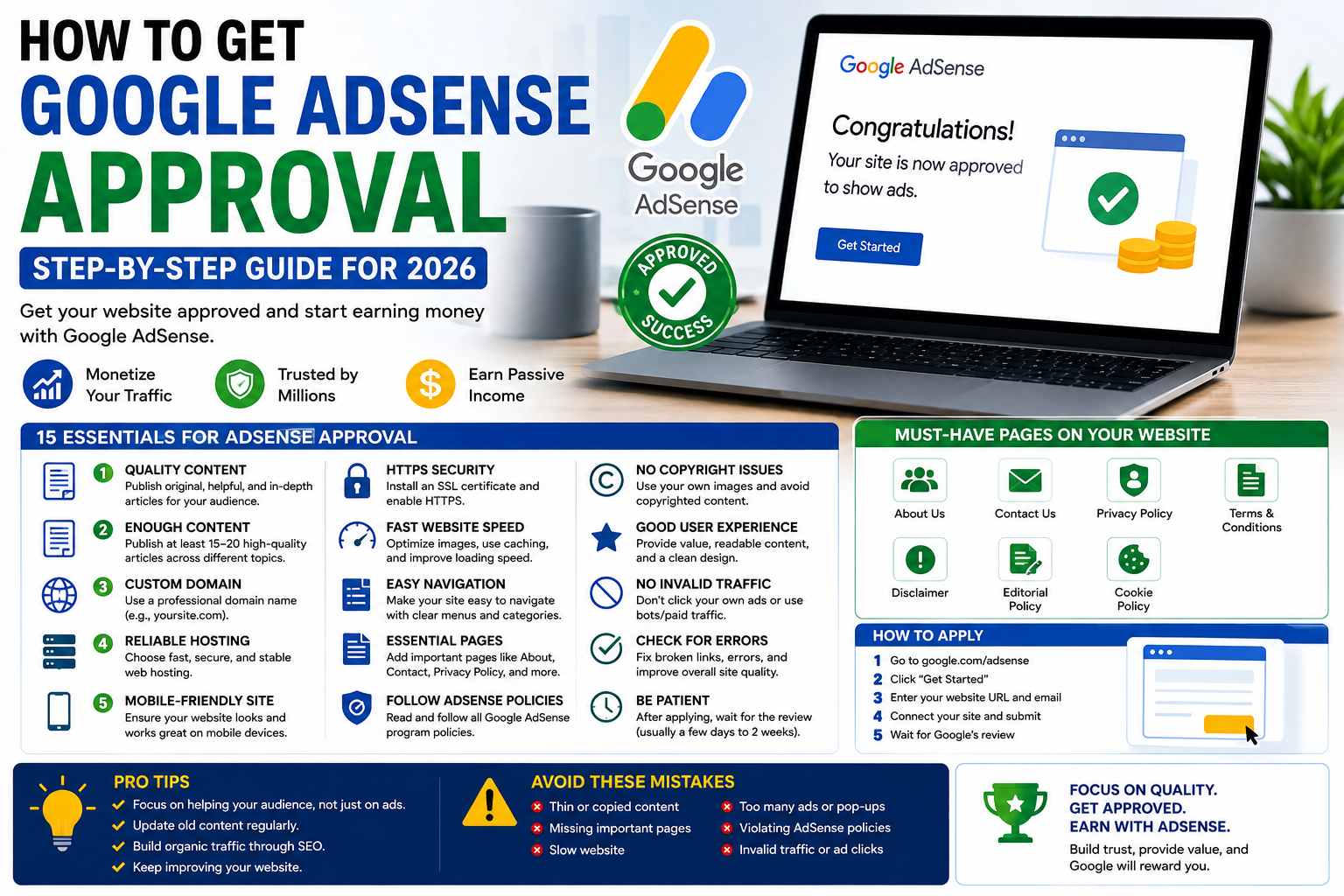

Google AdSense can be an attractive way for website owners to monetize original content. But getting approved is not simply a matter of publishing a certain number of articles, buying a domain, or reaching a specific traffic level.
Google evaluates websites against its publisher policies and overall quality requirements. That means a site with fewer excellent articles can be in a better position than a site with hundreds of thin, repetitive, or poorly written posts.
For Kenyan bloggers, publishers, and small businesses, the best approach is to build the website as a useful publication first and treat AdSense as a monetization opportunity that comes afterward.
This guide explains what to check before applying, common problems that can hurt an application, and practical steps you can take to make your website more trustworthy and useful to visitors.
What Is Google AdSense?
Google AdSense is an advertising program that allows eligible website publishers to display Google-served advertisements on their websites.
Depending on factors such as advertiser demand, visitor location, content, and ad formats, publishers may earn revenue when eligible ads are displayed or interacted with.
AdSense can be used by different types of publishers, including:
- Technology websites
- News and media publications
- Educational websites
- Business websites
- Blogs
- Travel websites
- Lifestyle publications
- Niche information websites
However, having a website does not automatically qualify you for AdSense. Your site must meet Google’s applicable policies and requirements.
Does Google Require a Minimum Number of Articles?
Google does not publish a specific minimum number of articles required for AdSense approval.
You may see advice online claiming that you need 20, 30, 50, or 100 articles before applying. These numbers should not be treated as official Google requirements.
Instead of chasing a particular article count, ask whether your website contains enough useful, original content to demonstrate what the site is about.
For example, a technology website should have a meaningful collection of technology content rather than dozens of unrelated articles created primarily to increase its post count.
Quality matters more than quantity
Before applying, review your articles and ask:
- Does the article answer the reader’s question?
- Is the information accurate?
- Does it contain original analysis or useful explanation?
- Is it sufficiently detailed for the topic?
- Is the writing clear and easy to understand?
- Does the article provide more value than simply repeating information available elsewhere?
If the answer is consistently yes, your site is in a stronger position.
1. Publish Original, Helpful Content
Content quality should be your first priority.
Avoid building an AdSense application around articles that simply rewrite press releases, copy information from other websites, or provide very little information.
A strong article should add something useful through:
- Original reporting
- First-hand experience
- Local context
- Independent analysis
- Practical instructions
- Comparisons
- Examples
- Expert commentary
- Accurate explanations
For example, instead of publishing a generic article titled “Best Internet Providers in Kenya,” a stronger article could compare specific providers based on pricing, speeds, coverage, installation costs, contract terms, and the type of customer each service suits.
That gives readers a reason to visit your website.
2. Avoid Thin and Repetitive Articles
One of the biggest weaknesses on many websites preparing for monetization is thin content.
An article doesn’t become valuable simply because it is 1,500 words long.
A 700-word article that completely answers a question can be more useful than a 2,500-word article filled with repetition.
Look for articles that:
- Repeat the same information several times
- Contain generic introductions
- Add unnecessary headings
- Provide little original information
- Exist mainly to target a keyword
- Cover almost exactly the same topic as another article on your site
Consider combining overlapping articles when appropriate.
3. Demonstrate Who Is Behind the Website
A professional website should make it reasonably clear who publishes its content.
Create an About page explaining:
- What your publication covers
- Who your target audience is
- Where your publication operates
- What type of content you publish
- Your editorial approach
For articles written by individual contributors, consider using author pages that explain their role and relevant experience.
This is particularly important for publishers covering areas where accuracy and trust matter.
4. Create a Clear Contact Page
Visitors should have a straightforward way to contact your publication.
Your Contact page can include:
- Email address
- Contact form
- Business or editorial contact information
- Advertising or partnership contact where relevant
Avoid creating a contact page that contains only a generic form with no explanation of how readers can reach you.
A transparent contact process helps make a website look like a genuine publication rather than a collection of automatically generated pages.
5. Publish Important Policy Pages
Before applying, make sure your website has the pages appropriate for your business and publishing model.
Common examples include:
- Privacy Policy
- Terms and Conditions
- About Us
- Contact Us
- Cookie information where applicable
- Disclaimer where appropriate
- Editorial Policy
These pages should be genuine and relevant to your website.
Do not simply create pages filled with generic text and never review them.
6. Make Your Website Easy to Navigate
A visitor should be able to understand your website within seconds.
Your navigation should make it easy to find:
- Main categories
- Recent articles
- Important pages
- Search
- Contact information
For a technology publication, categories might include areas such as:
- Tech News
- AI & Innovation
- Smartphones
- Gadgets
- Cybersecurity
- Business & Fintech
- Telecom & Internet
Avoid creating dozens of categories containing only one or two articles.
A smaller number of well-maintained categories usually provides a better experience.
7. Make Your Website Mobile-Friendly
A large proportion of internet users access websites through smartphones.
Test your website on both desktop and mobile devices.
Check whether:
- Text is easy to read
- Images fit the screen
- Menus work correctly
- Buttons are easy to tap
- Articles don’t require horizontal scrolling
- Pop-ups don’t block the entire screen
- Pages load reasonably quickly
A technically functional desktop website is not enough if the mobile experience is poor.
8. Improve Your Website’s Loading Speed
Website speed is important for visitors and overall site quality.
Start with the basics:
- Compress large images
- Use modern image formats where appropriate
- Enable caching
- Remove unnecessary plugins
- Reduce excessive third-party scripts
- Use a reliable hosting provider
- Keep WordPress, themes, and plugins updated
Don’t install multiple optimization plugins simply because they promise higher speed scores. Poorly configured optimization tools can sometimes create additional problems.
Test important pages after making performance changes.
9. Use HTTPS
Your website should use HTTPS rather than unsecured HTTP.
HTTPS protects information exchanged between visitors and your website and is now standard for modern websites.
After installing an SSL certificate, check that:
- Your homepage uses HTTPS
- Article URLs use HTTPS
- Images load through HTTPS
- Internal links don’t unnecessarily point to HTTP versions
- HTTP pages redirect correctly where appropriate
10. Remove Broken and Low-Quality Pages
Before applying for AdSense, conduct a website-wide content audit.
Look for:
- Broken links
- Empty category pages
- Placeholder pages
- Duplicate articles
- Very short articles with little value
- Broken images
- Incorrect redirects
- Outdated information
- Pages returning errors
Don’t assume that publishing more content is always better.
Sometimes improving or removing weak content can make the overall website more coherent.
11. Be Careful With AI-Generated Content
Using artificial intelligence to assist with research, editing, brainstorming, or drafting does not automatically make an article unsuitable.
The important question is whether the final content provides genuine value and complies with Google’s applicable policies.
Avoid publishing large volumes of automatically generated articles that:
- Contain factual errors
- Repeat information from other websites
- Provide little original value
- Have unnatural wording
- Are created primarily to attract search traffic
If you use AI during your editorial process, fact-check the information and add human review, original context, and useful analysis.
12. Don’t Copy Other Websites
Copyright and originality are important considerations for publishers.
Avoid copying:
- Articles
- Product descriptions
- Images without permission
- News stories word-for-word
- Reviews from other websites
- Other publishers’ unique content
If you’re reporting on a story from another source, use your own writing and add meaningful context.
For technology news, this could mean explaining what a product announcement means for Kenyan consumers instead of simply reproducing the company’s announcement.
13. Use Images Responsibly
Images can make articles more useful, but publishers need to consider copyright.
Don’t randomly download images from Google Images and use them on your website.
Use images that you have:
- Created yourself
- Properly licensed
- Received permission to use
- Obtained from sources whose terms allow your intended use
Also make sure images are relevant to the article and optimized so they don’t unnecessarily slow down the page.
14. Build Useful Internal Links
Internal linking helps visitors discover related content.
For example, an article about Safaricom data bundles could naturally link to related articles about:
- Safaricom internet services
- Mobile money
- Home fibre
- Mobile network coverage
Links should be relevant and genuinely useful.
Avoid adding dozens of internal links simply to manipulate search rankings.
15. Don’t Buy Fake Traffic
Traffic is not something you should manufacture simply to impress an advertising platform.
Never use:
- Bots
- Automated traffic
- Click farms
- Purchased fake visits
- Services promising guaranteed ad clicks
You should also never click your own ads or encourage readers to click advertisements.
Invalid traffic can create serious problems for an AdSense account.
16. Don’t Fill Your Website With Ads Before Approval
If you’re preparing for AdSense, avoid covering your website with excessive advertisements from other networks.
Your primary purpose should remain providing useful content.
Visitors should be able to read your articles without being overwhelmed by:
- Full-screen interruptions
- Aggressive pop-ups
- Auto-playing media
- Excessive banners
- Misleading download buttons
- Advertisements that resemble navigation
A clean website is easier to use and makes your content the focus.
17. Make Your Content Relevant to Your Audience
For a Kenyan technology publication, local context can make an article substantially more useful.
Instead of writing generic global articles, consider information such as:
- Kenyan pricing
- Local availability
- Kenyan mobile networks
- M-Pesa payment options
- Local regulations
- Device availability
- Internet speeds and coverage
- Kenyan consumer considerations
For example, a smartphone review becomes more useful to Kenyan readers when it discusses local pricing, availability, network compatibility, battery performance, and whether the device represents good value in Kenya.
18. Check Your Search Console and Technical Setup
Before applying, make sure your website is technically healthy.
Check:
- Google Search Console
- Indexing status
- Sitemap
- Robots.txt
- Mobile usability
- Broken URLs
- HTTPS
- Page errors
Not every page needs to be indexed, but your important content should be technically accessible to search engines.
19. Don’t Apply Just Because You Have Reached a Certain Number of Posts
There is no magic article count that guarantees approval.
Instead, use a readiness test.
Your website should have:
Content
- Original articles
- Useful information
- Clear categories
- No obvious copied content
Trust
- About page
- Contact page
- Author information
- Transparent editorial approach
Technical
- HTTPS
- Mobile-friendly design
- Working navigation
- No major broken pages
- Reasonable page speed
Policy
- Privacy information
- Terms where appropriate
- Compliance with applicable Google publisher policies
User experience
- Easy navigation
- Readable articles
- No excessive interruptions
- Useful internal linking
Common Reasons Websites Struggle With AdSense
There isn’t one universal reason every application is unsuccessful, but common weaknesses can include:
- Low-value or thin content
- Significant amounts of copied content
- Poor website navigation
- Missing important information about the publisher
- Policy violations
- Poor user experience
- Technical problems
- Automatically generated content that provides little value
If Google doesn’t approve your site, don’t simply submit another application immediately. Review the website, identify weaknesses, make meaningful improvements, and then consider applying again.
How Much Traffic Do You Need for AdSense?
There is no published minimum traffic figure that guarantees approval.
A website can have substantial traffic and still have policy or quality problems.
Likewise, a smaller website can potentially qualify if it provides useful content and meets the relevant requirements.
Your priority should therefore be quality, relevance, originality, and compliance, not simply increasing visitor numbers before applying.
Does a New Website Qualify for AdSense?
A new website can potentially qualify, but being new does not guarantee approval.
What matters is whether the website has been developed into a useful, functioning publication with content and site information that meet Google’s requirements.
Rather than rushing to apply immediately after launching, spend time developing the site properly.
What Should You Do After AdSense Approval?
Approval is not the end of the process.
Continue to:
- Publish useful content
- Update outdated articles
- Monitor website performance
- Follow Google’s publisher policies
- Protect your account from invalid traffic
- Improve the user experience
- Build genuine organic traffic
Your advertising strategy should never come at the expense of your readers.
Final Thoughts
Getting Google AdSense approval is less about finding a secret formula and more about building a website that deserves to be trusted.
There is no guaranteed article count, traffic threshold, or WordPress plugin that will automatically result in approval.
Build a clear publication, write genuinely useful content, provide information about who is behind the site, maintain a good user experience, secure your website, and follow Google’s policies.
For Kenyan publishers, adding genuine local context can make content significantly more useful. Instead of creating articles solely for search engines or advertising revenue, focus on answering the questions your readers actually have.
Build the website for the reader first. Monetization should follow.
