
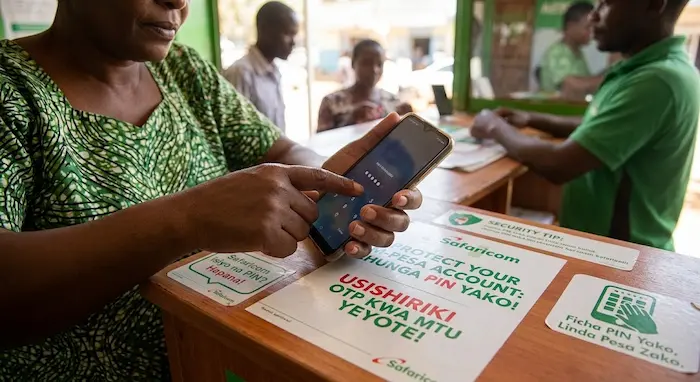

M-PESA has become an important part of everyday financial life in Kenya. People use it to send money, pay bills, buy goods, receive salaries, save, invest and pay for online services.
That convenience also makes an M-PESA account an attractive target for fraudsters.
Scammers can use social engineering, fake customer-care calls, phishing messages, SIM-swap attempts, fraudulent transaction messages and other tactics to try to gain access to a customer’s money or personal information.
The Communications Authority of Kenya (CA) reported that digital financial services and mobile money generated 110 escalated consumer complaints between April and June 2026. The regulator also highlighted concerns involving SIM-replacement fraud, identity theft and unauthorised access to consumer accounts.
Protecting your M-PESA account therefore requires more than simply keeping your PIN secret. You also need to protect your phone, SIM card, personal information and transaction details.
Here are practical steps Kenyan M-PESA users can take to reduce their risk.
1. Never Share Your M-PESA PIN
Your M-PESA PIN should be known only to you.
Do not give it to:
- Safaricom employees
- M-PESA agents
- Friends or relatives
- People claiming to be customer-care representatives
- People claiming to be calling from a bank
- Online sellers
- Strangers offering to help you complete a transaction
Safaricom’s published M-PESA terms state that customers are responsible for keeping their PIN confidential and should not disclose it to third parties, including people claiming to have authority to request it.
A genuine customer-care representative should not need you to reveal your M-PESA PIN.
If someone has seen your PIN
Change it immediately.
Safaricom also advises customers to change their PIN if they suspect another person has seen it.
2. Do Not Share OTPs or Verification Codes
Fraudsters may attempt to convince you that they need a verification code sent to your phone.
They might say:
“We are confirming your identity.”
Or:
“Your M-PESA account has been blocked. Give me the code to activate it.”
Treat unexpected verification-code requests as a warning sign.
An OTP or verification code can be an important part of an authentication process. Giving a code to someone who initiated contact with you can potentially help them complete an unauthorised action.
The safest approach is simple: never disclose an OTP or verification code to a person who calls or messages you asking for it.
3. Be Careful With Fake M-PESA Messages
One common fraud technique involves sending a fake transaction message.
For example, someone may claim:
“I accidentally sent you KSh 5,000. Please send it back.”
They may even show you a message that appears to confirm the transaction.
Do not rely solely on a message displayed on another person’s phone.
Check your own M-PESA transaction confirmation and balance before taking action.
Safaricom specifically advises customers to rely on their own transaction notifications rather than SMS shown to them from another person’s handset.
Example
Suppose a stranger approaches you outside a shop and claims they accidentally sent KSh 3,000 to your number.
Before sending any money back:
- Check your own M-PESA messages.
- Check your balance or transaction history.
- Confirm whether the money actually arrived.
- If there is a genuine mistaken transaction, use the appropriate official reversal process rather than sending money to an unfamiliar number simply because someone claims they made a mistake.
4. Be Alert to Fake Customer-Care Calls
A fraudster may call pretending to be from Safaricom.
They may claim:
- Your M-PESA account has a problem.
- Your SIM is about to be blocked.
- You have won a promotion.
- Your account needs verification.
- Your M-PESA registration needs to be updated.
- Someone is trying to access your account.
The caller may then request personal information, your PIN or a verification code.
Do not provide sensitive credentials simply because someone identifies themselves as customer care.
If you are concerned about your account, end the call and independently contact Safaricom through its official customer-care channels.
Safaricom’s published security guidance also warns customers to verify reversal requests rather than automatically trusting someone claiming that a transaction needs to be reversed.
5. Protect Your SIM Card From SIM-Swap Fraud
SIM-swap fraud is particularly important because your mobile number can be connected to financial services, email accounts and other digital services.
In a SIM-swap attack, a fraudster may attempt to convince a mobile operator that they are the legitimate owner of your number and obtain a replacement SIM.
The Communications Authority of Kenya has previously issued an advisory concerning disclosure of personally identifiable information that can facilitate SIM-swap fraud.
The regulator has also identified SIM-replacement fraud and unauthorised account access among consumer concerns in its latest complaints reporting.
Reduce your risk by protecting personal information
Be careful about sharing:
- Your national ID details
- Date of birth
- Phone number
- Full name
- Account information
- Copies of identification documents
- Security questions and answers
Do not post unnecessary personal information publicly on social media.
Fraudsters can sometimes combine information from different sources to make a scam appear more convincing.
6. Keep Your Phone Secure
Your phone is effectively a gateway to many of your digital services.
If someone steals an unlocked phone containing your SIM card, banking applications, email accounts and other services, the risk goes beyond the physical value of the device.
Use:
- A strong screen lock
- Fingerprint authentication where available
- Face authentication where appropriate
- Automatic screen locking
- Updated operating-system software
- Official app stores
- Device-tracking features
Avoid leaving your phone unlocked in public places.
If your phone is stolen, act quickly.
Related TechDrivers guide
Read our detailed guide:
How to Block a Stolen Phone in Kenya: IMEI, SIM & M-PESA
It explains what Kenyan users should do after losing a phone, including protecting the SIM and M-PESA account.
7. Never Give Your Phone to a Stranger to “Help” With M-PESA
Be cautious when someone asks to use your phone to complete a transaction.
This can happen in busy environments such as:
- Bus stations
- Markets
- Shops
- Entertainment venues
- Transport stops
- M-PESA agent locations
If somebody asks you to hand over your phone, consider completing the transaction yourself.
Never allow another person to see your PIN while you enter it.
If you are using an M-PESA agent, shield your PIN from people around you.
8. Check the Number Before Sending Money
Always confirm the recipient before pressing the final confirmation button.
This is particularly important when:
- Paying a new supplier
- Sending money to an online seller
- Paying for goods advertised on social media
- Sending money to a person you have never paid before
- Making a large transaction
A simple mistake in the recipient’s number can turn into a difficult recovery process.
For larger transactions, take an extra moment to confirm the recipient’s name and number.
9. Don’t Trust “You’ve Won” Messages
Fraudsters often use prizes and promotions to make people act quickly.
You might receive a message claiming:
“Congratulations! You have won KSh 100,000.”
The message may ask you to:
- Call a particular number.
- Pay a small “processing fee.”
- Provide personal information.
- Share an OTP.
- Send money to claim the prize.
Do not assume a promotion is legitimate simply because it mentions Safaricom or M-PESA.
Verify promotions independently using official company channels.
10. Avoid Clicking Suspicious Links
Be careful with SMS, WhatsApp messages, emails and social-media posts containing links that ask you to log in or provide financial information.
For example:
“Your M-PESA account has been suspended. Click here to reactivate it.”
A suspicious link may lead to a fake website designed to collect your personal information.
Before entering information, check the website address carefully.
Do not assume that a page is legitimate simply because it contains the M-PESA logo or Safaricom branding.
11. Do Not Install Apps From Unknown Sources
Fraudsters may try to persuade users to install an application to receive a payment, claim a prize or solve an account problem.
Only install applications from trusted sources.
Avoid installing APK files sent through WhatsApp, Telegram, SMS or unfamiliar websites unless you have independently verified the source and understand exactly what the application does.
Malicious applications can potentially expose information stored on your device.
The Communications Authority has highlighted threats including phishing, social engineering and SIM-swap fraud and has encouraged stronger cybersecurity awareness and good cyber-hygiene practices.
12. Check Your M-PESA Transactions Regularly
Don’t wait until you suspect fraud before checking your account.
Regularly review your transactions and watch for:
- Payments you don’t recognise
- Unexpected withdrawals
- Unusual transfers
- Unknown merchant payments
- Transactions made when you were not using your phone
Safaricom’s M-PESA security guidance recommends checking transaction information and taking action when you suspect your account or PIN has been compromised.
Early detection can make it easier to report suspicious activity.
13. Act Quickly If You Suspect Fraud
If you discover a suspicious transaction or believe your M-PESA PIN has been compromised, don’t wait.
Take immediate steps to secure your account and contact Safaricom through official customer-care channels.
You should also keep records of:
- Transaction IDs
- Amount involved
- Date and time
- Phone numbers involved
- Relevant SMS messages
- Screenshots
- Names or details provided by the suspected fraudster
These details can be useful when reporting the incident.
If you cannot resolve a telecommunications or digital-financial-services complaint with the provider, the Communications Authority provides a mechanism for escalating unresolved consumer complaints. Its latest report says consumers whose complaints remain unresolved by service providers can escalate them to the Authority.
14. Be Careful When Using M-PESA for Investments
M-PESA is increasingly connected to other financial products and services.
For example, Safaricom’s ecosystem includes investment services such as Ziidi Trader.
That means protecting your M-PESA credentials can also help protect access to other financial services connected to your mobile account.
TechDrivers has previously covered the expansion of Ziidi Trader:
The broader lesson is that your mobile-money account should be treated as a financial account, not simply a phone service.
15. Be Careful With Fuliza and Other M-PESA Services
Fraudsters can also exploit people’s familiarity with M-PESA-linked services.
If someone contacts you claiming to be calling about Fuliza, a loan, a transaction or another M-PESA service, do not automatically trust the caller.
Verify the information independently.
For example, don’t provide your PIN or verification code because somebody says they need it to check your Fuliza status.
Related TechDrivers guide
If you use Fuliza, you can also read:
How to Opt Out of Fuliza in Kenya
Link this to your existing Fuliza article once the exact published URL is confirmed in WordPress.
16. Use a Separate Email and Strong Passwords for Important Accounts
Your M-PESA account does not operate in isolation.
Your phone number may be connected to:
- Banking
- Social media
- E-commerce
- Investment accounts
- Cloud storage
- Business accounts
Protect these accounts with strong, unique passwords and two-factor authentication where available.
The Communications Authority has specifically highlighted cybersecurity awareness, multi-factor authentication and regular software updates as useful cyber-hygiene practices.
If a fraudster compromises another account containing your personal information, that information could potentially be used in attempts to target your mobile or financial accounts.
Common M-PESA Fraud Scenarios in Kenya
Understanding how scams work can make them easier to identify.
| Fraud scenario | What the scammer may do | What you should do |
|---|---|---|
| Fake customer care | Calls asking for PIN or OTP | End the call and verify independently |
| Fake transaction | Claims to have sent money | Check your own M-PESA records |
| Fake reversal | Says a transaction must be reversed | Verify before taking action |
| SIM swap | Attempts to obtain control of your number | Protect personal information and report suspicious SIM activity |
| Fake promotion | Claims you’ve won money | Verify the promotion independently |
| Phishing link | Sends a fake login or payment page | Don’t click or enter credentials |
| Fake seller | Requests payment for goods that don’t exist | Verify the seller before paying |
| Phone theft | Attempts to access services through your device | Block the SIM and secure your accounts immediately |
What Should You Do If Your M-PESA PIN Is Compromised?
If you believe someone knows your M-PESA PIN:
- Change your PIN immediately.
- Review recent transactions.
- Look for transactions you don’t recognise.
- Contact Safaricom through official channels if you suspect unauthorised access.
- Do not share another PIN or verification code with someone claiming to help.
- Keep evidence of suspicious messages or transactions.
Safaricom’s published guidance specifically recommends changing your PIN when you suspect someone else has seen it.
What Should You Do If Your Phone Is Stolen?
Act quickly.
Your first priorities should include:
- Reporting the stolen phone.
- Securing or blocking the affected SIM.
- Protecting your M-PESA account.
- Checking recent financial transactions.
- Changing important account passwords where necessary.
- Securing your email and other accounts.
- Using available device-location or remote-locking features.
For a step-by-step guide, see:
How to Block a Stolen Phone in Kenya: IMEI, SIM & M-PESA
Why M-PESA Security Matters More Than Ever
Kenya’s mobile-money ecosystem continues to expand.
The Communications Authority’s June 2026 sector figures, as covered by TechDrivers, put mobile-money subscriptions at about 54 million, with M-PESA accounting for 88.8% of subscriptions.
That scale means mobile money is deeply integrated into everyday economic activity.
A Kenyan consumer may use M-PESA to receive income, pay rent, purchase goods, pay bills, access financial products or run a small business.
Consequently, protecting the account is increasingly similar to protecting access to a bank account.
The technology itself is only part of the security equation. User awareness is equally important.
Frequently Asked Questions
Can a Safaricom employee ask for my M-PESA PIN?
You should not disclose your M-PESA PIN to another person, including someone claiming to be a Safaricom employee. Safaricom’s published terms state that the PIN should be kept secret and not disclosed to third parties.
What should I do if someone asks for my M-PESA OTP?
Do not share the OTP. If you are concerned about the transaction or account, contact Safaricom independently through an official channel rather than following instructions from an unsolicited caller or message.
How can I tell if an M-PESA message is fake?
Do not rely solely on a message shown to you by another person. Check your own M-PESA notifications and transaction information before believing that money has been sent to you.
What is SIM-swap fraud?
SIM-swap fraud involves an attempt to obtain control of a victim’s mobile number by getting a replacement SIM issued or otherwise taking control of the number. The Communications Authority has issued guidance concerning personal-information disclosure that can facilitate SIM-swap fraud.
Can I protect M-PESA by simply locking my phone?
A screen lock is useful, but it should not be your only security measure. You should also protect your M-PESA PIN, SIM, personal information, passwords and verification codes.
What should I do if my phone containing M-PESA is stolen?
Report the theft, secure the SIM, protect your M-PESA account, check recent transactions and secure other important accounts connected to the phone.
What if I sent money to the wrong number?
Do not assume that the person contacting you about the transaction is legitimate. Use official Safaricom procedures to report the transaction and seek assistance with reversal where applicable.
Where can I report an unresolved telecommunications complaint?
Start by reporting the issue to your service provider. If it remains unresolved, the Communications Authority of Kenya says consumers can escalate complaints to the regulator.
Final Thoughts
M-PESA makes it easy to move money, but that convenience also makes account security important.
The most effective protection starts with simple habits: keep your PIN secret, never share OTPs, verify transactions using your own phone, protect your SIM, avoid suspicious links, secure your smartphone and act quickly when something looks wrong.
Fraudsters often rely on urgency and social engineering rather than sophisticated technology. A caller telling you that your account will be blocked in five minutes wants you to act before you have time to think.
Stop. Verify the information independently. Then take action through an official channel.
As Kenya’s mobile-money ecosystem continues to grow, digital-financial security is becoming an everyday skill—not just a concern for banks and technology companies.
