
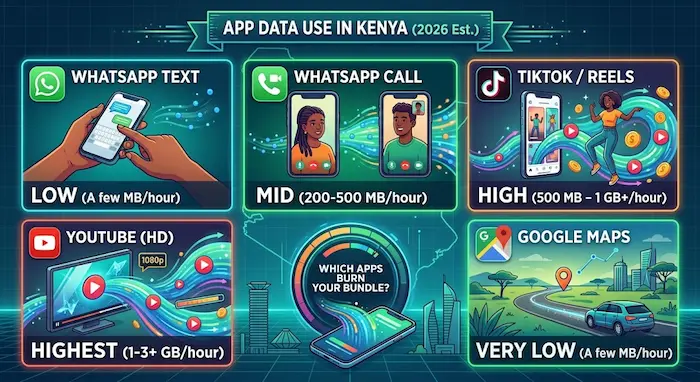

TikTok can burn through hundreds of megabytes in an hour. Google Maps may use only a few megabytes. WhatsApp text messages barely make a dent.
So where does your mobile data actually go?
For Kenyan smartphone users relying on prepaid bundles, knowing which apps consume the most data can make a real difference.
A 1GB bundle can last quite a while if you mostly send WhatsApp messages and use Maps.
Start watching short videos for an hour, however, and that same bundle can disappear much faster.
The important thing is that there is no single fixed amount of data that an app uses.
Your consumption depends on what you do inside the app, video quality, autoplay, background activity, media downloads, device settings and network conditions.
Quick Answer: Which Apps Use the Most Data?
As a practical 2026 planning guide, these are reasonable ranges:
| App / Activity | Approx. mobile data use |
|---|---|
| WhatsApp text | Very low; generally a few MB per hour of active messaging |
| WhatsApp voice call | About 20–60 MB/hour |
| WhatsApp video call | About 200–500 MB/hour |
| TikTok | About 500 MB–1 GB/hour; can go higher |
| YouTube 360p | About 150–300 MB/hour |
| YouTube 720p | Roughly 500 MB–1 GB/hour |
| YouTube 1080p | Around 1–3 GB/hour |
| Instagram feed | Roughly 100–500 MB/hour depending on content |
| Instagram Reels | Can reach roughly 600 MB–1.2 GB/hour |
| Facebook feed/video | Roughly 80–400 MB/hour depending on usage |
| Google Maps navigation | Often only a few MB/hour |
| Banking apps | Usually relatively low for normal transactions |
These are estimates, not official consumption rates. Actual usage can vary substantially between users and sessions. Recent 2026 measurements similarly show that short-form video is among the heaviest mobile-data activities, while messaging and navigation are much lighter.
1. WhatsApp: Text Is Cheap, Video Is Not
WhatsApp can be one of the lighter apps on your phone — until you start using video.
A normal text conversation consumes very little data. Photos, videos, voice notes and calls increase consumption.
Recent estimates put WhatsApp voice calls at roughly 20–60MB per hour, while video calls can consume around 200–500MB per hour, depending on quality and conditions.
That means a 30-minute WhatsApp video call could potentially consume around 100–250MB.
For someone working with a small mobile bundle, that is significant.
WhatsApp data-saving tips
You can reduce consumption by:
- Using Wi-Fi for long video calls.
- Reducing automatic media downloads.
- Avoiding unnecessary HD media uploads.
- Enabling WhatsApp’s lower-data calling option where available.
- Checking which WhatsApp activities are consuming the most data.
The biggest surprise for many users is that texting is not what normally destroys the bundle — media does.
2. TikTok: One of the Biggest Data Burners
TikTok is a completely different story.
The app’s core experience is continuous video playback. As you scroll, the next videos can be loaded before you even decide whether you want to watch them.
Recent 2026 estimates put TikTok around 500MB to 1GB per hour under typical use, with some measurements and higher-quality scenarios reaching beyond that.
That creates a simple problem.
If you spend:
30 minutes/day × 30 days = 15 hours
At roughly 500MB per hour, that could represent around:
7.5GB per month.
At 1GB per hour:
15GB per month.
That is why a short daily TikTok habit can become one of the biggest consumers of a mobile data bundle.
3. YouTube: Video Quality Changes Everything
YouTube can consume relatively little data at lower resolutions and enormous amounts at higher quality.
Google itself says higher picture quality uses more data, while its Data saver option uses lower picture quality and can allow videos to start faster.
A practical planning range looks roughly like this:
| YouTube quality | Approx. data/hour |
|---|---|
| 360p | 150–300MB |
| 480p | 300–700MB |
| 720p | 500MB–1GB |
| 1080p | 1–3GB |
| 4K | Several GB/hour |
These figures vary according to the video, codec, frame rate and streaming conditions.
The important lesson is simple:
Don’t assume every YouTube hour costs the same amount of data.
A person watching 360p videos and another watching 1080p videos for the same amount of time can have dramatically different monthly data consumption.
4. Instagram: Photos Are Not the Whole Story
Instagram has evolved far beyond static photographs.
Your feed may contain:
- Photos
- Stories
- Reels
- Advertisements
- Live videos
- Auto-playing videos
That makes consumption highly dependent on how you use the platform.
Recent estimates place ordinary Instagram browsing in the hundreds of megabytes per hour, while Reels-heavy usage can approach or exceed 600MB–1GB per hour.
So someone who mainly checks photographs may use considerably less data than someone scrolling Reels continuously.
5. Facebook: Moderate Until Video Takes Over
Facebook can be relatively manageable when you’re mostly reading text and looking at static posts.
But videos change the equation.
The platform can consume substantially more data when your feed contains a lot of video content, particularly when videos autoplay.
Practical estimates put Facebook feed usage broadly in the tens to hundreds of megabytes per hour, depending heavily on whether you’re reading posts or watching videos.
If your Facebook usage is mostly video, treat it more like a streaming service than a messaging app.
6. Google Maps: Surprisingly Light
Google Maps looks data-intensive because it displays maps, routes, traffic and location information.
But normal navigation generally uses far less data than video apps.
Recent estimates put standard Google Maps navigation at roughly 3–10MB per hour, although actual usage varies with features such as live traffic, map downloads and how you use the app.
Google also allows users to download areas for offline navigation.
Once an area has been downloaded, Google says Maps can continue providing navigation when the connection is slow or unavailable, provided the entire route falls within the downloaded map.
For Kenyan drivers, this can save data
If you’re regularly navigating the same areas of Nairobi, Mombasa, Kisumu or another town, downloading relevant maps over Wi-Fi can reduce your dependence on mobile data while navigating.
However, offline Maps does not provide everything available online. Google notes that features such as live traffic information and alternate routes are unavailable when you’re offline.
7. Banking Apps: Usually Not the Data Problem
Banking apps are different from social media and video platforms.
A normal session might involve:
- Logging in
- Checking your balance
- Viewing transactions
- Sending money
- Paying a bill
- Downloading a statement
These activities generally involve relatively small amounts of data compared with video streaming.
The exact consumption varies by application and activity, but normal banking transactions are unlikely to be the main reason a user’s data bundle disappears.
The bigger consideration is security.
Do not install unofficial banking apps or use banking services through suspicious links simply because you are trying to save data.
8. The Biggest Data Drain Is Usually Video
Looking at the different categories reveals an obvious pattern.
Light users
- WhatsApp text
- Basic banking
- Google Maps
- Text-heavy browsing
These activities can often consume relatively small amounts of data.
Moderate users
- Facebook browsing
- Instagram browsing
- Photo sharing
- WhatsApp voice calls
- Music streaming
Consumption starts increasing depending on how much media is involved.
Heavy users
- TikTok
- Instagram Reels
- YouTube
- Video calls
- Live streams
This is where hundreds of megabytes or multiple gigabytes can disappear surprisingly quickly.
What Could 1GB of Data Get You?
Using the approximate ranges above, 1GB is not a fixed amount of “phone time.”
It depends on the activity.
For illustration:
| Activity | What 1GB could roughly represent |
|---|---|
| Google Maps navigation | Hundreds of hours in some usage scenarios |
| WhatsApp voice calls | Around 17–50 hours |
| WhatsApp video calls | Around 2–5 hours |
| TikTok | Roughly 1–2 hours |
| Instagram/Reels | Roughly 1–8+ hours depending on content |
| YouTube 360p | Roughly 3–7 hours |
| YouTube 720p | Roughly 1–2 hours |
| YouTube 1080p | Less than 1 hour in heavier scenarios |
These are planning estimates, not guarantees. Video quality, autoplay, caching and app behaviour can move the numbers significantly.
Why Your Phone May Show Different Numbers
You might read an article saying TikTok uses 800MB per hour and then discover that your phone says something completely different.
That doesn’t necessarily mean either figure is wrong.
Your actual consumption depends on:
- Video quality
- Network conditions
- How long you spend in the app
- Autoplay
- Background activity
- Media uploads
- Downloads
- App version
- Device settings
- Cached content
This is why your own phone’s data-usage screen is the most useful measurement for your personal behaviour.
Android provides network data-usage information for services and allows users to examine usage over selected periods.
How to Find Which App Is Eating Your Data
Instead of guessing, check your phone.
On Android, the exact menu varies by manufacturer, but look for:
Settings → Network & Internet / Connections → Data Usage → Mobile Data Usage
You should see a breakdown showing which applications have consumed the most mobile data.
This can reveal something surprising.
You may think your banking app is using data because you open it every day.
Then you discover that TikTok, YouTube or Instagram has consumed several gigabytes.
How Kenyan Users Can Make Their Data Last Longer
1. Reduce YouTube quality on mobile networks
YouTube provides a Data saver option and separate video-quality preferences for mobile networks and Wi-Fi.
2. Use Wi-Fi for long video calls
A long WhatsApp video call can consume hundreds of megabytes.
3. Download Maps over Wi-Fi
Google Maps supports offline map downloads, allowing navigation without continuously relying on mobile data.
4. Be careful with TikTok and Reels
Short videos are easy to underestimate because each individual video is short.
The problem is the continuous stream of videos.
5. Disable unnecessary automatic downloads
Photos, videos and app updates can quietly consume data in the background.
6. Check your phone’s data dashboard
Don’t guess where your data went.
Look at the actual app-by-app usage.
A Simple Kenyan Data-Budget Example
Imagine someone has 10GB for 30 days.
That works out to roughly:
10,240MB ÷ 30 = about 341MB per day.
Now imagine that person watches TikTok for just 30 minutes.
At an illustrative 800MB/hour rate, that session could consume around:
400MB.
That is already more than the person’s approximate daily average.
Add WhatsApp, Instagram, YouTube, browsing and background activity, and the 10GB bundle can disappear much faster than expected.
This is why time spent online is not enough to understand data consumption.
What you do during that time matters more.
The Bottom Line
Not every app is a data monster.
WhatsApp text and Google Maps are relatively light. Video is the real heavyweight.
TikTok, Instagram Reels and YouTube can consume hundreds of megabytes or several gigabytes depending on how they are used.
For Kenyan users buying limited mobile bundles, the easiest way to stretch data is therefore not necessarily to stop using apps.
It is to control video quality, autoplay, background downloads and long video sessions.
And if you’re wondering where your own data bundle is disappearing, don’t rely on estimates.
Check your phone. The numbers are already there.
FAQs
Which app uses the most mobile data?
Video-heavy apps such as TikTok, YouTube and Instagram Reels can consume the most data because they continuously load video. Actual usage depends on quality and behaviour.
Does WhatsApp use a lot of data?
Text messaging uses very little. WhatsApp voice and video calls, photos, videos and automatic media downloads consume considerably more.
Does Google Maps use a lot of data?
Normal navigation is generally relatively light compared with video apps. Google also supports offline maps, which can reduce mobile-data use.
How can I make 1GB of data last longer?
Reduce video quality, limit short-video scrolling, use Wi-Fi for large downloads and video calls, disable unnecessary automatic downloads and monitor which apps consume the most data.
Is there an exact amount of data each app uses?
No. Published figures are estimates. Actual consumption varies according to video quality, content, settings, caching, background activity and network conditions.
How can I see which app uses my data?
On Android, open your phone’s Settings and look for the mobile-data or data-usage section. The exact menu varies by device manufacturer. Android also provides network-data usage information for supported services.
Editorial Note
TechDrivers’ figures in this article are practical planning ranges compiled from recent 2026 measurements and technical guidance, not universal consumption rates. App usage can change after updates, and actual data consumption varies by device, network, settings, video quality, content and user behaviour.
