

Kenyan classrooms are increasingly moving beyond chalkboards, printed textbooks and traditional one-way teaching.
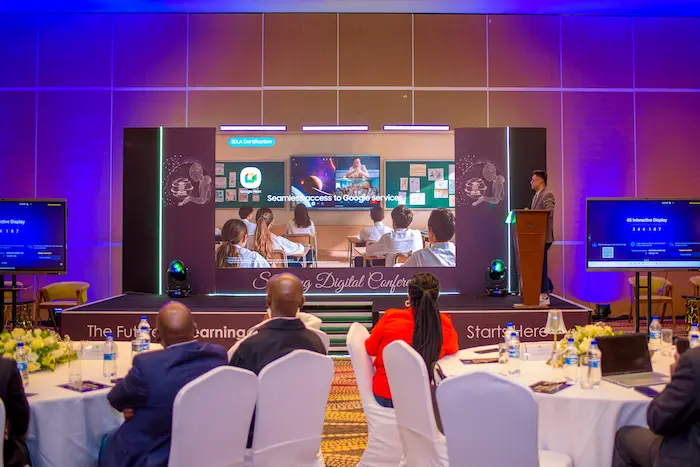
The latest push comes from Samsung Electronics East Africa, which has introduced an integrated Digital Classroom ecosystem aimed at helping Kenyan schools adopt connected learning technologies.
The initiative combines interactive displays, tablets, device management, security tools and digital learning capabilities into a technology environment designed for both teachers and students.
But the important question is not simply whether Samsung has launched a Digital Classroom.
The bigger question is:
What would a Samsung-powered digital classroom actually change for a Kenyan school?
And perhaps more importantly, how much would schools need to invest to make it work?
What Is the Samsung Digital Classroom?
Samsung’s Digital Classroom is better understood as an ecosystem rather than a single device.
Samsung’s education solutions include interactive displays designed to make lessons more participatory, Galaxy devices for students and teachers, AI-enabled learning features and Knox security and management capabilities.
In Kenya, the recently launched ecosystem has been described as combining:
- Samsung tablets
- Interactive smart displays
- Knox for Classrooms
- Digital learning content
- AI-powered learning capabilities
- Device management
- Teacher and student collaboration tools
The objective is to create a classroom in which technology is integrated into the lesson rather than simply being an additional computer sitting in the corner.
How Would It Work Inside a Kenyan Classroom?
Imagine a teacher beginning a science lesson.
Instead of writing an entire diagram on a chalkboard, the teacher could display an interactive lesson on a large screen.
Students using tablets could follow the material, interact with content and participate in classroom activities.
The teacher can then use the digital system to deliver information, share content and manage connected devices.
Samsung’s education technology is designed around this kind of connected classroom experience, with interactive displays supporting content delivery and participation.
The technology therefore changes the classroom from a teacher-to-student communication model into something more interactive.
The Interactive Display Is at the Centre
One of the most visible components is Samsung’s Interactive Display.
Unlike a conventional television or projector, an interactive classroom display can be used directly for teaching activities.
Samsung’s newer Interactive Display ecosystem includes AI features such as Live Transcript, Circle to Search, AI Quiz and My Lessons, which can help teachers create accessible instructional material and assess student understanding.
The company is also expanding its Interactive Display range with models available in different screen sizes, including larger displays designed for lecture halls and shared learning spaces.
For Kenyan schools, the practical advantage is that a display can potentially replace several separate classroom technologies:
Projector + whiteboard + presentation screen + some digital teaching tools
with one integrated device.
What Do the Tablets Add?
The display alone doesn’t create a digital classroom.
The student devices are arguably just as important.
With tablets, students can interact directly with digital learning material rather than simply watching the teacher demonstrate something on a screen.
For example, a mathematics lesson could involve students completing exercises on their tablets while the teacher monitors the class.
A geography lesson could use interactive maps.
A science class could use videos, diagrams or simulations.
A computer studies lesson could involve students working directly with digital tools.
The technology therefore has the potential to make lessons more visual, interactive and participatory.
Samsung Knox: The Security Layer
Putting dozens of connected devices into a classroom creates another problem:
Who controls them?
This is where Samsung’s Knox ecosystem becomes important.
Samsung says its education solutions use Knox to support secure digital content, quizzes and e-textbook delivery.
For a school administrator, device management is important because a classroom full of tablets can quickly become difficult to control.
Schools need to manage:
- Which devices belong to which students
- Which applications can be installed
- Access to inappropriate content
- Software updates
- Device security
- Lost or stolen devices
- Teacher access
- Student accounts
A digital classroom therefore needs IT administration, not just hardware.
Where Does AI Fit In?
Artificial intelligence is becoming an increasingly important component of Samsung’s education strategy.
Samsung’s current Interactive Display ecosystem includes AI-powered tools intended to help teachers with tasks such as creating quizzes, finding additional learning resources and making lessons more accessible.
This could eventually reduce some of the administrative workload for teachers.
For example, an AI-assisted classroom system could help a teacher generate questions from lesson material or create additional resources for students who need more practice.
But schools should be careful not to assume that AI automatically improves education.
The teacher remains critical.
AI should support teaching rather than replace professional judgement.
What Does a Kenyan School Need to Implement It?
This is where the conversation becomes much more practical.
Buying a smart display is only one part of the investment.
A school considering a connected classroom would need to think about at least six areas.
1. Classroom Display
The school needs an appropriate interactive display.
Screen size will depend on classroom dimensions and the number of students.
2. Student Devices
If the goal is one-to-one digital learning, students may need individual tablets.
Alternatively, a school could start with a shared-device model.
3. Internet Connectivity
Connected classrooms require reliable internet for many cloud-based services.
Schools should therefore assess their existing:
- Fibre connection
- 4G/5G coverage
- Wi-Fi infrastructure
- Router capacity
- Network security
A smart classroom with poor internet can quickly become a frustrating classroom.
4. Power
This is particularly important in Kenya.
Every device needs electricity.
Schools should consider:
- Power reliability
- Surge protection
- Charging infrastructure
- Backup power
- Solar options where appropriate
5. Teacher Training
This may be the most important investment of all.
A teacher who has never used an interactive display or digital learning platform needs training.
Technology does not automatically change teaching methods.
Teachers need to know how to use it effectively.
6. Technical Support
Schools need someone responsible for troubleshooting.
When a tablet stops connecting to Wi-Fi or the classroom display develops a problem during a lesson, teachers cannot be expected to become IT technicians.
How Much Does a Samsung Digital Classroom Cost in Kenya?
There is an important distinction here:
There is no single universal “Samsung Digital Classroom price.”
The final cost depends on the size of the classroom, number of students, display model, number of tablets, networking requirements, software, installation, training and support.
Samsung’s Kenyan launch does not establish a universal per-classroom retail price in the sources reviewed.
Schools should therefore request a custom quotation rather than relying on a single online figure.
A school could potentially have costs in several categories:
| Component | Cost consideration |
|---|---|
| Interactive display | Depends on screen size/model |
| Student tablets | Depends on number of students and device model |
| Teacher device | Depends on selected Galaxy device |
| Wi-Fi infrastructure | Depends on classroom/network size |
| Internet | Monthly recurring cost |
| Installation | Depends on site |
| Device management | Depends on solution/licensing |
| Teacher training | Depends on programme |
| Technical support | Recurring or contracted cost |
| Backup power | Depends on school’s infrastructure |
The key point
A school shouldn’t ask:
“How much is a Samsung smart classroom?”
It should ask:
“How much will it cost us to equip, connect, train and maintain one classroom for three to five years?”
That produces a much more realistic technology budget.
Could Public Schools Afford It?
This is where implementation becomes complicated.
Private schools may have more flexibility to invest in classroom technology.
Public schools face different realities.
A school may have limited budgets for:
- Devices
- Internet
- Electricity
- Maintenance
- Teacher training
- Replacement equipment
This means Kenya’s digital education strategy cannot depend exclusively on schools purchasing expensive technology individually.
Partnerships between government, technology companies, development organisations and education institutions could become important.
Samsung has previously supported education initiatives in Kenya, including the donation of 1,000 Galaxy Tab devices to UNHCR for refugee youth education across 15 locations in Dadaab and Kakuma.
That illustrates another possible model: technology companies can participate through partnerships and targeted programmes rather than relying solely on direct school purchases.
The Biggest Benefit Could Be Teacher Collaboration
Digital classrooms are often marketed primarily around students.
But teachers may benefit just as much.
A connected classroom can make it easier to:
- Share teaching materials
- Display multimedia content
- Conduct interactive exercises
- Collaborate with students
- Give digital assignments
- Use quizzes
- Review student responses
- Reuse digital lesson materials
Samsung’s smart-school model has historically emphasised interactive teaching, shared learning material and collaboration between teachers and students.
What About the Competency-Based Curriculum?
Kenya’s move toward competency-based education creates an interesting opportunity for digital learning.
CBC places greater emphasis on skills, practical application, creativity and learner participation.
Digital tools can support these approaches by allowing students to interact with multimedia content, collaborate on projects and demonstrate knowledge in different formats.
But technology alone doesn’t implement CBC.
A school can have a room full of tablets and still teach in exactly the same way.
The real value comes when the teaching methodology changes alongside the technology.
The Digital Divide Remains a Major Challenge
There is also a risk that digital classrooms could increase inequality.
A wealthy private school may be able to equip every classroom with:
- Interactive displays
- Tablets
- High-speed internet
- Backup power
- IT staff
A rural school may struggle to maintain reliable electricity or internet access.
That creates a potential divide between students who learn in technology-rich environments and those who do not.
Kenya’s digital education strategy therefore needs to consider access, affordability and sustainability, not simply technology adoption.
What Happens When Devices Break?
This is one of the questions schools should ask before signing a technology contract.
A tablet can be lost.
A screen can fail.
A charging system can stop working.
A network can go down.
A software licence can expire.
A school should therefore ask the supplier:
- Who provides warranty support?
- Where are repairs performed?
- How quickly are devices repaired?
- Are replacement devices available?
- Who manages software updates?
- What happens when a tablet is lost?
- How much does support cost after the initial deployment?
These questions can be more important than the launch-day demonstration.
Privacy and Student Data
Digital classrooms also create a new responsibility:
protecting student information.
Schools may collect or process information about:
- Student identities
- Learning activity
- Assessments
- Device usage
- Accounts
- Digital assignments
Schools need clear policies governing how this information is handled.
Technology adoption should therefore happen alongside appropriate cybersecurity, privacy and access controls.
Samsung’s use of Knox is particularly relevant here because device security and management become more important as schools connect larger numbers of devices.
What Would Successful Implementation Look Like?
A successful digital classroom shouldn’t be measured by how many tablets a school owns.
Instead, schools should measure outcomes such as:
Are students participating more?
Are teachers spending less time on repetitive administrative tasks?
Are students accessing better learning resources?
Are learning outcomes improving?
Are teachers actually using the technology?
Is the system affordable to maintain?
These are much better measures than simply counting installed devices.
A Better Way for Kenyan Schools to Start
Schools don’t necessarily need to digitise every classroom at once.
A pilot programme could be more practical.
For example:
Phase 1: One classroom
Equip one classroom and train teachers.
Phase 2: Measure results
Track student participation, teacher feedback, technical problems and learning outcomes.
Phase 3: Improve
Fix connectivity, training or device-management problems.
Phase 4: Expand
Roll the programme out to additional classrooms only after the pilot demonstrates value.
This approach reduces financial risk and gives schools real evidence before making a large investment.
Is Samsung’s Digital Classroom Worth It?
The technology has genuine potential.
Interactive displays can make teaching more engaging.
Tablets can give students direct access to digital resources.
AI tools can help teachers create and adapt learning material.
Knox can help schools manage and secure connected devices.
Samsung also has previous experience with digital education initiatives in Africa and Kenya.
But technology is not a magic solution.
A digital classroom can fail because of:
- Poor internet
- Lack of teacher training
- Insufficient technical support
- High maintenance costs
- Unreliable electricity
- Poor digital content
- Inadequate cybersecurity
- Lack of long-term funding
The hardware is only the beginning.
Final Verdict
Samsung’s Digital Classroom initiative represents a significant shift in how technology could be integrated into Kenyan schools.
The most interesting part isn’t the interactive screen or the tablets individually.
It is the attempt to create a connected classroom ecosystem where displays, student devices, security, digital content and AI tools work together.
For Kenyan schools, however, the real test will be implementation.
Schools need reliable connectivity, electricity, trained teachers, technical support and a sustainable budget.
And before spending money, administrators should demand answers about the total cost of ownership, not simply the purchase price.
If implemented properly, digital classrooms could help Kenyan students develop the technology, collaboration and digital skills increasingly demanded by the modern economy.
But the winning formula won’t be:
More technology = better education.
It will be:
Better teachers + better content + appropriate technology + reliable infrastructure + measurable outcomes = better digital learning.
That is the standard Samsung’s Digital Classroom—and Kenya’s wider digital education ambitions—should ultimately be judged against.
What TechDrivers recommends schools ask before buying
- What is the total cost per classroom?
- What is included in the quotation?
- How much will maintenance cost annually?
- What internet speed and Wi-Fi infrastructure are required?
- How will teachers be trained?
- Who provides technical support?
- What happens when a device breaks or is lost?
- How is student data protected?
- What digital learning content is included?
- How will the school measure whether learning outcomes improve?
The technology is impressive. The real story will be whether Kenyan schools can turn that technology into measurable learning outcomes.
