
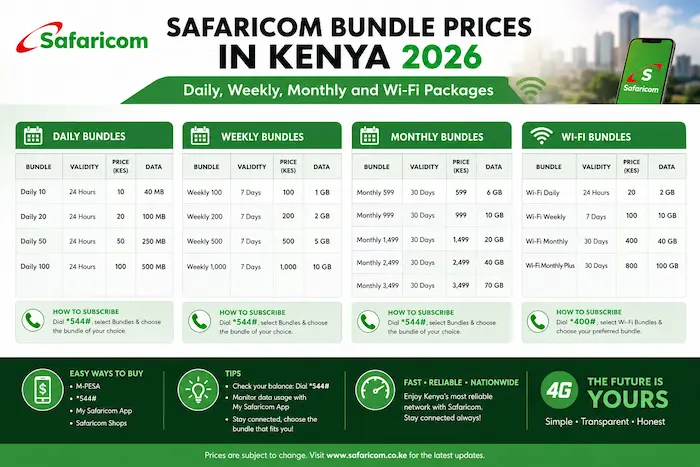

Safaricom remains one of Kenya’s most widely used mobile networks, offering a range of data bundles for smartphones, 4G routers and 5G Wi-Fi devices.
Whether you need a small bundle for occasional browsing, a monthly package for work and streaming, or a large home internet plan, Safaricom has several options.
Safaricom’s latest published terms and conditions, updated in August 2026, list its current prepaid and postpaid data bundles.
In this guide, we look at Safaricom bundle prices in Kenya in 2026, how long they last and how to buy them.
Note: Safaricom offers different bundles and targeted promotions, so the options displayed on your line may sometimes differ. Always confirm the available offer on *544# or the MySafaricom app before paying.
Safaricom Monthly Data Bundle Prices
Safaricom’s current standard monthly data bundles include:
| Data | Price | Validity | Extra |
|---|---|---|---|
| 500MB | KSh 100 | 30 days | — |
| 1GB | KSh 250 | 30 days | — |
| 2.5GB | KSh 500 | 30 days | Free WhatsApp |
| 10GB | KSh 1,000 | 30 days | Free WhatsApp |
| 22GB | KSh 2,000 | 30 days | Free WhatsApp |
| 40GB | KSh 3,000 | 30 days | Free WhatsApp |
| 60GB | KSh 5,000 | 30 days | Free WhatsApp |
These are the standard monthly data bundles currently published by Safaricom.
How to Buy Monthly Bundles
Dial:
*544# → 30 Day Bundles
Select your preferred package and pay using M-Pesa or airtime.
Safaricom states that the monthly bundles are valid for 30 days. Under its published terms, unused data may roll over when another qualifying bundle is purchased before expiry, subject to the applicable rollover conditions.
Safaricom Daily Bundles
Safaricom also offers short-term data packages for customers who only need internet access for a day.
The current Safaricom prepaid/postpaid bundle terms include daily packages, with the exact options available through *544#.
The daily bundles have a 24-hour validity period.
Because Safaricom can present different offers to different customers, the safest way to see the daily bundles available on your line is:
Dial *544# → Data Bundles → Daily Bundles
This is particularly useful if you only need data for:
- Social media
- Browsing
- Maps
- Short-term work
- Emergency internet access
Some third-party Kenyan bundle trackers currently list Safaricom’s Daily 10MB at KSh 10, Daily 200MB at KSh 20 and Daily 1GB at KSh 100, but customers should confirm the current offer displayed on *544# before purchasing.
Safaricom Weekly Bundles
Weekly bundles are useful if you need more data than a daily package but don’t want to commit to a 30-day plan.
Safaricom’s published terms include weekly data bundles with a seven-day validity period.
The exact packages shown can depend on the current Safaricom offer available to your line.
Some current Kenyan bundle listings report packages including:
- 350MB
- 1GB
- 4GB
- 10GB
with prices varying by package and offer.
To check the latest weekly packages:
Dial *544# → Data Bundles → Weekly Bundles
Safaricom 4G Wi-Fi Bundle Prices
If you use Safaricom’s 4G router at home or in an office, there are separate 4G Wi-Fi packages.
Safaricom currently lists:
| 4G Wi-Fi Data | Price | Validity |
| 7.5GB | KSh 499 | 7 days |
| 25GB | KSh 999 | 30 days |
| 60GB | KSh 1,999 | 30 days |
| 140GB | KSh 2,999 | 30 days |
| 180GB | KSh 4,100 | 30 days |
| 250GB | KSh 6,299 | 30 days |
| 500GB | KSh 12,499 | 30 days |
Safaricom says these packages can be purchased through the MySafaricom app or by dialing *400*3# and selecting the option to buy a plan.
The 4G Wi-Fi packages are designed for Safaricom’s 4G router rather than normal smartphone data use.
Safaricom 5G Wi-Fi Bundle Prices
For customers with a Safaricom 5G router, Safaricom offers larger data allocations.
Current 5G Wi-Fi data packages include:
| Data | Price | Validity |
| 400GB | KSh 3,499 | 30 days |
| 800GB | KSh 5,999 | 30 days |
| 1,500GB | KSh 9,999 | 30 days |
Safaricom’s official FAQ also lists 5G speed-based plans:
| Speed | Price | Validity |
| 15Mbps | KSh 2,999 | 30 days |
| 50Mbps | KSh 4,000 | 30 days |
| 100Mbps | KSh 5,000 | 30 days |
| 250Mbps | KSh 10,000 | 30 days |
The 5G router currently costs KSh 2,999, according to Safaricom’s published information.
Safaricom Home Fibre Prices
If you need unlimited home internet rather than mobile data bundles, Safaricom also offers Home Fibre.
Current packages listed by Safaricom include:
| Package | Speed | Monthly Price |
| Bronze | 40Mbps | KSh 2,999 |
| Silver | 60Mbps | KSh 4,100 |
| Gold | 150Mbps | KSh 6,299 |
| Diamond | 500Mbps | KSh 12,499 |
| Platinum | 1Gbps | KSh 20,000 |
Safaricom lists fair-usage limits for these packages, after which speeds are reduced according to the applicable plan.
This makes Home Fibre more suitable for households with heavy internet usage, streaming, remote work and multiple connected devices.
Which Safaricom Bundle Is Best for You?
The best package depends on how much data you use.
If you need data for one day
A daily bundle may be more economical than buying a monthly package.
If you need data for a few days
Consider a weekly bundle.
If you use mobile data every day
A monthly package such as the 10GB, 22GB or 40GB option may make more sense.
If you stream heavily
Consider a larger monthly bundle or Safaricom 4G/5G Wi-Fi.
If you have several people using the internet
A 4G/5G Wi-Fi package or Home Fibre may provide better value than buying individual smartphone bundles.
How to Buy Safaricom Bundles
There are several ways to purchase Safaricom data.
Method 1: Using *544#
Dial:
*544#
Then choose the appropriate data bundle category and follow the prompts.
Safaricom’s published monthly bundle instructions specifically direct customers to *544# and the 30 Day Bundles option.
Method 2: MySafaricom App
You can also use the MySafaricom app to browse available offers and purchase bundles.
For router packages, Safaricom provides specific options through the app and *400# services.
Method 3: Safaricom Website
Customers can also access Safaricom’s online account and bundle services through its official website.
How to Check Your Safaricom Data Balance
After purchasing a bundle, you should check your remaining data regularly.
You can use the available Safaricom USSD menu or the MySafaricom app to view your balance and expiry information.
Checking your balance can help you avoid unexpectedly using airtime once your bundle is exhausted.
What Happens When a Safaricom Bundle Expires?
The validity period depends on the package.
For example:
- Daily bundles generally last 24 hours.
- Weekly bundles generally last seven days.
- Monthly bundles generally last 30 days.
Safaricom’s published terms specify that unused monthly data expires after the validity period unless the applicable rollover conditions are met.
Always check the expiry date after purchasing a bundle.
Safaricom Bundle Tips for Kenyan Users
1. Compare the price per GB
Don’t look only at the headline price.
A KSh 500 bundle may provide significantly better value per GB than several smaller purchases.
2. Consider how often you use data
If you only browse occasionally, a monthly bundle may not always be the best choice.
3. Watch your video streaming
YouTube, TikTok, Netflix and other video services can consume data quickly.
4. Use Wi-Fi for large downloads
If you have access to reliable Wi-Fi, use it for operating-system updates and large files.
5. Check for targeted offers
Safaricom may display different offers depending on the subscriber or service.
Check *544# and the MySafaricom app before buying.
6. Check expiry dates
A bundle that looks cheap can become expensive if you repeatedly buy data that expires unused.
Safaricom Bundle Prices: Quick Summary
For regular smartphone users, Safaricom’s current standard monthly data options include:
KSh 100 → 500MB
KSh 250 → 1GB
KSh 500 → 2.5GB + Free WhatsApp
KSh 1,000 → 10GB + Free WhatsApp
KSh 2,000 → 22GB + Free WhatsApp
KSh 3,000 → 40GB + Free WhatsApp
KSh 5,000 → 60GB + Free WhatsApp
For home users, Safaricom’s current 4G Wi-Fi packages range from 7.5GB at KSh 499 to 500GB at KSh 12,499, while 5G Wi-Fi data packages range from 400GB at KSh 3,499 to 1,500GB at KSh 9,999.
Final Thoughts
Safaricom offers data packages for different types of users, from customers who need a small amount of data for a day to households that need hundreds of gigabytes for home internet.
For smartphone users, the 30-day bundles are particularly useful for regular browsing, social media, work and streaming. For heavier home usage, Safaricom’s 4G Wi-Fi, 5G Wi-Fi and Home Fibre packages provide much larger allocations or fixed broadband options.
Because Safaricom can change its bundles and introduce targeted offers, *check 544# or the MySafaricom app before purchasing to confirm the exact package and price available to you.
Check Safaricom’s official website
Frequently Asked Questions
What is the cheapest Safaricom data bundle?
Safaricom’s current standard monthly list starts at 500MB for KSh 100. Daily and other specialized offers can have lower entry prices. Check *544# for the current options available on your line.
How much is 10GB on Safaricom?
The current standard monthly package listed by Safaricom is 10GB for KSh 1,000, with free WhatsApp, valid for 30 days.
How much is 22GB on Safaricom?
The current standard monthly package is 22GB for KSh 2,000, with free WhatsApp, valid for 30 days.
How much is 40GB on Safaricom?
Safaricom currently lists 40GB for KSh 3,000, with free WhatsApp and 30-day validity.
How much is 60GB on Safaricom?
The current standard monthly package is 60GB for KSh 5,000, with free WhatsApp and 30-day validity.
What is the Safaricom 4G Wi-Fi price?
Safaricom’s current 4G Wi-Fi packages include 7.5GB for KSh 499, 25GB for KSh 999, 60GB for KSh 1,999, 140GB for KSh 2,999, 180GB for KSh 4,100, 250GB for KSh 6,299 and 500GB for KSh 12,499.
What is the Safaricom 5G Wi-Fi price?
Current 5G Wi-Fi data packages include 400GB for KSh 3,499, 800GB for KSh 5,999 and 1,500GB for KSh 9,999, all valid for 30 days.
