
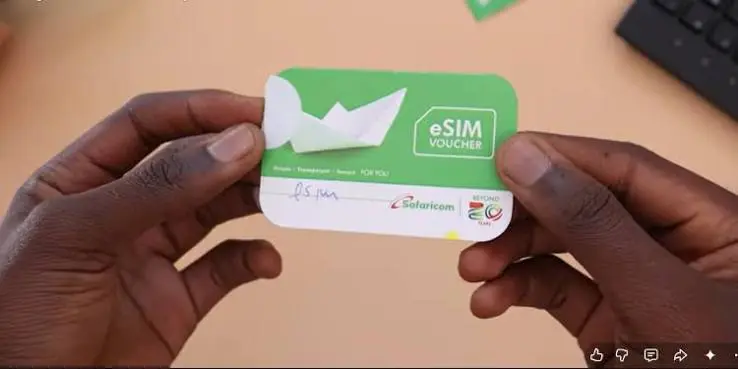

Safaricom eSIM in Kenya gives smartphone users a way to use a Safaricom mobile number without inserting a physical SIM card into their phone.
Instead of receiving a plastic SIM, an eSIM is downloaded electronically and stored inside the phone’s built-in SIM hardware. On compatible smartphones, this can make it easier to use two mobile lines, keep a Safaricom number while travelling, and switch between mobile plans without physically changing SIM cards.
However, getting a Safaricom eSIM is not simply a matter of scanning a QR code. Your phone must support eSIM, the exact device variant matters, and your Safaricom line must meet the operator’s registration requirements.
What Is a Safaricom eSIM?
An eSIM, short for embedded SIM, is a digital SIM profile that is downloaded to a compatible smartphone.
A traditional SIM card is a removable piece of hardware. An eSIM performs the same basic function but does not require a physical card.
Instead of:
Phone → Physical SIM → Safaricom network
an eSIM uses:
Phone’s built-in eSIM hardware → Digital SIM profile → Safaricom network
The difference is mainly how the subscriber profile is stored on the device.
This doesn’t mean that eSIM is a separate mobile network. Your Safaricom eSIM still connects to Safaricom’s cellular network in the same way a compatible physical SIM does.
The main benefit is convenience and flexibility.
Does Safaricom Support eSIM in Kenya?
Yes. Safaricom provides eSIM services for compatible devices in Kenya.
The service is particularly relevant as more smartphones sold in Kenya increasingly support eSIM alongside, or instead of, physical SIM cards.
However, having a smartphone with an eSIM option does not automatically guarantee that every Safaricom eSIM feature will work on that device.
Compatibility can depend on:
- The exact smartphone model
- Regional version of the phone
- Software configuration
- Whether the device is carrier-locked
- Safaricom’s current eSIM requirements
- Whether the phone supports the required cellular bands and services
This is why checking the exact model is important before requesting a SIM replacement.
Who Can Get a Safaricom eSIM?
A Safaricom eSIM is generally suitable for a customer who has:
- An eSIM-compatible smartphone
- A Safaricom line
- Correct subscriber registration details
- A device that is not carrier-locked
- Access to the required eSIM activation process
Safaricom subscriber registration also requires identification information in accordance with Kenya’s SIM-registration requirements.
Depending on your circumstances, you may be required to provide an identification document such as a Kenyan National ID, Alien ID or Passport.
If you are converting an existing Safaricom number, make sure the subscriber information associated with the line is accurate.
Which Phones Support Safaricom eSIM?
Many modern premium and upper-mid-range smartphones support eSIM.
Examples include selected models from:
- Apple iPhone
- Samsung Galaxy
- Google Pixel
- Other manufacturers offering eSIM-capable devices
But don’t rely on the phone’s name alone.
For example, an international version of a smartphone may support eSIM while another regional version of the same model may have different SIM capabilities.
Before buying a phone specifically for eSIM use, check the exact model number and regional specification.
How to check on an iPhone
Go to:
Settings → Mobile Service/Cellular
Look for an option such as:
Add eSIM
or
Add Mobile Plan
The exact wording can vary according to the iOS version and region.
How to check on Samsung Galaxy
Go to:
Settings → Connections → SIM Manager
If the phone supports eSIM, you may see an option such as:
Add eSIM
or
Add mobile plan
Again, menus can vary between Galaxy models.
How to Get a Safaricom eSIM in Kenya
If you want to convert your Safaricom number from a physical SIM to an eSIM, the safest approach is to use an official Safaricom channel or authorised service point.
You should have your compatible smartphone and the identification information required for subscriber verification.
The process can differ depending on whether you are:
Converting an existing Safaricom number
or
Getting a new Safaricom line.
For an existing number, make it clear that you want to replace or migrate your physical SIM to an eSIM while retaining the same mobile number.
Step-by-Step: How to Activate a Safaricom eSIM
Once Safaricom provides the required eSIM activation details, the installation takes place through your phone’s SIM settings.
Step 1: Confirm eSIM Compatibility
Before beginning the activation process, confirm that your exact smartphone model supports eSIM.
This is particularly important for phones purchased outside Kenya.
Don’t assume that two phones with the same commercial name have identical SIM capabilities.
Step 2: Make Sure Your Phone Is Connected to the Internet
Connect the phone to Wi-Fi or another reliable internet connection.
The phone generally needs internet access to download the eSIM profile.
If you’re replacing your only active SIM, having Wi-Fi available is especially useful because your physical SIM service may be interrupted during the replacement process.
Step 3: Obtain Your Safaricom eSIM Activation Details
Safaricom will provide the information required to download the eSIM profile through its applicable activation process.
This may include a QR code.
Treat your eSIM activation information as private.
Don’t photograph the QR code and publish it online, and don’t send it to people you don’t trust.
Step 4: Open Your Phone’s eSIM Settings
On an iPhone, go to:
Settings → Mobile Service/Cellular → Add eSIM
On a compatible Samsung Galaxy:
Settings → Connections → SIM Manager → Add eSIM
The exact wording may differ depending on your phone and software version.
Step 5: Scan the Safaricom QR Code
Select the option to use a QR code and scan the code provided during your Safaricom eSIM activation.
Your phone should communicate with the eSIM activation system and begin downloading the mobile profile.
Step 6: Complete the Installation
Follow the instructions displayed on your smartphone.
You may be asked to select which line should be used for:
- Calls
- Messages
- Mobile data
If your phone supports dual SIM, you can configure the Safaricom eSIM alongside another mobile line.
Step 7: Test the Safaricom Line
After activation, test the important services.
Try:
- Making a phone call
- Receiving a phone call
- Sending an SMS
- Receiving an SMS
- Turning on mobile data
- Checking your Safaricom services
- Confirming access to M-PESA-related services
Don’t immediately dispose of your old physical SIM until you have confirmed that the replacement is working correctly.
How to Activate Safaricom eSIM on iPhone
For a compatible iPhone, the general process is:
- Connect the iPhone to Wi-Fi.
- Open Settings.
- Tap Mobile Service or Cellular.
- Select Add eSIM.
- Choose the QR-code option where applicable.
- Scan the Safaricom activation QR code.
- Follow the instructions displayed by the iPhone.
- Wait for the Safaricom line to activate.
- Select your preferred default line if using dual SIM.
- Test calls, SMS and mobile data.
The exact menu names can change with iOS updates and regional configurations.
How to Activate Safaricom eSIM on Samsung Galaxy
On a compatible Samsung Galaxy smartphone:
- Connect the phone to Wi-Fi.
- Open Settings.
- Select Connections.
- Tap SIM Manager.
- Select Add eSIM or the equivalent option.
- Scan the Safaricom QR code.
- Follow the on-screen instructions.
- Wait for the eSIM profile to download.
- Enable the Safaricom line.
- Test calls, SMS and mobile data.
If the option to add an eSIM doesn’t appear, check the exact model and regional version of your Galaxy device.
Can You Use Safaricom eSIM and Another SIM Together?
On compatible dual-SIM phones, yes.
This is one of the biggest advantages of eSIM technology.
For example, a Kenyan user could potentially configure:
Safaricom eSIM + another operator’s physical SIM
This can be useful when you want to maintain your Safaricom number while using another network for mobile data or a second phone number.
However, dual-SIM functionality varies between smartphones.
Some phones allow both lines to remain active, while others have restrictions around which SIM can use mobile data or 5G.
Therefore, check the specifications of your exact phone.
What Happens to Your Old Safaricom SIM?
If you are replacing an existing physical Safaricom SIM with an eSIM, the physical SIM will generally no longer be the active SIM for that number once the replacement has been completed.
This is why you should test the eSIM before throwing away the old SIM.
Check that:
- Your phone can make calls
- You can receive calls
- SMS works
- Mobile data works
- Your Safaricom services remain accessible
- M-PESA-related functions work as expected
Once you are satisfied that the eSIM is working correctly, you can safely dispose of the old SIM according to your normal security practices.
What If Your Safaricom eSIM Doesn’t Work?
An eSIM activation problem doesn’t necessarily mean that the Safaricom service is unavailable.
There are several possible causes.
1. Restart the Phone
After installing an eSIM, restart your smartphone.
This can allow the device to register the newly installed mobile profile with the network.
2. Check Whether the eSIM Is Enabled
Open your SIM settings and confirm that the Safaricom eSIM is switched on.
On dual-SIM phones, it’s possible to install the profile successfully but leave the line disabled.
3. Check Airplane Mode
Make sure Airplane Mode is turned off.
If it is enabled, your phone won’t establish a normal cellular connection.
4. Check Network Selection
Make sure the phone is allowed to connect to the appropriate mobile network.
Avoid changing advanced network settings unnecessarily if you are not familiar with them.
5. Confirm Your Phone’s Exact Model
If the eSIM profile cannot be installed, check whether the exact model supports eSIM.
This is especially important for:
- Imported phones
- Used smartphones
- Regional variants
- Phones purchased from international retailers
A phone can look identical to an eSIM-supported model while having different hardware or software capabilities.
6. Check Your Internet Connection
The eSIM profile needs to be downloaded to the phone.
If your Wi-Fi connection is unstable, the installation may fail or remain incomplete.
Try a reliable Wi-Fi network before attempting the activation again.
7. Contact Safaricom
If you’ve confirmed compatibility and followed the activation process but the line still doesn’t work, contact Safaricom through its official customer-support channels or visit a Safaricom Shop.
This is particularly important if the problem involves SIM replacement, subscriber registration or network activation.
Safaricom eSIM vs Physical SIM
| Feature | Safaricom eSIM | Physical SIM |
|---|---|---|
| Physical card | No | Yes |
| Installation | Digital | Insert card |
| Requires eSIM-compatible phone | Yes | No |
| Can support dual SIM | On compatible phones | On compatible phones |
| Risk of losing the SIM card | Very low | Possible |
| Moving the line between phones | Requires digital transfer/replacement process | Usually simpler |
| Useful for travel | Very convenient | Convenient |
| Requires activation process | Yes | Yes |
The choice isn’t necessarily about one technology being universally better.
A physical SIM can still be more convenient for people who frequently move their number between different phones.
An eSIM can be more convenient for users who rarely change devices and want dual-SIM flexibility.
Advantages of Safaricom eSIM
1. No Physical SIM Card
You don’t need to carry a tiny plastic SIM that can be lost or damaged.
The subscriber profile is stored electronically on the phone.
2. Better Dual-SIM Flexibility
If your phone supports both eSIM and a physical SIM, you can potentially use two networks on the same device.
For example:
Safaricom eSIM + another network’s physical SIM
This can be useful for separating personal and business numbers or choosing different networks for specific services.
3. Useful for Travellers
eSIM technology can make international travel easier on supported devices.
You can potentially keep your primary Safaricom number while adding another compatible mobile plan for travel.
The exact options depend on the destination network and your phone’s capabilities.
4. Less Physical Handling
There is no need to remove the SIM tray whenever you want to change or configure a mobile line.
This can be particularly convenient for people who use multiple mobile networks.
Disadvantages of Safaricom eSIM
eSIM also has limitations.
Changing phones can be less straightforward
If you regularly move your SIM between phones, a physical SIM can be faster because you can remove it from one phone and insert it into another.
An eSIM may require a digital transfer, reactivation or SIM-replacement process.
Phone compatibility matters
Not every smartphone supports eSIM.
Even phones with the same commercial model name can have different capabilities depending on their region.
Activation information must be protected
Your eSIM QR code or activation information should be treated as sensitive.
Don’t share it publicly.
A damaged phone can create a problem
If your phone is lost or stops working, accessing the eSIM on another device isn’t as simple as physically moving a SIM card.
You may need to complete another activation or replacement process.
Is Safaricom eSIM Better Than a Physical SIM?
There isn’t one answer for every user.
Choose eSIM if you:
- Have a compatible modern smartphone
- Want dual-SIM flexibility
- Travel frequently
- Don’t regularly switch phones
- Prefer a digital SIM experience
- Want to avoid carrying a physical SIM
A physical SIM may be better if you:
- Frequently change phones
- Use older devices
- Need the simplest possible transfer between phones
- Don’t need dual-SIM functionality
For many modern smartphone users, eSIM is primarily a convenience upgrade rather than a major network-performance upgrade.
Your phone doesn’t automatically become faster simply because you replace a physical SIM with an eSIM.
The main benefit is how the mobile subscription is stored and managed.
Does eSIM Improve Safaricom Network Speed?
No.
Switching from a physical SIM to an eSIM does not automatically make Safaricom’s network faster.
Your mobile experience is still influenced by factors such as:
- Network coverage
- 4G or 5G availability
- Network congestion
- Smartphone capabilities
- Location
- Signal conditions
- Your mobile plan
The eSIM primarily changes the form in which your subscriber profile is stored.
So if you’re experiencing slow Safaricom internet, changing to an eSIM should not be treated as a guaranteed speed fix.
Is Safaricom eSIM Secure?
An eSIM removes the physical SIM card from the equation, which means there is no plastic SIM to physically remove from the phone.
However, that doesn’t eliminate the need for account security.
Users should still:
- Protect their phone with a strong screen lock
- Use account security features where available
- Keep recovery information updated
- Avoid sharing activation QR codes
- Be careful with SIM-swap and social-engineering scams
- Report suspicious activity quickly
The security of your mobile number depends on more than the physical or digital form of the SIM.
What Kenyan Buyers Should Check Before Buying an eSIM Phone
If eSIM is important to you, don’t simply ask a seller:
“Does this phone support eSIM?”
Ask for the exact model number.
This is particularly important when buying:
- Imported phones
- Refurbished phones
- Second-hand devices
- Phones from international online marketplaces
Before paying, verify that the specific regional variant supports eSIM.
This can save you from buying an otherwise excellent phone that lacks the feature you expected.
Frequently Asked Questions
How do I get a Safaricom eSIM in Kenya?
Use an official Safaricom channel or authorised service point and request an eSIM for a compatible device. If you’re converting an existing number, request migration or SIM replacement while retaining your number.
Does Safaricom eSIM use the same network as a physical SIM?
Yes. The eSIM is a digital form of the SIM profile. It does not create a separate Safaricom network.
Can I use Safaricom eSIM with another network?
On a compatible dual-SIM phone, you can potentially use a Safaricom eSIM together with another network’s physical SIM or another supported eSIM.
Can I keep my existing Safaricom number?
Yes, if you’re converting an existing line through the appropriate Safaricom SIM-replacement process, you can retain your mobile number.
Will my old physical SIM still work after conversion?
Once the replacement is completed, the old physical SIM should generally no longer be the active SIM for that number. Confirm that the eSIM works before disposing of the old card.
Does Safaricom eSIM work on every iPhone?
No. eSIM support depends on the exact iPhone model, region and configuration.
Does Safaricom eSIM work on every Samsung Galaxy?
No. eSIM support varies by Galaxy model and regional variant.
Does eSIM improve internet speed?
No. Switching from a physical SIM to an eSIM does not automatically improve network speed.
Can I use an eSIM when travelling outside Kenya?
Potentially, yes. Compatible phones can support additional mobile plans while retaining an existing line, but international roaming and local eSIM availability depend on the networks and plans involved.
Final Verdict: Is Safaricom eSIM Worth Switching To?
Safaricom eSIM is a practical option for Kenyan smartphone users with compatible devices, particularly people who want dual-SIM flexibility or regularly travel.
The biggest advantage isn’t faster internet. It is convenience.
You don’t need to insert a physical SIM card, and compatible dual-SIM smartphones can allow you to keep a Safaricom line while using another mobile connection.
However, compatibility is the most important consideration. The exact phone model and regional variant can determine whether eSIM is available.
If you’re planning to switch, the safest approach is to confirm your device compatibility, use an official Safaricom activation channel, protect your eSIM activation information and test calls, SMS, data and relevant Safaricom services before disposing of your old SIM.
As eSIM adoption grows in Kenya, the technology is likely to become increasingly common in smartphones, particularly premium and newer devices.
For most users, however, the decision comes down to one question:
Do you value the flexibility of a digital SIM enough to give up the simplicity of a removable physical SIM?
If the answer is yes, Safaricom eSIM is worth considering.
