

Losing a phone in Kenya can be much more serious than losing the device itself.
For many people, the same smartphone contains M-Pesa, banking applications, email, WhatsApp, social media, photographs, work documents and saved account information.
If your phone is stolen while your Safaricom SIM is inside, one of the first priorities should be protecting your mobile number and M-Pesa account.
The good news is that losing the physical phone does not automatically mean losing the money in your M-Pesa account. However, the longer you wait to secure the SIM and connected accounts, the more opportunity there may be for unauthorised access.
Safaricom’s published M-PESA terms instruct customers to immediately contact Customer Care if they lose their equipment or believe their PIN may have been accessed by an unauthorised person.
Here is what you should do if your M-Pesa phone is stolen in Kenya.
What Happens to M-Pesa When Your Phone Is Stolen?
Your M-Pesa account is associated with your mobile number, not simply the physical handset.
Therefore, replacing a stolen phone is not the same thing as losing your M-Pesa account.
The immediate concern is securing the SIM card and mobile number connected to your M-Pesa account.
A stolen smartphone can also expose other services if the device was unlocked or if the thief obtains access to passwords, authentication messages or applications.
That means you should think about the incident in two parts:
- Protect the mobile number and M-Pesa account
- Protect the stolen device and other digital accounts
Can Someone Access Your M-Pesa If They Steal Your Phone?
It depends on the circumstances.
Simply possessing your phone does not automatically give someone your M-Pesa PIN. However, the risk can increase if:
- The phone was unlocked when it was stolen.
- The thief knows your phone passcode.
- Your M-Pesa PIN was stored somewhere on the device.
- Someone knows or has discovered your M-Pesa PIN.
- Your SIM is removed and used elsewhere.
- Other financial applications are logged in on the phone.
Safaricom’s M-PESA terms state that customers should keep their PIN confidential and immediately report lost equipment or suspected unauthorised access.
The important lesson is simple: do not wait for an unauthorised transaction before securing your account.
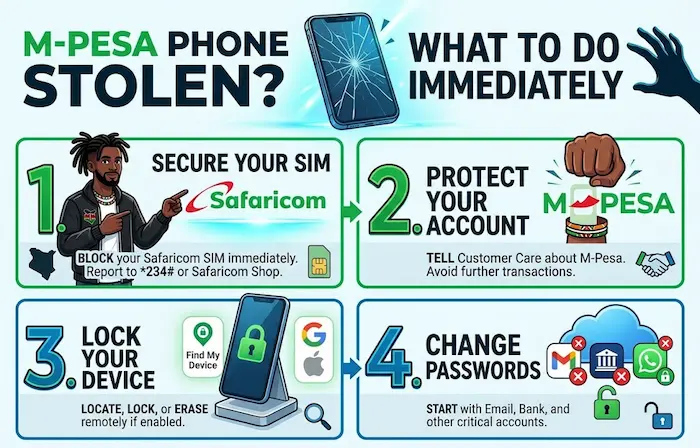
What to Do Immediately After Your M-Pesa Phone Is Stolen
If your phone disappears, take action as quickly as possible.
1. Contact Safaricom
Report that your phone and SIM have been lost or stolen.
Safaricom’s published M-PESA terms list 234 for M-PESA support and also direct customers to Safaricom shops and other customer-care channels.
Use official Safaricom channels rather than a number supplied by a stranger.
2. Secure the SIM
Ask Safaricom about blocking the lost SIM and replacing it.
The objective is to prevent continued use of the stolen SIM and restore your number to a replacement SIM after the required verification process.
3. Protect Your M-Pesa Account
Tell customer care that the stolen phone contained your M-Pesa-enabled line.
If you suspect your PIN has been exposed, make that clear when reporting the incident.
4. Lock the Phone Remotely
If you had Google’s device-finding service or Apple’s Find My enabled, use another device to secure the stolen phone.
Depending on the device and its settings, you may be able to:
- Locate it
- Lock it
- Display a message
- Sign out or secure accounts
- Erase its contents
Remote device protection is particularly important if the phone contained personal or financial information.
5. Change Important Passwords
From another trusted device, consider changing passwords for:
- Google or Apple account
- Banking applications
- Social media
- Cloud storage
- Business accounts
- Other services containing sensitive information
Start with accounts that can be used to reset other passwords.
How to Replace a Stolen Safaricom SIM
Once you report the stolen SIM, you can ask Safaricom about obtaining a replacement.
You will need to follow Safaricom’s current customer-verification requirements.
The replacement process is important because your mobile number may be connected to:
- M-Pesa
- Banking
- Business accounts
- Government and other online services
Safaricom also provides a SIM Swap Whitelist feature. Its current portal says that once a number is whitelisted, the line can only be replaced at a Safaricom Shop or Care desk.
This is worth considering as an additional layer of protection against unauthorised SIM-replacement attempts.
Will You Lose Your M-Pesa Balance When Your Phone Is Stolen?
No, the physical theft of your phone does not by itself mean your M-Pesa balance has disappeared.
The priority is securing the mobile line and account.
After obtaining a replacement SIM and restoring access, you can continue using your account subject to Safaricom’s procedures.
However, you should check your transactions carefully after the incident.
Safaricom’s M-PESA terms state that customers receive transaction notifications and should report errors, anomalies or transactions they did not make.
What If the Thief Knows Your M-Pesa PIN?
This situation should be treated as urgent.
If you believe another person knows your M-Pesa PIN, contact Safaricom immediately.
Do not wait to see whether money is withdrawn.
You should also avoid telling anyone your replacement PIN, OTP or other authentication information while trying to recover the account.
A genuine recovery process should not require you to disclose your secret M-Pesa PIN to another person.
Check Your Recent M-Pesa Transactions
After securing your number, check your M-Pesa transaction history.
Look for:
- Withdrawals you did not make
- Transfers you do not recognise
- Payments you did not authorise
- Unexpected purchases
- Other unfamiliar activity
Safaricom’s published M-PESA terms say customers should notify the company as soon as possible about errors, anomalies or transactions not made according to their instructions.
Keep screenshots, SMS messages and transaction references where available. They may be useful when reporting a disputed transaction.
Your Stolen Phone Could Expose More Than M-Pesa
M-Pesa may be the first account you think about, but it should not be the last.
Consider what else was accessible from the stolen phone.
Banking applications
If you had mobile banking applications installed, contact your bank if you believe the account or device credentials may be exposed.
Your email account can be particularly important because it may contain password-reset links and security notifications.
Change the password if you believe the account could have been accessed.
Secure your WhatsApp account and be alert to unexpected verification messages.
Never give a WhatsApp verification code to someone who contacts you claiming they are helping recover your account.
Social media
Review active sessions and remove the stolen device where the platform allows it.
Cloud storage
Google Drive, iCloud and other cloud services can contain photographs, documents and personal information.
Review the devices connected to these accounts.
A Kenyan Example: Losing Your Phone in a Matatu
Imagine you are travelling in Nairobi and discover after getting off a matatu that your smartphone is missing.
The phone contains your Safaricom SIM, M-Pesa, mobile banking apps and Gmail account.
The wrong approach would be to spend several hours trying to locate the phone before protecting your accounts.
A safer sequence is:
Secure the SIM → protect M-Pesa → lock the phone remotely → secure important accounts → report the theft.
If a device-tracking service shows the phone at an unfamiliar location, do not put yourself at risk by confronting whoever has it.
What If Your Phone Was Stolen While It Was Unlocked?
This requires faster action.
An unlocked phone can provide easier access to applications and information than a locked device.
Prioritise:
- Locking the phone remotely.
- Contacting Safaricom.
- Securing M-Pesa.
- Changing important passwords.
- Checking banking and financial accounts.
- Reviewing email and account-security activity.
If you use an Android phone or iPhone, make sure you know how to access the relevant device-recovery service before you need it.
What If the Thief Removes the SIM?
Removing the SIM does not necessarily protect the information stored on the smartphone.
The device can still contain:
- Photos
- Documents
- Applications
- Saved sessions
- Contacts
- Cloud-account access
This is why SIM protection and device protection are separate security measures.
Blocking the SIM addresses the mobile-number side of the problem. Remotely locking or erasing the device addresses the handset and its stored information.
Should You Track the Stolen Phone Yourself?
Use device-tracking technology where available, but do not put yourself in danger.
If your phone appears on a map at a location you do not recognise, avoid confronting a suspected thief.
Instead, preserve the tracking information and report the theft to the relevant authorities.
Your personal safety is more important than recovering a smartphone.
What About the Phone’s IMEI Number?
The IMEI is a unique identifier associated with a mobile device.
You may need it when reporting a stolen phone or dealing with your mobile network operator.
You can often find the IMEI on:
- The original phone box
- Purchase documentation
- A receipt
- Your device account
- Previously saved device information
If you still have access to your phone before it is stolen, save the IMEI somewhere secure.
For a more detailed guide, read TechDrivers’ How to Block a Stolen Phone in Kenya: IMEI, SIM, M-PESA and Account Protection.
How to Protect Your M-Pesa Before Your Phone Is Stolen
The best time to prepare for phone theft is before it happens.
Use a strong screen lock
Avoid easily guessed PINs such as birthdays, 1234 or 0000.
Never save your M-Pesa PIN in your phone
Do not store your M-Pesa PIN in an ordinary notes application, contact entry or message.
Enable device tracking
Set up the appropriate Android or iPhone tracking service.
Keep your accounts updated
Make sure you know the recovery options for your important accounts.
Protect your SIM
Consider available SIM-security measures, including Safaricom’s SIM Swap Whitelist service. Safaricom says whitelisted numbers can only be replaced at a Safaricom Shop or Care desk.
Use multi-factor authentication
Enable additional authentication on important online accounts where available.
Phone Theft and SIM-Swap Fraud Are Connected Risks
Phone theft and SIM-swap fraud are not the same thing.
With phone theft, someone physically takes your handset.
With SIM-swap fraud, someone attempts to transfer your mobile number to another SIM without your authorisation.
However, both can threaten accounts linked to your phone number.
TechDrivers has already explained this in detail in How SIM-Swap Fraud Works in Kenya and How to Protect Yourself.
If your phone suddenly loses network service without an obvious reason, especially alongside unexpected account notifications, investigate rather than assuming it is simply a temporary network problem.
M-Pesa Phone Theft Is Also an Account-Security Problem
A smartphone has increasingly become a gateway to several digital services.
Your M-Pesa number might also be connected to banking, email, social media and other financial platforms.
That is why protecting the phone itself is only one part of the response.
TechDrivers has also published How to Protect Your M-PESA Account From Fraud in Kenya, which covers PIN security, OTP scams, fake customer-care calls, SIM swaps and other common risks.
What If You Notice an Unauthorised M-Pesa Transaction?
If you discover a transaction you did not make:
- Contact Safaricom through an official channel.
- Report the transaction.
- Provide the relevant transaction details.
- Keep the confirmation SMS or other evidence.
- Secure your SIM and other accounts.
- Report the matter to the relevant authorities where appropriate.
Do not rely on a person who contacts you claiming they can recover your money in exchange for your PIN or an OTP.
Frequently Asked Questions
Can someone access M-Pesa if they steal my phone?
Possession of the phone alone does not automatically give someone your M-Pesa PIN. However, the risk can increase if the phone was unlocked, the PIN was compromised or other account credentials were accessible.
Will I lose my M-Pesa money if my phone is stolen?
No. Losing the physical handset does not automatically mean losing your M-Pesa balance. Secure the SIM and account immediately and check your transaction history.
What should I do first when my M-Pesa phone is stolen?
Contact Safaricom to report the lost or stolen SIM and secure your M-Pesa account. Then remotely lock the phone and secure important online accounts.
Can I replace my stolen Safaricom SIM?
Yes, customers can request a replacement through Safaricom’s current SIM-replacement process, subject to the required verification.
What if I forgot my M-Pesa PIN?
Contact Safaricom through its official support channels for the current PIN-recovery process. Do not give your PIN or other confidential credentials to another person.
Should I change my passwords after my phone is stolen?
If the stolen phone had access to your email, banking, social media or other accounts, changing important passwords from a trusted device is a sensible security step.
Can I track my stolen phone?
Android and iPhone users may be able to locate or secure supported devices using Google’s and Apple’s device-finding services. Availability depends on the device, account and settings.
Should I confront someone if my tracking app shows my phone nearby?
No. Do not put yourself at risk. If tracking information points to a suspected thief or unfamiliar location, contact the appropriate authorities.
What is the difference between phone theft and SIM-swap fraud?
Phone theft involves the physical loss of the handset. SIM-swap fraud involves an unauthorised attempt to transfer your mobile number to another SIM. Both can create risks for accounts linked to the number.
Final Takeaway
When your M-Pesa phone is stolen, do not treat it as just a lost handset.
Your phone may be connected to your money, mobile number, banking services, email and other digital accounts.
The safest response is to act quickly:
Secure the SIM. Protect M-Pesa. Lock the phone. Change important passwords. Check transactions. Report the theft.
You should also remember that your personal safety comes first. A tracking application may help you locate a device, but it is not a reason to confront a suspected thief.
Preparing before anything happens—by enabling device tracking, using a strong screen lock, protecting your M-Pesa PIN and securing your important accounts—can make a stolen-phone incident much easier to manage.
Editorial note: This article provides general digital-security information for Kenyan consumers. Mobile-network procedures and requirements can change, so readers should confirm current SIM-replacement and account-security instructions directly with their service provider.
