
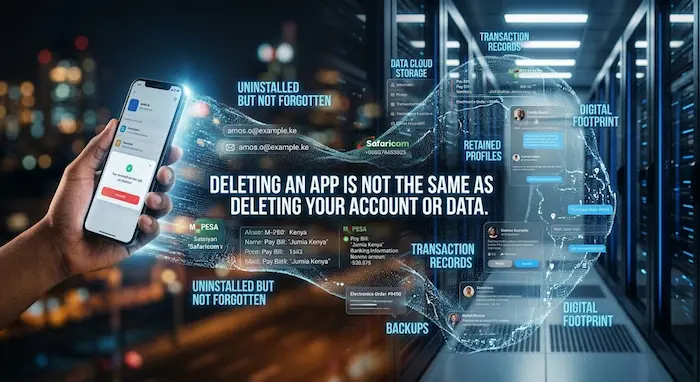

You find an app you no longer use, press Uninstall, and the icon disappears from your phone.
It feels like everything connected to the app has disappeared too.
But that is not necessarily what happened.
Deleting an app from your phone is not always the same thing as deleting your account or personal data.
The app itself may be gone from your device while information associated with your account remains on the company’s servers, in backups, or with services connected to your account.
For Kenyan smartphone users who rely on apps for mobile money, banking, shopping, social media, transport, communication and work, understanding this difference matters.
This guide explains what happens when you uninstall an app, what can remain behind and what you can do if you actually want your information deleted.
Uninstalling an App Is Not the Same as Deleting Your Account
There are three different actions that people often confuse:
- Uninstalling the app
- Deleting app data from your phone
- Deleting your account and requesting deletion of associated data
They are not necessarily the same thing.
When you uninstall an Android app, the application is removed from the device. Google also provides options to clear an app’s cache or storage, with the latter removing the app’s data stored locally on the device.
But if you created an account with the company, that account can exist independently of the application installed on your phone.
For example, deleting a shopping app does not automatically mean that the company has forgotten the email address, phone number, orders or account associated with you.
That information may be stored on the company’s systems.
Think of it this way
Uninstalling the app = removing the key from your phone.
Deleting the account = asking the service to close the account.
Data deletion = asking what personal information the company should erase, subject to applicable retention requirements and exceptions.
That distinction is important.
What Happens to Data Stored on Your Phone?
When you uninstall an app, locally stored app information can be removed from your device.
Android also gives users the option to clear an app’s cache and storage before uninstalling it. Google says clearing cache removes temporary data, while clearing storage removes the app’s data stored on the device.
However, not everything associated with the app necessarily lives inside the app’s folder.
You might still have:
- Photos saved to your gallery
- Downloaded documents
- Screenshots
- Files saved in your Downloads folder
- Notifications or messages from other services
- Browser history
- Information synchronized with a cloud account
For example, deleting a photo-editing app does not necessarily delete photographs that you previously exported to your phone’s gallery.
Similarly, uninstalling a social-media app does not automatically remove photos you previously saved elsewhere on the device.
What Happens to Your Data on the Company’s Servers?
This is where things become more complicated.
Modern apps often rely on cloud servers.
When you create an account, the information associated with that account may be stored remotely rather than only on your phone.
Depending on the service, this could include:
- Your name
- Phone number
- Email address
- Profile information
- Account history
- Photos or videos
- Messages
- Orders
- Payment information
- Device information
- Login records
- Usage information
Therefore, removing the application from your phone does not necessarily remove the company’s copy of that information.
Google Play’s current guidance makes this distinction clear: apps that allow users to create accounts are required to provide a way to request account deletion and associated data deletion.
That is different from simply uninstalling the application.
What About Your Google Account?
Android users should also understand the relationship between an app and their Google account.
Your Google account can synchronize information such as email, contacts and other data with your device.
Removing a Google account from the phone removes the account’s associated information from that device, but that does not mean the Google account itself has been deleted.
This is another example of why removing something from your phone is not automatically the same as deleting it from the internet.
What About Facebook, Instagram and Other Social Apps?
Social-media accounts demonstrate the difference particularly well.
For example, Facebook distinguishes between deactivation and deletion.
Deactivation leaves the account available for possible reactivation, while permanent deletion starts a separate account-deletion process. Facebook also notes that some information, such as messages sent to other people, may remain visible to recipients after an account is deleted.
Facebook also says that deletion can involve a delay and that copies may remain in backup storage for a period of time or where retention is necessary for certain purposes.
The important lesson is:
Deleting the Facebook app is not the same as deleting your Facebook account.
The same principle applies broadly to other services: always check the service’s own account-deletion process.
Why Your Messages May Not Disappear
One of the biggest misconceptions about deleting an account is assuming that everything another person received from you automatically disappears.
That is not necessarily the case.
Imagine you send someone a message through an online service.
Even if you later delete your account, the recipient may already have:
- The message
- A screenshot
- A downloaded attachment
- A saved photograph
- A copy elsewhere
Facebook, for example, says that messages sent to friends can remain in their inboxes after an account is deleted.
So deleting your account cannot necessarily erase information that another person has independently received or copied.
What Happens to Cloud Backups?
Backups create another layer.
Companies may maintain backup systems for disaster recovery, security, system restoration or other legitimate purposes.
That means data can sometimes exist in backup systems even after a deletion request has been made.
This does not necessarily mean the information remains available to ordinary users.
For example, Facebook says copies of some information may remain in backup storage after deletion for purposes such as recovery from disasters, software errors or other data loss events.
The exact retention period and treatment of backups depends on the service’s policies and applicable law.
What About Apps You Used for M-PESA, Banking or Payments?
This is particularly important in Kenya.
Many people use their smartphones as their primary gateway to financial services.
You could have apps connected to:
- Mobile money
- Banks
- SACCOs
- Investment platforms
- Insurance
- Digital lenders
- Online shopping
- Payment services
If you stop using one of these apps, do not simply uninstall it and assume your account has disappeared.
Your financial relationship with the company may continue.
There may also be transaction records that the provider is required or permitted to retain.
Before deleting a financial-services app, check whether you still need:
- Transaction history
- Statements
- Receipts
- Account records
- Tax documents
- Customer-support records
- Access to your account
If the service provides an account-deletion option, review its terms carefully before proceeding.
Kenya’s Data Protection Law Gives Users Rights
Kenyan consumers are not completely powerless when it comes to their personal information.
The Data Protection Act, 2019 provides data-subject rights and establishes rules around how personal data should be handled.
The Office of the Data Protection Commissioner (ODPC) lists rights including being informed about processing, accessing personal data, correcting inaccurate information, objecting to processing, restricting processing and requesting erasure.
The Act also provides for requests to erase or destroy personal data that a controller or processor is no longer authorised to retain, is irrelevant, excessive or was obtained unlawfully.
But the right to erasure is not an unlimited “delete everything immediately” button.
There can be circumstances where information must or may be retained, including situations involving legal obligations or evidence.
The ODPC’s guidance also explains that erasure can involve data held in live systems, backups and information shared with third parties, depending on the circumstances and applicable retention requirements.
What Should You Do Before Deleting an App?
If you are finished with an app, don’t immediately press uninstall.
Take a few minutes to check what is connected to it.
1. Check whether you have an account
Open the app or its website and look for:
Settings → Account → Privacy → Delete Account
The exact wording varies.
If the service offers account deletion, follow that process.
2. Download information you still need
Before deleting an account, consider saving:
- Receipts
- Invoices
- Photos
- Documents
- Transaction records
- Important messages
- Account statements
Some services allow you to download a copy of your information before deletion.
Facebook, for example, recommends downloading a copy of your information before permanently deleting the account.
3. Remove unnecessary permissions
If you are keeping the account but no longer need certain permissions, review what the app can access.
Depending on the app, permissions can include:
- Location
- Camera
- Microphone
- Contacts
- Photos
- Files
4. Disconnect third-party logins
You may have used:
Sign in with Google
or
Continue with Facebook
to create an account on another service.
Deleting the original app does not necessarily delete the separate account you created using that login.
5. Cancel subscriptions
Uninstalling an app does not necessarily cancel a paid subscription.
Check your Google Play or Apple subscription settings and the company’s own billing system.
6. Then uninstall the app
Once you have dealt with the account and anything important inside it, uninstall the application.
How to Delete an App Properly on Android
If your objective is simply to remove the application and its local data, Android provides several options.
You can uninstall the application through the Play Store or your phone’s settings.
You can also clear the app’s cache or storage from Android settings, although the exact menu can vary by device manufacturer and Android version. Google says clearing storage permanently deletes the app’s local data.
However, remember:
This deals primarily with information on your device.
It does not automatically instruct the company operating the service to delete your online account.
A Kenyan Example: You Delete a Shopping App
Imagine you ordered electronics from an online shopping app.
Over several months, you provided:
- Your name
- Phone number
- Delivery address
- Order history
You then uninstall the app because you no longer use it.
What has probably happened?
The app has been removed from your phone.
But the company may still have an account associated with your information.
Your previous orders may also remain part of the company’s records.
If you want to stop using the service completely, look for the company’s account-deletion or data-deletion procedure rather than relying on uninstalling the application.
Another Example: You Delete a Social-Media App
Suppose you remove Instagram or Facebook from your phone.
Your profile does not necessarily disappear.
Your friends can still potentially see your profile, depending on the account’s status.
Your previous posts and account information may continue to exist.
To actually remove the account, you need to use the platform’s account-deletion process.
This is why it is useful to separate:
App removal
from
Account deletion
and
Data deletion.
What If You Sell or Give Away Your Phone?
This is an even bigger privacy issue.
If you are selling an old smartphone, simply uninstalling your banking, social-media and messaging apps is not enough.
Before handing the phone to another person:
- Back up information you need.
- Sign out of important accounts.
- Remove your Google or Apple account from the device.
- Remove banking and payment accounts.
- Remove your SIM card.
- Remove memory cards where applicable.
- Perform a proper factory reset.
- Check that the device starts at the initial setup screen.
For more practical advice, see TechDrivers’ guide:
How to Block a Stolen Phone in Kenya: IMEI, SIM, M-PESA and Account Protection
That article also explains why a smartphone contains much more sensitive information than just the device itself.
Your Phone Number Is Part of the Privacy Picture
Deleting an app does not necessarily remove the phone number you used to register for it.
This matters because Kenyan phone numbers are frequently connected to multiple digital services.
A single number might be associated with:
- M-PESA
- Banking
- Gmail
- Social media
- Investment platforms
- Shopping accounts
- Delivery services
That is why protecting your number is also part of protecting your digital identity.
TechDrivers has previously explained how criminals can attempt to exploit mobile numbers through SIM-swap fraud:
How SIM-Swap Fraud Works in Kenya and How to Protect Yourself
You can also read:
How to Protect Your M-PESA Account From Fraud in Kenya
What About Your Data in Search Engines?
There is another distinction worth understanding.
Deleting an account does not necessarily mean every reference to you immediately disappears from the internet.
Search engines can index:
- Public profiles
- Public posts
- Business listings
- Websites
- News articles
- Cached or archived information
- Other pages containing your name
Whether something can be removed depends on where the information exists and who controls it.
Deleting an app therefore does not give you control over every copy of information that may have appeared elsewhere.
How to Check What an App Knows About You
Before deleting an important service, look for its:
Privacy Policy
Account Settings
Data Download
Data Deletion
Privacy Centre
These sections can tell you:
- What information is collected
- Why it is collected
- How it is used
- Whether it is shared
- How long it may be retained
- How to request deletion
Google Play also provides a Data Safety section for apps, where users can review disclosures about data collection, sharing and deletion practices.
Do not treat the Data Safety section as a replacement for reading the developer’s privacy information, but it can be a useful starting point.
The 30-Second Privacy Check Before You Uninstall
Before deleting an app, ask yourself:
Account
Do I still have an account with this company?
Data
What personal information did I give it?
Money
Are there payments, subscriptions or financial records attached to it?
Files
Did I store photos, documents or receipts in the app?
Login
Did I use Google, Apple or Facebook to sign in?
Privacy
Does the company provide an account or data deletion option?
Records
Will I need any information from this account later?
If the answer to any of these questions is yes, don’t rush to uninstall.
Frequently Asked Questions
Does deleting an app delete my account?
Usually, you should not assume that it does. Uninstalling removes the application from your device, while account deletion is normally a separate process.
Does uninstalling an app delete my personal data?
It can remove locally stored app data from your device, depending on the operating system and how the app stores information. It does not automatically mean that information held on the company’s servers has been deleted.
Can an app company keep my data after I delete my account?
Potentially, depending on the company’s retention policies and applicable legal requirements. Some information may need to be retained for legitimate purposes, while other information may be subject to deletion requests.
Can I ask a company to delete my personal data in Kenya?
Kenya’s data-protection framework gives data subjects rights relating to their personal information, including a right to request erasure in circumstances provided by law. However, the right is subject to limitations and exceptions.
Does deleting Facebook from my phone delete my Facebook account?
No. Removing the app from your phone is different from permanently deleting your Facebook account. Facebook provides a separate account-deletion process.
Does deleting an app stop it from collecting my data?
Removing the app normally prevents that particular installation from continuing to collect information from the device through the app. However, your account and information already held by the service can remain until you take appropriate account or data-deletion steps.
What should I do before deleting a banking or financial app?
Check that you have access to important statements and records, understand whether the account itself remains active, cancel subscriptions if applicable and use the provider’s official account-management or closure process.
What should I do before selling my old phone?
Back up your information, sign out of accounts, remove your Google or Apple account, remove your SIM and memory card where applicable, and perform a factory reset.
The Bottom Line
Deleting an app can make it disappear from your phone in seconds.
Your data is a different story.
The most important distinction is:
Uninstalling an app does not necessarily delete your account.
And:
Deleting your account does not necessarily mean every copy of every piece of information disappears instantly.
Some information may remain in backups, transaction records, messages received by other people or records that a company is legally permitted or required to retain.
For Kenyan users, the issue is becoming increasingly important as smartphones become the gateway to banking, M-PESA, shopping, work, social media and other digital services.
Before you uninstall an app, ask three questions:
What information did I give this service?
Do I still have an account?
Do I actually want the account and associated data deleted?
Once you understand those three things, you can make a much more informed decision about what happens to your digital footprint.
Deleting an app removes software from your phone. It does not automatically erase your digital history.
